



11 ways to protect data on a mobile device
These days, your phone carries more details about your life than your wallet ever did. It holds your photos, banking apps, work emails, and private messages. It knows where you are, where you’ve been, and where you’re going next. Losing it, or having it compromised, isn’t just inconvenient — it’s a direct hit to your privacy and often your finances too. In this guide, we’ll cover the threats you need to watch out for and 11 practical steps to make your device much harder to crack.

Table of Contents
- Why mobile data protection is crucial
- Understanding mobile security threats
- Mobile malware
- Phishing and social engineering
- Unsecured public Wi‑Fi
- Unsafe app permissions
- Outdated software
- Data leakage (through cloud and backup hacking)
- Device theft
- How can you protect data on a mobile device?
- 1. Strengthen device access
- 2. Enable encryption
- 3. Update software regularly
- 4. Use secure network connections
- 5. Use eSIM technology
- 6. Manage app security
- 7. Implement remote security features
- 8. Back up your data
- 9. Practice safe browsing and communication
- 10. Install security software
- 11. Be aware of physical security
- Conclusion: How can you protect data on a mobile device?
Why mobile data protection is crucial
We are aware that we use our phones for nearly everything, but it’s easy to forget how much personal and sensitive data is packed into these small devices. A survey on Data Privacy and Ethics using PCH Consumer Insights showed how little Americans aged 25 and up understand about digital privacy. However, 86% of them admitted to being more worried about data security than the state of the US economy.
And for good reason. In the first half of 2024 alone, over a billion US consumer records were exposed in data breaches. That’s a staggering 490% increase compared to the same period in 2023, according to the Identity Theft Resource Center.
The fallout from breaches like these is real: drained bank accounts, stolen identities, and personal photos falling into the wrong hands. All of it indicates that our phones aren't just gadgets anymore. They’re vaults. And vaults deserve locks.
Understanding mobile security threats
Before you start locking down your device, it helps to know what you’re protecting against:
Mobile malware
Smartphones are under siege. In Q1 2025 alone, 12 million mobile malware, adware, or unwanted app attacks were blocked — a 36% increase from the previous quarter. 39.56% of these were Trojan viruses aimed at stealing banking or login data.
Phishing and social engineering
Trickery rules mobile security. Every day, roughly 31,000 phishing attacks are launched (amounting to 3.4 billion phishing emails daily). So be aware that if you tap a link or attachment in a shady text or email, you might hand over the keys to your data.
Unsecured public Wi‑Fi
Think those free networks are harmless? Think again. In the U.S., 45% of adults trust public Wi‑Fi, even though it’s often unencrypted. Only 1% of Americans use a VPN to secure their connection. That means nearly half are exposing their data on networks that may not even lock the front door.
Unsafe app permissions
Apps often ask for access they don’t need. A study by NordVPN found that 87% of Android apps request unnecessary permissions, like access to your contacts, camera, or mic. That flashlight app might be snooping while you sleep.
Outdated software
Most Android phones don’t run the latest software. As of April 2025, just 27.4% of devices were updated to Android 14, meaning 72.6% remained on older (and potentially vulnerable) versions. Being behind on updates puts your phone at risk.
Data leakage (through cloud and backup hacking)
Convenience can turn risky. According to a report by IBM Security and the Ponemon Institute, 82% of data breaches involved data stored in cloud environments. If your backups are unencrypted or your cloud account gets hacked, all your synced photos, messages, and even sensitive docs can get exposed.
Device theft
Sometimes the threat isn’t digital at all. A stolen phone with no screen lock is an open invitation. In 2023, around 1.4 million mobile phones were reported stolen in the U.S., according to risk management experts at Crisis24. If your device isn’t secured, a thief can get instant access to apps, accounts, and sensitive data.
How can you protect data on a mobile device?
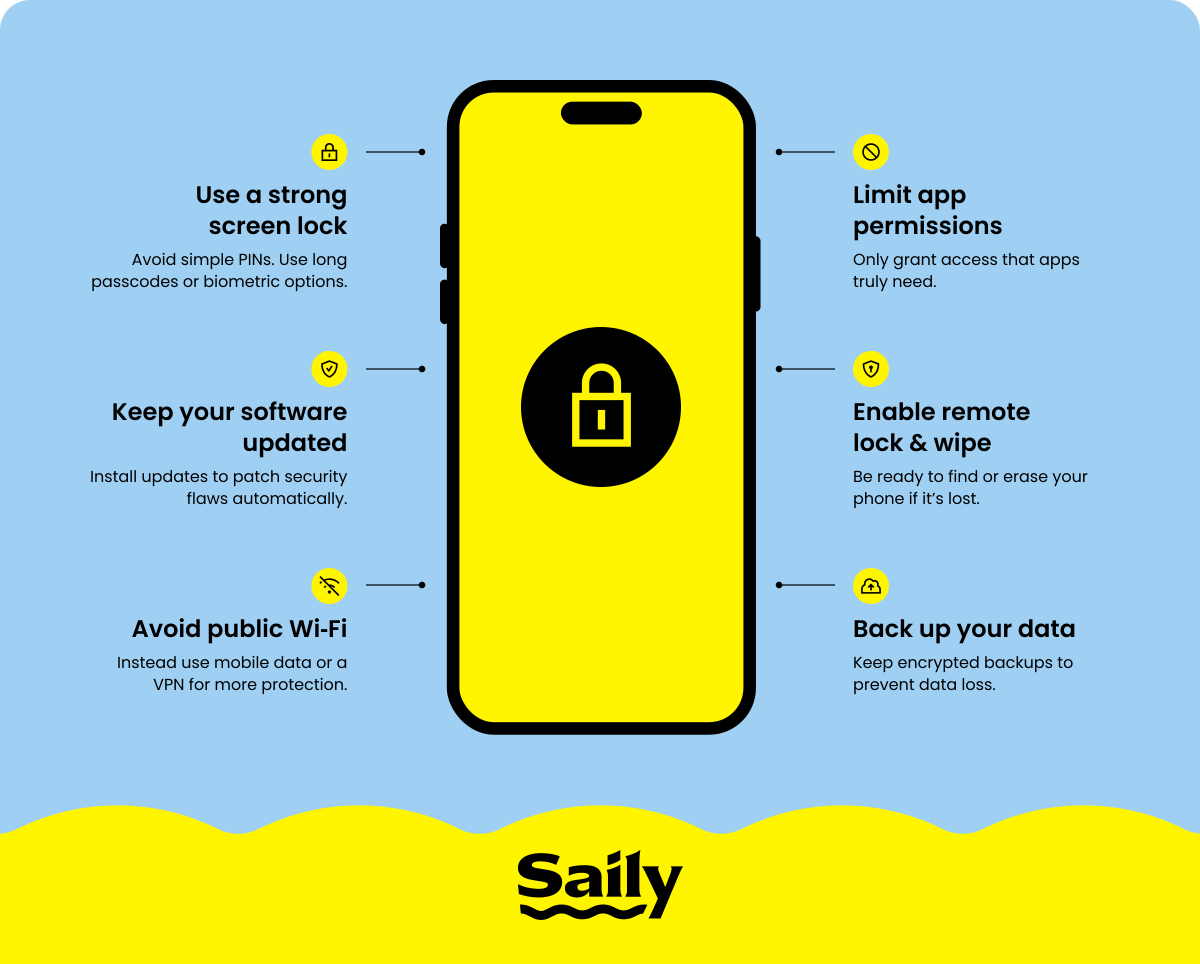
Your phone is only as secure as the habits you build around it. The good news is that most attacks rely on users leaving doors unlocked. By adopting these key practices, you can turn your device into a far tougher target:
1. Strengthen device access
Your screen lock is the first line of defense. Weak PINs like 1234 or birthdays are easy to guess, and yet millions of people still use them. A longer PIN or an alphanumeric password makes unauthorized access far less likely. Modern phones also offer biometric authentication like fingerprints or facial recognition, which add a convenient extra layer of protection.
It’s equally important to limit how long your screen stays active. Set your device to lock automatically after 30 seconds of inactivity (or an even shorter timeframe). This simple tweak reduces the window of opportunity for someone to snoop if you leave your phone unattended.
2. Enable encryption
Encryption ensures your stored data is unreadable without the correct passcode. On iPhones, this happens automatically as soon as you set a passcode. For Android, newer devices have encryption enabled by default, but older models may require activation. Check under “Settings” > “Security” (may be worded differently depending on your region) > “Encryption,” and confirm your phone’s status.
This feature is not about preventing theft — it’s about protecting your files if your phone is stolen or compromised. Without encryption, a hacker can access your data by connecting the device to another system. Even if it’s locked!
3. Update software regularly
Outdated software is a gift to attackers. Operating system and app updates often contain patches for known security flaws. Postponing them leaves your device vulnerable to exploits that hackers already know how to use.
Turning on automatic updates takes this task off your plate. Your phone can download and install them overnight, so you wake up to a more secure device. It’s a small habit that blocks a big category of attacks.
4. Use secure network connections
Public Wi‑Fi might seem convenient, but open networks often lack encryption. Hackers can easily intercept traffic on these networks, exposing your logins, banking details, and messages. When possible, use your mobile data for sensitive tasks or connect through a VPN.
A VPN creates a private tunnel for your data, keeping it safe from prying eyes. This is especially important when traveling, where you’re more likely to rely on public hotspots. Also, make it a habit to turn off Wi‑Fi and Bluetooth when not in use. It prevents your device from auto-connecting to unsafe networks or nearby devices. If you’re looking for an explanation that goes deeper than the basics, our guide to public Wi-Fi safety walks through the most common traps and the habits that can reduce risk.
5. Use eSIM technology
Traditional SIM cards can be removed or swapped out if your phone is stolen. An eSIM is embedded directly in your device, making it harder for thieves to tamper with your mobile connection.
With an eSIM app like Saily, you also get privacy perks like virtual location, ad blocking, and web protection built right in. Saily’s seamless connectivity and layers of security features keep you safe on the move without needing extra apps or manual configurations.
6. Manage app security
Every app you install is a potential doorway into your phone. Stick to official app stores like Google Play or the App Store, where apps are screened for malware. Even then, review the permissions an app asks for before granting access.
Apps requesting your contacts, microphone, or camera without a clear reason are a red flag. Regularly check your installed apps and remove any that you no longer use. This reduces the number of potential vulnerabilities on your device.
7. Implement remote security features
If your phone is lost or stolen, having a remote lock and wipe ready can stop someone from accessing your emails, photos, and apps. On iOS, turn on “Find my iPhone” in “Settings.” Android users should enable “Find my device” (also referred to as “Find hub”) via “Settings” > “Security” > “Find my device” or by ensuring it's active through your Google account and then by confirming location services are turned on on your device.
These features let you locate your phone on a map, remotely lock it, display a recovery message, or securely erase the device. They won’t physically retrieve your device, but they do ensure someone who finds it can’t access your information — which is the whole point.
8. Back up your data
Even with strong security, no system is perfect. Regular backups ensure that if your phone is wiped — either by you remotely or by a hacker — you don’t lose irreplaceable photos, messages, or files.
Use iCloud, Google Drive, or another trusted service for automatic backups. Alternatively, back up to a secure computer for added control. Whatever method you choose, make sure backups are encrypted and protected by strong passwords.
9. Practice safe browsing and communication
Be cautious of links in emails or text messages, even if they appear to come from people you know. Phishing attacks are designed to look convincing and often use urgent language to get you to act without thinking.
When chatting, choose apps with end-to-end encryption like Signal or WhatsApp. These tools ensure that your messages stay between you and your intended recipient.
10. Install security software
Your phone already does a lot to protect you, but adding a trusted security app is like giving it a personal bodyguard. These apps scan for malware, block shady websites, and send alerts if you wander onto a risky Wi‑Fi network.
Bitdefender Mobile Security and Norton Mobile Security are strong choices. They work quietly in the background to keep your device safe so you can scroll, shop, and stream without second‑guessing every link.
11. Be aware of physical security
No amount of digital security can help if someone gains physical access to your device. Keep your phone in a secure pocket or bag and avoid leaving it on tables in public spaces. When entering your passcode, shield your screen to prevent “shoulder surfing.”
This kind of physical awareness is often overlooked but remains one of the simplest ways to protect your data.
Conclusion: How can you protect data on a mobile device?
Staying secure isn’t about one magic setting or the world’s strongest password. It’s the small habits that add up: updating your software, locking your screen, watching your network connections, and backing up your data safely.
The threats won’t vanish, but you can make your phone a harder nut to crack, and keep your data where it belongs: in your hands.

Enjoy safer browsing with the Saily eSIM app
Saily is the only eSIM app with built-in online security features.
