Can I get a Saily eSIM refund?
Getting a full or partial Saily eSIM refund within 30 days of purchase is possible, but it depends on whether you’ve activated your data plan, and if so, how much data you’ve used. If you a) haven’t installed your eSIM or b) have installed your eSIM but haven’t activated your data plan, then you should be eligible for a full refund. If, however, you’ve used a portion of your mobile data, Saily unfortunately cannot guarantee a full refund. That being said, you may be entitled to a full refund if more than 99% of your data is unused (in other words, you’ve used less than 1% of your data plan) or if you were unable to use your plan due to service quality issues on our end. The following section will explain the Saily refund policy in more detail.
What is Saily’s refund policy?
Saily’s refund policy can be divided into two categories — 1) refunds for non-activated data plans and 2) refunds for activated data plans with unused or minimally used data. However, some restrictions apply to obtaining a full or partial Saily refund. Let’s take a closer look at what conditions need to be met for a Saily eSIM refund.
Refunds for non-activated data plans
According to Saily’s terms of service, you can get a full refund within 30 days of purchase if you a) have purchased an eSIM but have not yet installed it, or b) have installed your eSIM but haven’t used any of the data on your plan. A key variable to keep in mind is that you cannot activate your plan manually — it automatically activates once you arrive at your destination. In other words, you can only use your data if you’re in the country/destination you’ve purchased the plan for.
For instance, let’s say you’ve purchased a plan for a trip but due to extenuating circumstances, you’ve had to cancel and never made it to your destination. Even if you’ve installed your eSIM already, your plan will not be activated. In this scenario, you shouldn’t have trouble getting a full or partial refund as long as you request one within 30 days of purchasing the plan because you wouldn’t have used any of your data. However, some Saily refund exceptions apply.
Refunds for activated data plans with unused or minimally used data
If you’ve used even a minimal amount of data on your plan, Saily unfortunately cannot guarantee a full refund. This clause of the Saily refund policy exists to prevent abuse from users seeking infinitely free data. However, the Saily support team carefully reviews each case to come to a fair conclusion.
You may still be eligible for a full or partial refund if:
You were unable to use much of your data because of quality issues related to Saily.
You activated your data plan, but > 99% of the data is unused (you’ve used less than 1% of your data).
Ultimately, the Saily support team will use their discretion to decide whether you’re eligible for a full or partial refund based on your unique circumstances.
Saily refund restrictions
Even if you believe you’re eligible for a full or partial Saily refund, please note that certain restrictions exist that make you ineligible, including:
Evidence of abuse: If the Saily support team concludes that you’ve abused the Saily refund policy (ex: through repeated refund requests), violated the Saily terms of service, or committed fraudulent activity according to the terms of service.
Deleted account: If you delete your account after purchasing a data plan and subsequently request a refund.
Unrelated charges: If you request a refund for charges incurred on other phones, other SIM cards, other providers, hotel phones, or any other charges not directly associated with your Saily account.
Now that we’ve covered the Saily refund policy, let’s take a look at how to actually get a refund.
How to get a Saily eSIM refund
You can apply for an automatic refund through the Saily Refund Center, which is accessible through the Saily app or our website. If you’re having trouble submitting a refund request, you can also chat with a support representative about your refund in the Saily app. Overall, you'll have three options for submitting a Saily refund request:
Apply for an automatic refund via the Saily app (recommended option)
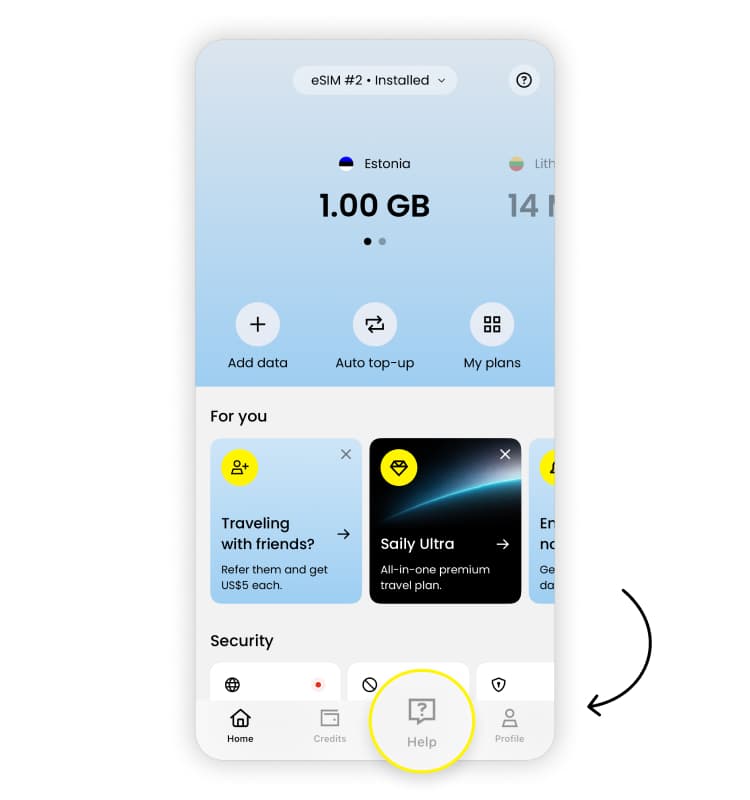
To apply for an automatic refund through the Refund Center in the Saily app:
Go to "Help."
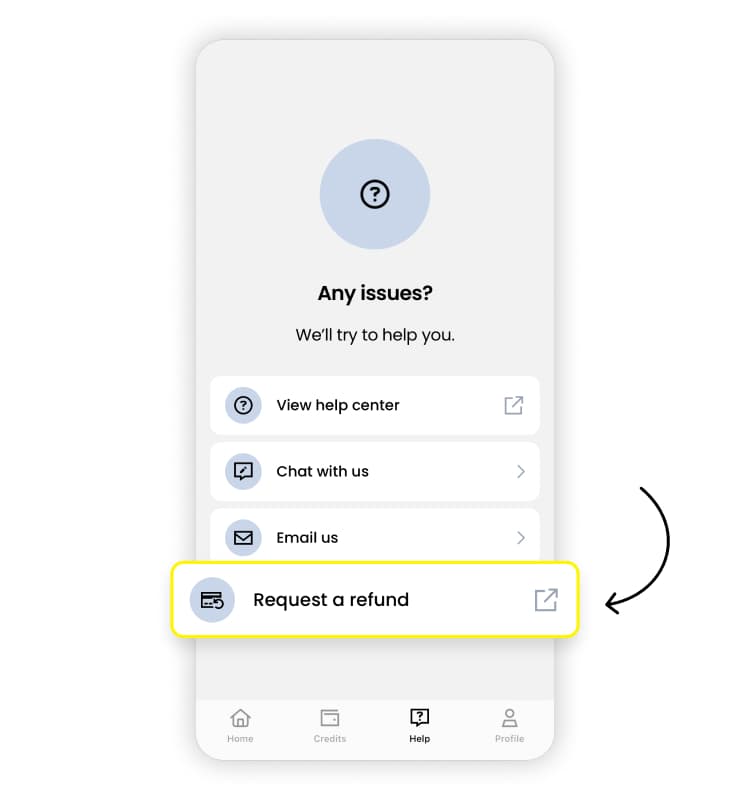
Tap “Request a refund.”
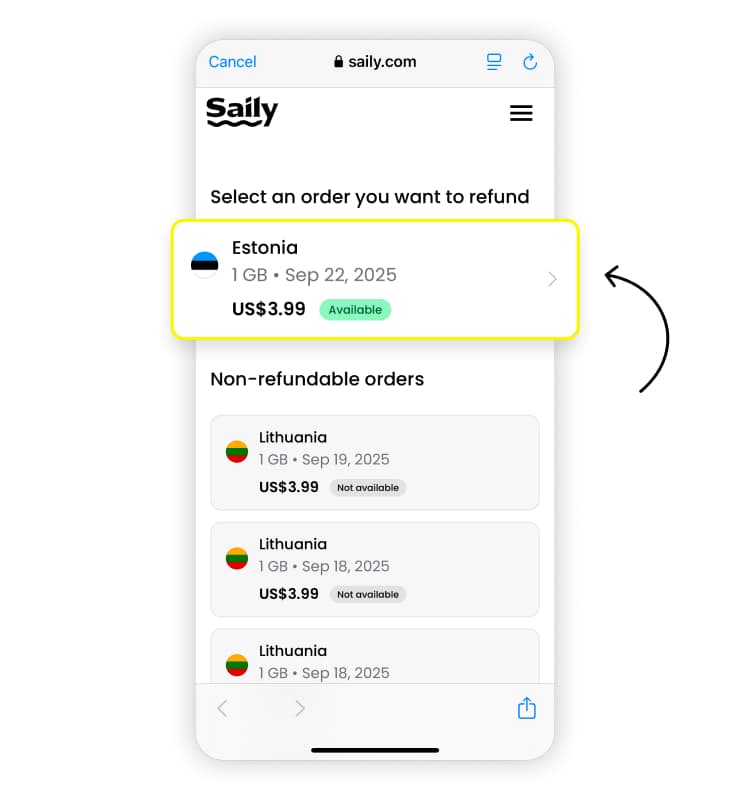
Here, you’ll be asked to log into the Refund Center using the same login credentials from your Saily account. Once you’ve logged in, you’ll see a list of refundable and non-refundable plans you’ve purchased. Select the plan you’d like a refund for.
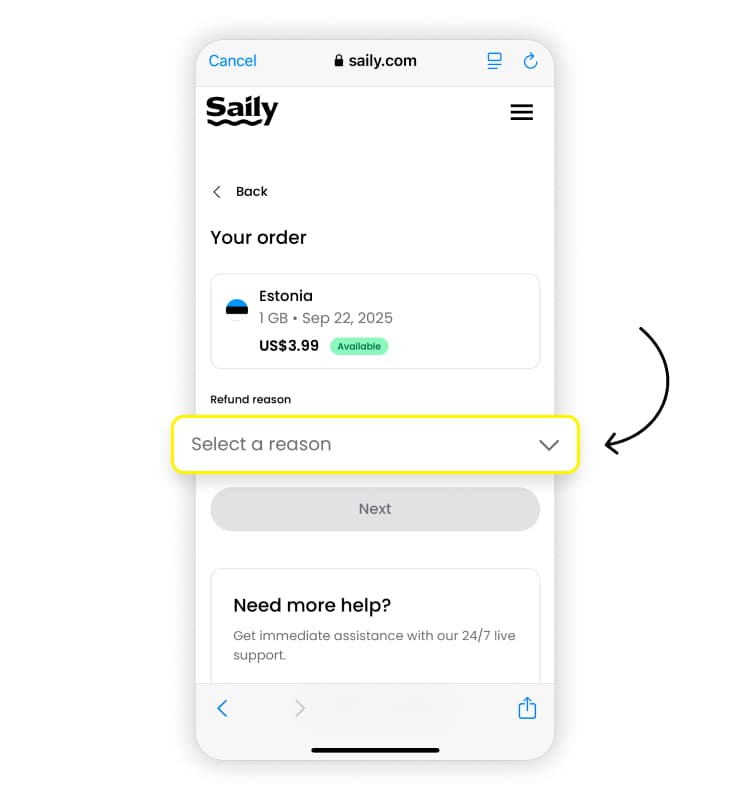
Tap the drop-down menu under “Refund reason” and select the option that applies to you. Then, tap “Next.”
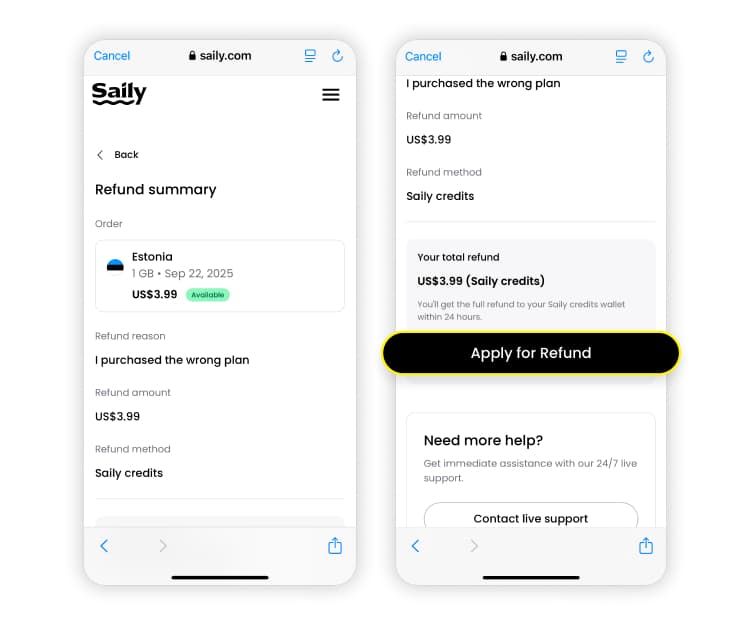
Once you’ve confirmed that everything is correct in your refund summary, scroll down and tap “Apply for refund.”
If none of the refund reasons apply to your case, you can discuss your refund request with a support representative via our 24/7 live chat.
Talk to a customer support representative using our 24/7 live chat in the Saily app
To access Saily’s 24/7 live chat support via the Saily app:
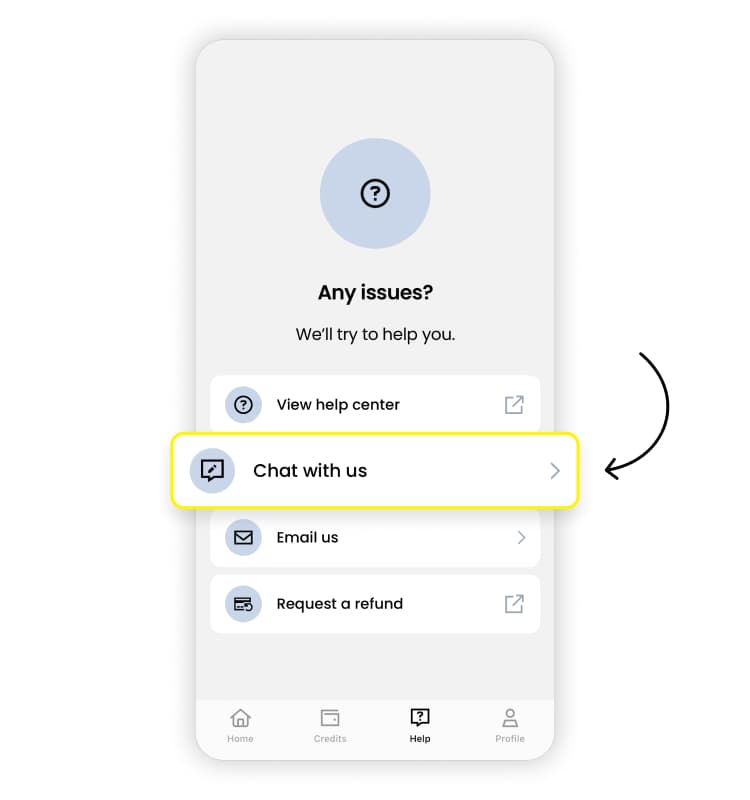
Go to “Help.”
Select “Chat with us.”
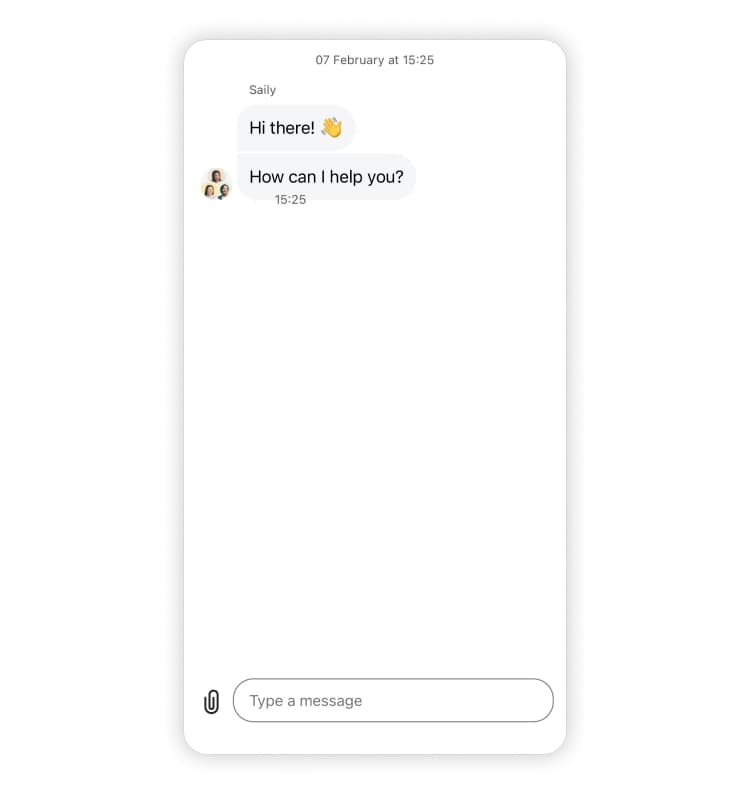
Start chatting with a Saily support representative.
Alternatively, you can access 24/7 live chat support via the Refund Center in the app.
To access 24/7 live chat support via the Help Center in the Saily app:
Go to “Help.”
Tap "Request a refund."
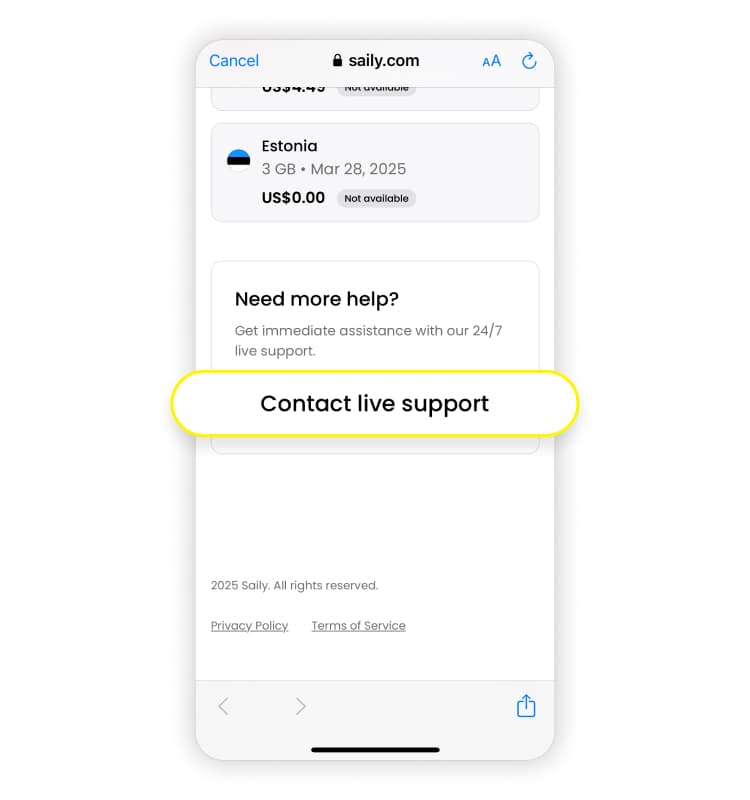
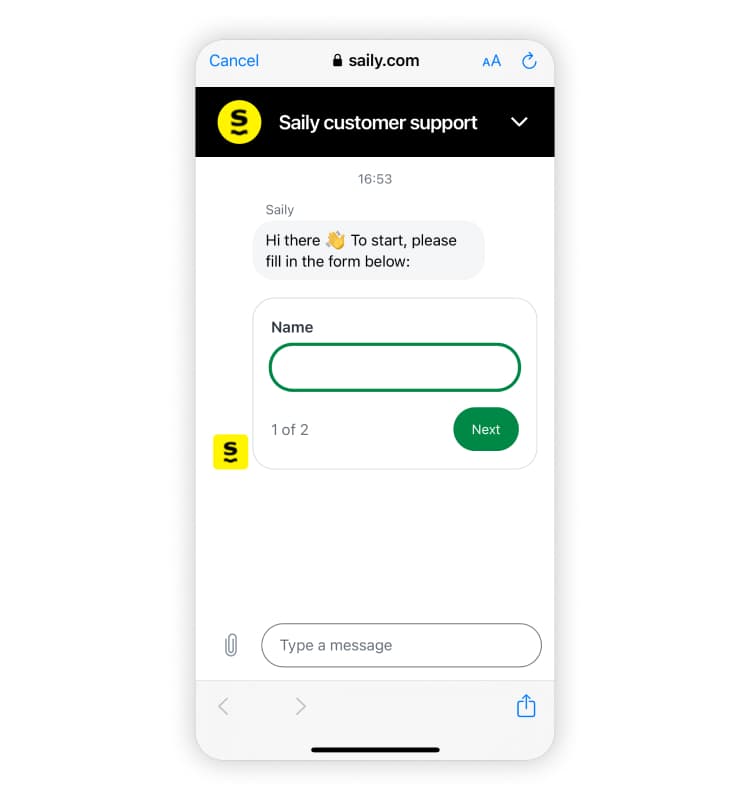
Here, you’ll be asked to log into the Refund Center using the same login credentials from your Saily account. Once you’ve logged in, you’ll see a list of refundable and non-refundable plans you’ve purchased. Scroll down to the “Need more help?” section and tap “Contact live support.”
Here, you'll be asked to fill out your name and the same email you used to purchase your eSIM plan. Then, you'll be instantly connected with a live customer support rep.
How long does it take to get a Saily refund?
It usually takes up to five working days for Saily’s customer support representatives to make their decision about your refund request. You should receive your refund shortly after, but no later than 30 calendar days.