


What is a VoIP phone? A complete guide to voice over IP
If you’ve used WhatsApp, FaceTime, or Microsoft Teams, you’ve unknowingly used Voice over Internet Protocol (VoIP), a fancy term for technology that lets you make calls over an internet connection instead of a traditional phone line. VoIP phones and apps have become default options for businesses, remote workers, and travelers to cut costs on international audio and/or video calls. This guide covers what exactly VoIP is and how it works, types of VoIP phones and how they compare to traditional landlines, and the benefits of using a VoIP phone or app.

Table of Contents
- What is a VoIP phone?
- How does a VoIP phone work?
- Types of VoIP phones
- Hard phones (IP desk phones)
- Softphones (software-based)
- Mobile VoIP apps (for smartphones)
- VoIP phone vs. landline: Key differences
- Benefits of VoIP phones
- Potential drawbacks of VoIP
- What is a VoIP phone number?
- VoIP phones for business vs. residential use
- VoIP phones for business
- VoIP phones for home
- How to set up a VoIP phone
- Using VoIP apps for travel with eSIM data
- VoIP phones and apps: Final takeaways
What is a VoIP phone?
A Voice over Internet Protocol (VoIP) phone is any device (desk phone, mobile phone, computer, laptop, or tablet) with software installed to allow you to make calls over the internet instead of over the traditional Public Switched Telephone Network (PSTN). Some VoIP phones manufactured by Cisco, Yealink, Grandstream, and Polycom may look like landlines but only allow you to make and receive calls over ethernet. More commonly, you’ll hear about VoIP in the context of apps like WhatsApp, FaceTime, Microsoft Teams, and Signal, which let you communicate over Wi-Fi or cellular data, without using call or SMS allowances from your mobile plan.
These days, VoIP technology has become the default for business communications because calling costs drop significantly, especially for international calls. Features that used to require expensive hardware like call forwarding, voicemail, and video conferencing come bundled in the software. However, VoIP apps are also incredibly popular for personal use, especially for travelers looking to make calls without having to buy a SIM card that comes with a local phone number.

VoIP apps + eSIM data = a perfect travel combo
Traveling soon? You can use affordable eSIM data to make international calls with VoIP apps!
How does a VoIP phone work?
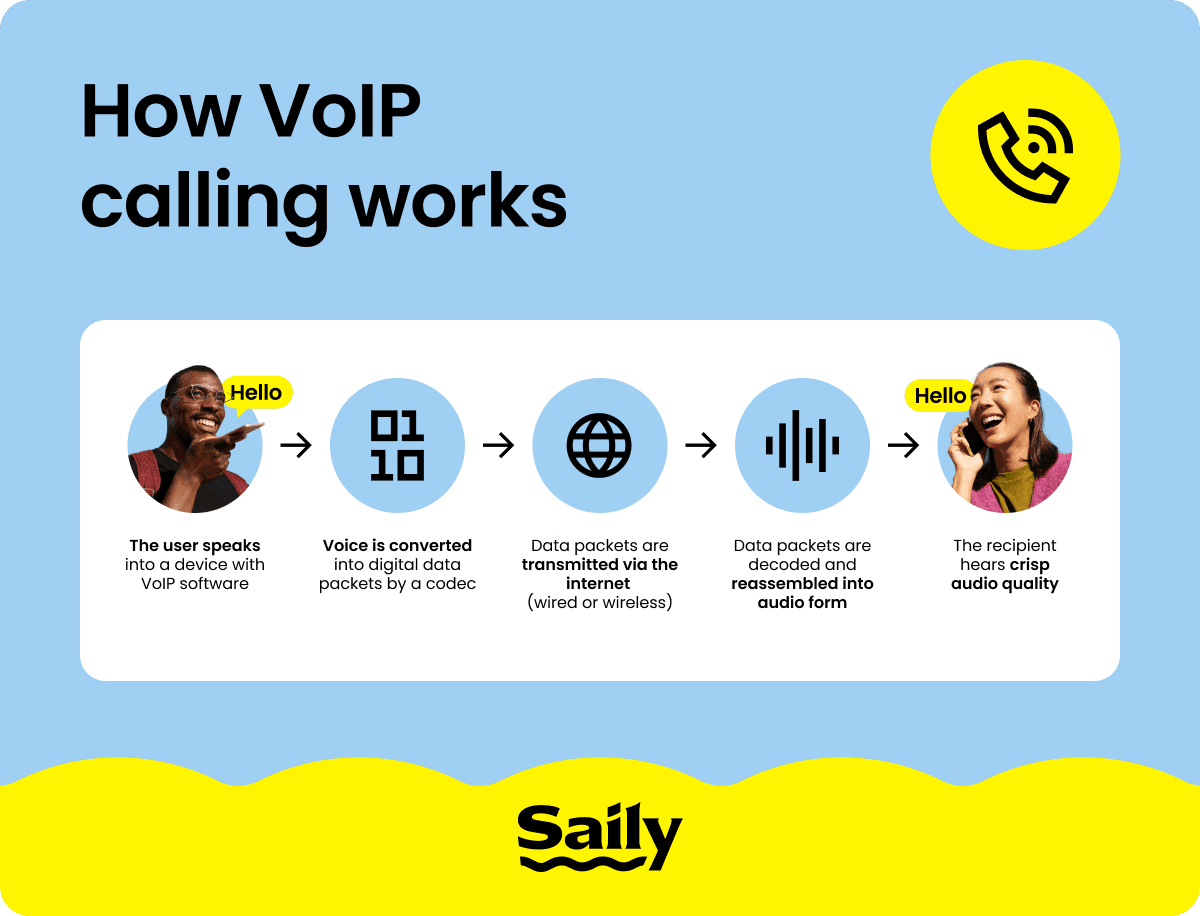
In short, a VoIP phone converts your voice and/or video into digital data packets, then that data travels across the internet to the person on the other end, and their device converts it back into sound and/or video. The whole process happens in milliseconds.
The slightly longer version of how VoIP phones work may explain why VoIP quality can vary. When you speak into a VoIP device, a codec — a piece of software — compresses your voice into small data packets. Those packets are sent over the internet, reassembled at the other end, and decoded back into audio. Common codecs like G.711 and G.722 each handle this compression differently, which is why some VoIP services produce better sound and video quality than others.
Most VoIP systems rely on something called the Session Initiation Protocol (SIP) — the set of rules that lets different devices and systems communicate with each other. It’s basically the process of telling a device that a call is coming, establishing a connection, and ending it when you hang up.
What VoIP does not use is the Public Switched Telephone Network (PSTN), the old-school system of physical copper lines that traditional phones run on. Since a telephone company won’t be routing your call through expensive infrastructure around the world, international phone calls are much cheaper over VoIP.
The trade-off, however, is that the quality of a VoIP call depends entirely on your internet connection. A strong, stable connection makes for clear audio and video. A patchy connection means frustrating lag and a jumble of pixels in place of a face.
Types of VoIP phones
VoIP phones can look like your run-of-the-mill landline phone (hard phones), an application on your computer (softphones), or mobile apps (VoIP apps). Let’s examine all three in detail.
Hard phones (IP desk phones)
Hard phones that use VoIP technology look almost identical to the desk phones you'd find in any office. The key difference is that they connect via ethernet rather than a phone line and communicate using IP technology. Hard phones typically include a display screen, physical buttons, a speakerphone, and sometimes additional features like call recording and voicemail. Hard phones work best in offices or any environment where someone has a dedicated workstation and handles a high volume of phone calls.
Softphones (software-based)
Softphones most commonly refer to VoIP technology installed on computers or laptops to turn it into a desktop phone. The software turns whatever device you own into a fully functional VoIP phone, using that device's microphone, speakers, and internet connection to make calls. Softphones are particularly common at customer support centers and many users pair them with a headset for better call quality.
The appeal of softphones is flexibility — you can work from a cafe, a hotel room, or your sofa and still have full access to your business phone system, making them a popular choice for remote workers.
Mobile VoIP apps (for smartphones)
VoIP apps are designed to make calls over Wi-Fi or mobile data without contributing to your mobile plan’s calling allowances. Some of the most popular VoIP apps for smartphones include WhatsApp, FaceTime, Messenger, and Signal. VoIP apps are perfect for people who travel regularly, work across time zones, or want to make international calls without paying international rates. As long as you have a decent internet connection, you can make a clear call from pretty much anywhere on earth. With VoIP apps, you’ll also eliminate the need for getting a SIM card with a local phone number — you can rely on data-only eSIMs or SIM cards and make audio and/or video calls over mobile data.
VoIP phone vs. landline: Key differences
The key differences between VoIP phones and landlines come down to technology, ease of setup, cost, and flexibility:
VoIP | Landline | |
|---|---|---|
Technology | IP telephony (internet-based). | Copper wire network (PSTN). |
Cost | Lower monthly costs, often free international calls. | Higher fixed costs, expensive international rates. |
Features | Voice calling, video calling, video recording, messaging (with apps). | Voice calling, voicemail. |
Installation | Easy software setup. | Technician required. |
Mobility | Can work from any location with Wi-Fi or mobile data. | Tied to a physical line. |
Scalability | Add or remove users through software or an app. | Requires infrastructure changes to add more users. |
Long-term viability | Growing, widely-adopted technology. | PSTN is being phased out in many countries. |
While VoIP phones outcompete old-school landlines by several metrics, landline phones do have one advantage — they usually keep working during a power outage. VoIP, on the other hand, goes down when your internet connection or power does. For the average traveler or remote workers, this trade-off is acceptable. But for hospitals, emergency services, or critical infrastructure, the drawbacks are worth considering significantly.
Benefits of VoIP phones
The benefits of switching from a traditional phone service to a VoIP phone or app are hard to argue with — especially for travelers, remote workers, and business owners.
Cost savings. Calls over VoIP cost significantly less than through traditional carriers, especially for long-distance and international calls. Hardware costs are also much lower than setting up a conventional phone system in an office. For travelers and remote workers, getting a prepaid data plan or using free Wi-Fi will eliminate charges for calls and SMS.
Call from anywhere. You can make and receive phone calls from any location with an internet connection, provided that you’re using a VoIP app or software that isn’t banned in the country you’re in.
Video and messaging features. VoIP services often include video calling, messaging, call forwarding, auto attendant, voicemail-to-email transcription, and call recording— all built in, without extra costs.
Easy scalability. Adding a new team member to a VoIP system only involved downloading software or a mobile app. You won’t need new hardware, new wiring, or a technician to install physical infrastructure.
High definition audio quality. VoIP codecs deliver noticeably clearer audio than traditional phone lines.
Easy integration with other tools. VoIP platforms can connect directly with CRMs and productivity tools, which means call logs, recordings, and contact information can all live in one place.
Potential drawbacks of VoIP
While VoIP technology is steadily outcompeting the use of traditional landlines around the world, it isn’t a utopian solution across the board. In certain situations, relying solely on VoIP phones may pose significant disadvantages. Some drawbacks of VoIP phones and apps include:
Internet dependency. VoIP technology needs a stable internet connection to work. If your internet connection is slow or unreliable, call quality takes a hit. If you’re planning on using a VoIP phone or app for remote work, it's worth considering how much data you need to maintain consistent communication.
Won’t work during power outages. Traditional landlines operate through your phone company’s network, not your home electricity. That means that landlines usually work during a power outage (provided it’s not nation-wide). VoIP technology depends on your router, modem, and devices. Unless you’re using a VoIP app with your mobile data, a power outage would take the whole system offline.
Trouble contacting emergency services. When you call emergency services from a landline, your location is automatically sent through. VoIP location tracking is improving, but it can still be less precise — especially with mobile VoIP apps. If you're using VoIP as your primary phone, make sure your provider has 911 location services enabled.
Variations in call quality. A VoIP call is only as good as the internet connection running it. Congested networks, slow broadband, or weak Wi-Fi can introduce lag, echo, or dropped calls.
What is a VoIP phone number?
A VoIP phone number is exactly the same as a regular phone number — you can call it from any smartphone via an internet connection, and calls made from it show up as a normal number on the recipient’s end. The difference is that the number is assigned to a VoIP service rather than to a physical phone line.
VoIP numbers can be local, toll-free, or international. Most providers let you choose the area code or country code you want, regardless of where you physically are. So a business based in one country can have a local number in another country, making it easier for customers there to reach them.
On top of that, VoIP apps like WhatsApp let you use the existing phone number on your SIM card or eSIM.
VoIP phones for business vs. residential use
As previously mentioned, VoIP hard phones, softphones, and apps are popular choices to make business calls or regular phone calls. Let’s take a look at the use cases for VoIP phones in the context of business and residential use.
VoIP phones for business
A business VoIP phone system is built to accommodate multiple users, who all receive unlimited audio and video calling, messaging, call queues, call routing, and auto attendants. Call center features — like real-time call monitoring and analytics — are standard on most platforms. In other words, VoIP phones already come with features that would normally require additional software.

Keep your business online with an eSIM
Is your team traveling for business? Keep them online with a Saily eSIM for business.
VoIP phones for home
If you’re thinking of ditching your physical landline because of the costs, VoIP phones for residential use can include lower monthly costs and the ability to make international calls without paying per-minute international rates. If you have family in another country and you're calling frequently, a VoIP app or a residential VoIP phone service will save you a decent chunk of money over a traditional phone plan. Setup is straightforward and doesn’t require a technician.
How to set up a VoIP phone
If you’ve purchased a VoIP for your home or office and want to set it up, follow these steps:
Ensure you have reliable, high-speed internet. VoIP calls typically require internet speeds of around 100 Kbps. Most home broadband connections will do just fine, but business setups with many simultaneous phone calls really need a strong connection.
Choose a VoIP phone or app. Decide on whether you want a physical IP desk phone, a softphone, or just an app for your smartphone. Cisco, Yealink, Grandstream, and Polycom all manufacture VoIP phones for business and residential use. If you just need a VoIP app, WhatsApp, FaceTime, and Signal are popular choices for voice and video calls.
Set up your account and install the software. Most softphones and apps have user-friendly guides for easy setup. For hard phones, you'll configure the device with your provider's server details, usually with the assistance of a customer support rep or a set of detailed instructions
Make a test call. Check the audio quality in both directions, and confirm that your number is working correctly.
Using VoIP apps for travel with eSIM data
Want to stay in touch with friends, family, or colleagues in another country while you travel without incurring international calling charges? As long as you have an internet connection, you can make audio or video calls and send messages on your VoIP app of choice. The trouble is that relying on your international roaming can often defeat the point of VoIP apps because you may incur expensive charges just to use mobile data. To avoid a sky-high roaming bill, we recommend getting a prepaid eSIM (digital SIM card) to have mobile data on-the-go for calling and messaging.
The Saily eSIM app offers affordable data plans for over 200 worldwide destinations. With a Saily eSIM, you’ll have reliable mobile data to FaceTime a loved one from the Eiffel Tower or join an important team call during your airport layover. Best of all, Saily offers unlimited hotspot sharing for all of its data plans, so you can share your data with travel companions or use it on multiple devices.
VoIP phones and apps: Final takeaways
If you’re asking yourself, “What is a VoIP phone?,” here’s what you need to know:
VoIP phones and apps allow you to make audio and/or video calls over an internet connection (Wi-Fi, ethernet, or mobile data).
VoIP phones and apps are a great way to make international calls without using your phone plan’s calling allowances. They can be used by businesses, remote workers, or travelers.
VoIP technology comes in the form of physical desk phones (hard phones), software to install on a computer (softphones), or apps (for mobile).
The quality of your VoIP call depends on your internet connection.
Popular VoIP apps for travelers include WhatsApp, FaceTime, Messenger, and Signal.
For travelers and remote workers in need of affordable prepaid data to make international calls on a VoIP app, just download the Saily eSIM app for a reliable, easy connection.

Stay connected with the Saily eSIM app
Affordable mobile data plans for every journey.
FAQ


Related articles