

Google in China: What’s blocked and how to stay connected in 2026
Travelers using Google services, like Search, Maps, or Gmail, may be in for a surprise when they step off the plane in mainland China and find that Google doesn’t work. With the exception of Hong Kong and Macau, Google’s core services are blocked by China’s Great Firewall. But you don’t have to give up your usual apps completely. This guide explains what’s blocked, why, and how you can access Google and stay connected while you travel.

Table of Contents
- Is Google banned in China? What travelers need to know
- Is Google blocked in China? Which services are affected
- Does Google Maps work in China?
- Does Google work in China at all?
- Why is Google blocked in China?
- China’s version of Google: Local alternatives
- Search and maps alternatives
- Email and productivity alternatives
- How to access Google in China
- Can you use Google in China with a VPN?
- Using a travel eSIM to stay connected
- Step by step: Setting up an eSIM before you travel
- Other apps blocked in China travelers should know about
- Tips for planning your trip to China
Is Google banned in China? What travelers need to know
Google and most of its services are blocked in mainland China via the Great Firewall — a combination of laws and network systems used by the Chinese government to control internet access. The same internet censorship doesn’t apply in Hong Kong and Macau, where you can still access Google services.
China's Great Firewall reach:
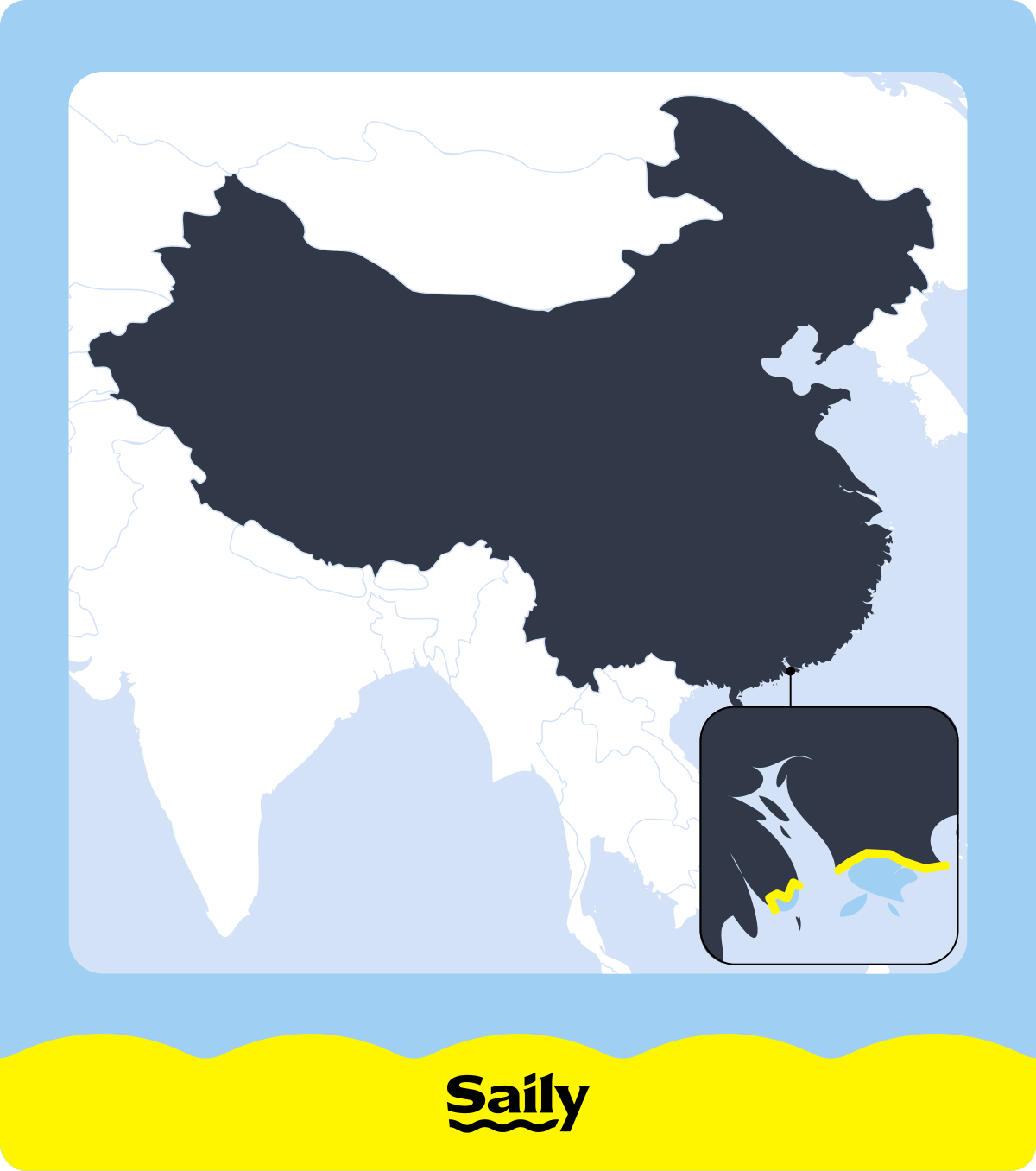
If you connect to a local network in mainland China, essentials like Google Translate and Google Maps won’t load at all, and your Gmail account will be inaccessible. To reach Google services, you’ll need a workaround, such as a VPN or a travel eSIM, that routes your data outside mainland China.
Whichever method you choose, you’ll need reliable mobile data. Saily offers an eSIM for China with affordable mobile data for 200+ destinations worldwide and an app-based setup, so you don’t have to swap out your physical SIM.
Is Google blocked in China? Which services are affected

Most major Google services are completely blocked on mainland China’s local internet networks. Without a functional workaround, you won’t have access to Google Search, Gmail, Google Maps, Google Docs, Google Drive, YouTube, and the Google Play Store.
On a domestic connection, the availability of these tools — including services like Google Gemini — is effectively zero. This creates immediate practical fallout — you can’t look up local information, collaborate on shared itineraries, or use Google Translate or Gemini to translate complex text. Furthermore, Play Store won’t load, which makes downloading or updating Android apps impossible once you’ve arrived.
These restrictions can become a major problem mid-trip if you’re counting on Google Maps for navigation, Gmail for a boarding pass, or Google Drive for an important file. Don’t keep your important travel information online only. Save your documents, maps, and bookings directly to your device for offline use before your trip.
Does Google Maps work in China?
Google Maps doesn’t reliably work in mainland China without a workaround, making it a poor choice for travelers who depend on turn-by-turn navigation. Even if you manage to load it, you may notice that your location, roads, or map features don’t line up correctly. This happens because Chinese law requires maps to use a different coordinate system, which shifts locations slightly.
Because the availability of Google Maps in China is limited, download any maps and directions you’ll need before your trip. You can also use local alternatives such as Amap (Gaode Maps) and Baidu Maps.
Does Google work in China at all?
Google doesn’t work in mainland China on a standard local network, and this block extends to third-party apps and websites that rely on Google services behind the scenes. If a site requires you to sign in with your Google account or uses Google-hosted code to function, it may fail to load even if the site itself isn’t officially restricted.
If you’re wondering, “Can you use Google in China?” — the short answer is that it depends on your connection. You don’t have to leave your account behind when you travel, but you’ll need to prepare. By using international data roaming or switching to Chinese alternatives, you can maintain access to the tools you need.
Why is Google blocked in China?
Google is blocked in mainland China as part of the Great Firewall, the system the Chinese authorities use to regulate and filter internet access. The restrictions give the government greater control over what information is available online and how companies handle data, allowing China to develop its own large domestic tech industry with alternatives to many Western services.
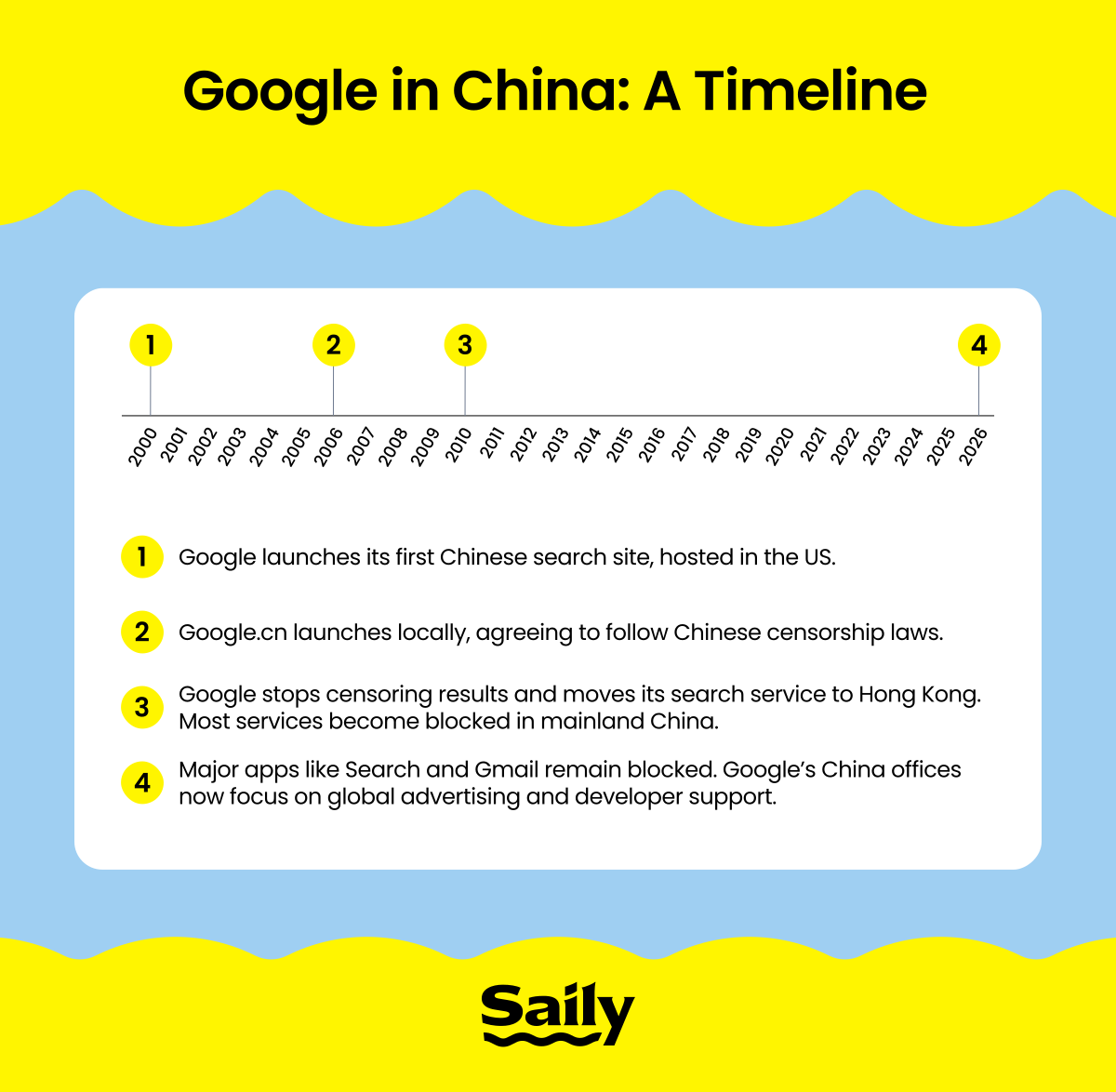
Google hasn’t always been unavailable in mainland China, though. In 2006, the company launched a Chinese search engine, Google.cn, and initially agreed to censor some search results to comply with local requirements. However, following a cyberattack and disagreements over censorship in 2010, Google announced it would stop censoring its search service and redirected users to its Hong Kong-based site. Access to Google services became increasingly restricted in the years that followed.
This regulatory history also helps explain why Google is blocked in China while Apple continues to operate there. Unlike Google, Apple has chosen to stay by complying with local regulations, such as storing Chinese users’ data on domestic servers and removing certain apps from the local App Store. By following these strict laws, Apple avoids the nationwide block that has kept Google services out of the country for over a decade.
China’s version of Google: Local alternatives
China has its own set of search engines, maps, messaging apps, and productivity tools that provide the same functionality as Google and other Western services. If you’re looking for China’s version of Google specifically, Baidu is the closest equivalent and a popular search engine throughout the country.
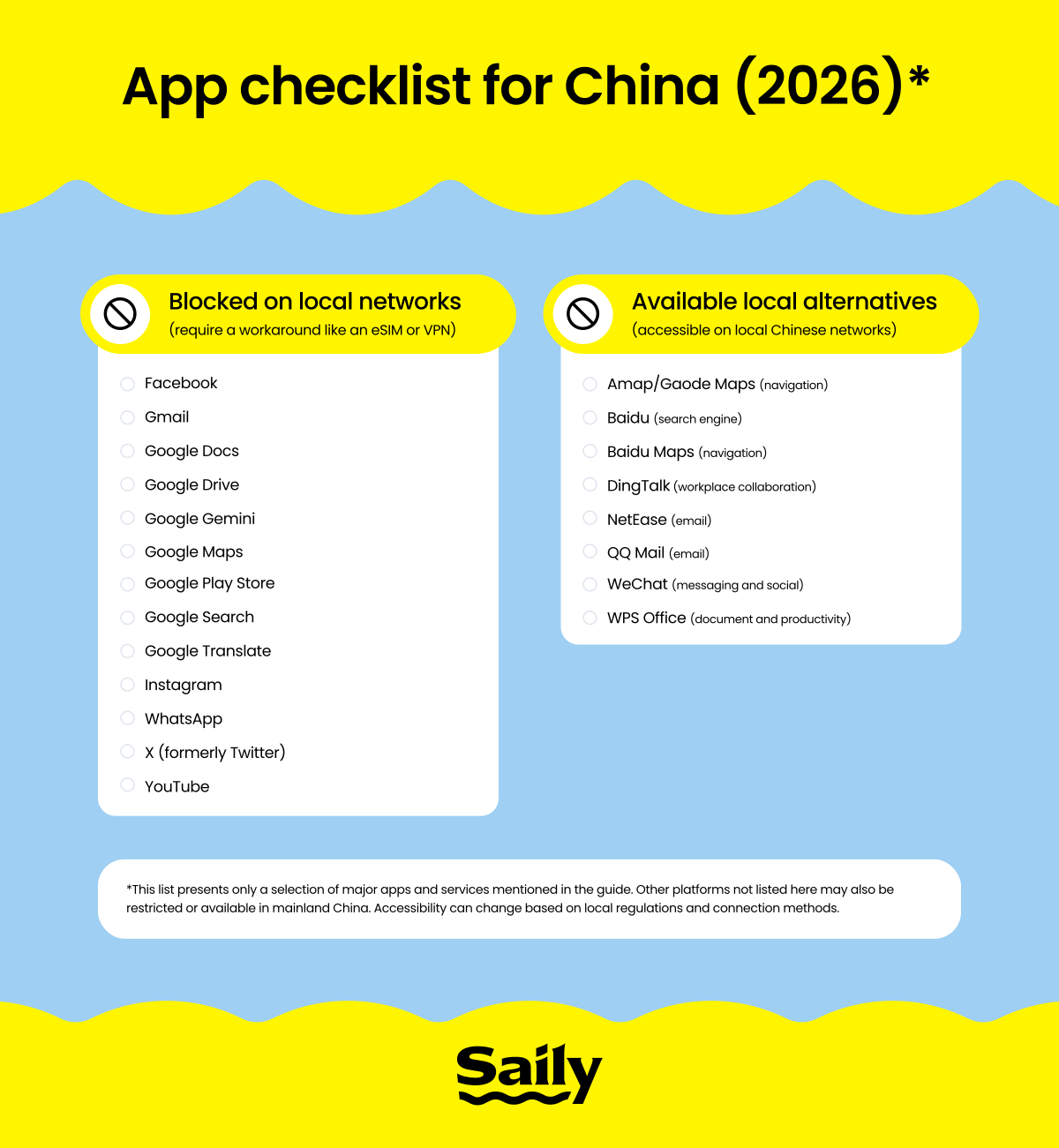
Chinese citizens and travelers can find local options for many everyday tasks, including navigation (Amap or Baidu Maps), email (NetEase or QQ Mail), document editing (WPS Office), and messaging (WeChat), but these alternatives aren’t always easy to use. For example, some features require an account or a Chinese phone number.
Search and maps alternatives
Baidu is a popular alternative to Google Search, while Amap (also known as Gaode Maps) and Baidu Maps can help you get around without Google Maps. These services are designed for use in China, so their local maps, directions, and points of interest may be more useful than Google’s while you’re there.
The language barrier can be a real drawback for international visitors. These platforms tend to be Chinese first, so looking up a destination or following directions can take more effort if you don’t read Chinese. Knowing some Chinese helps, as does having a translation tool handy.
Email and productivity alternatives
Google Docs is limited in China, but local services can cover the basics. WPS Office has tools for documents, spreadsheets, and presentations. DingTalk combines messaging with workplace collaboration features, while QQ Mail provides an alternative to Gmail.
If you can manage without Google services, those local alternatives may be all you need. It’s a different story if your work or travel plans already depend on Gmail, Google Docs, and Google Drive. Keeping access to those accounts generally requires using a travel eSIM or a VPN to route your data through another country.
How to access Google in China
If you want to keep using Google in China, sort out your connection before you travel. Two common options are using a VPN or a travel eSIM that routes your mobile data outside mainland China’s local networks.
A travel eSIM like Saily is a practical choice for mobile data. It routes your traffic through international networks, unblocking Google services at the system level so that your apps and browser function just as they do at home. You can start using your familiar tools the moment you land.
If you need a more versatile tool for all your devices, a paid VPN is another strong option. Services like NordVPN encrypt your traffic and tunnel it through a secure server in another country. While this is a great way to stay connected on any network — including local Wi-Fi — connection stability can fluctuate depending on local conditions.
Regardless of which method you choose, make sure to download and set it up before you set off. You won’t be able to access app stores or provider websites once you’re in China, so preparing in advance is the only way to ensure you stay connected.
Can you use Google in China with a VPN?
A VPN lets you access blocked websites in China by creating an encrypted tunnel for your internet traffic. By routing your data through a server in a different country, a VPN makes your connection appear as if it’s originating from outside mainland China, granting access to Google Search, Gmail, Google Maps, and other blocked services.
While VPNs are a well-known solution, they require careful preparation. Many VPN websites and apps are themselves blocked within China, so you must install and update the software on all your devices before you leave home. Reliability also matters — free VPNs are often inconsistent and easily detected by network filters. NordVPN is a trusted, capable option with features built to maintain a stable connection on restricted networks.
A VPN is a great choice if you’re comfortable configuring and testing apps ahead of time to ensure a smooth experience. By handling the setup before you travel, you can keep your access to the open web throughout your stay.
Using a travel eSIM to stay connected
A travel eSIM can be a simpler way to access Google in China because its data roaming traffic is routed through networks outside mainland China, such as servers in your home country or another destination. Instead of relying solely on a local internet connection, you can connect to mobile data that may not be subject to the same restrictions.
Saily offers affordable data plans in 200+ destinations. You can buy and install an eSIM for China directly in the Saily eSIM app without scanning QR codes or manually entering activation details. And if you need help along the way, 24/7 live chat support is also available.
In addition, you get security features built for travel, such as web protection and an ad blocker, along with the ability to change your virtual location to one of the 115+ destinations. Need calls and texts too? Saily offers a separate add-on with a US-based phone number that includes local calls and SMS in China.
Step by step: Setting up an eSIM before you travel
To ensure a smooth trip, follow these steps to prepare your connection and data before you land:
Buy and install your eSIM before departure. Setting up your travel eSIM while you still have unrestricted internet access gives you a chance to fix potential connection issues before your trip. If you plan to use a VPN, install it before you set off as well.
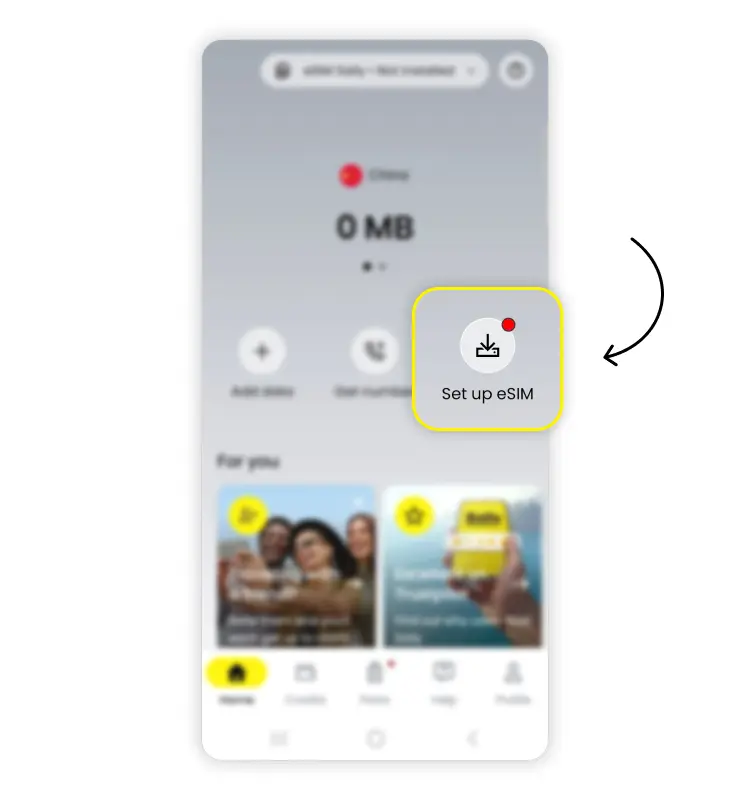
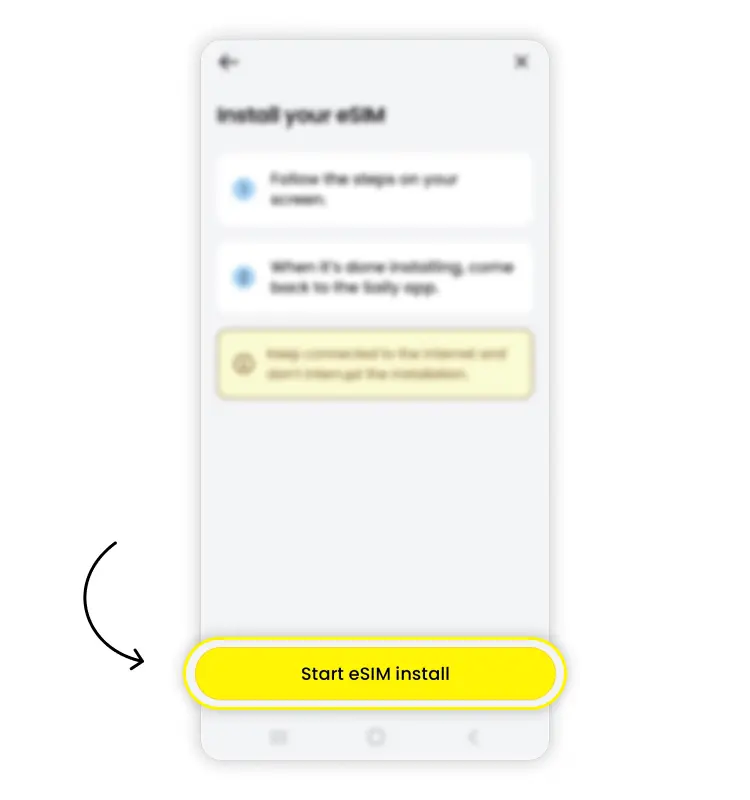
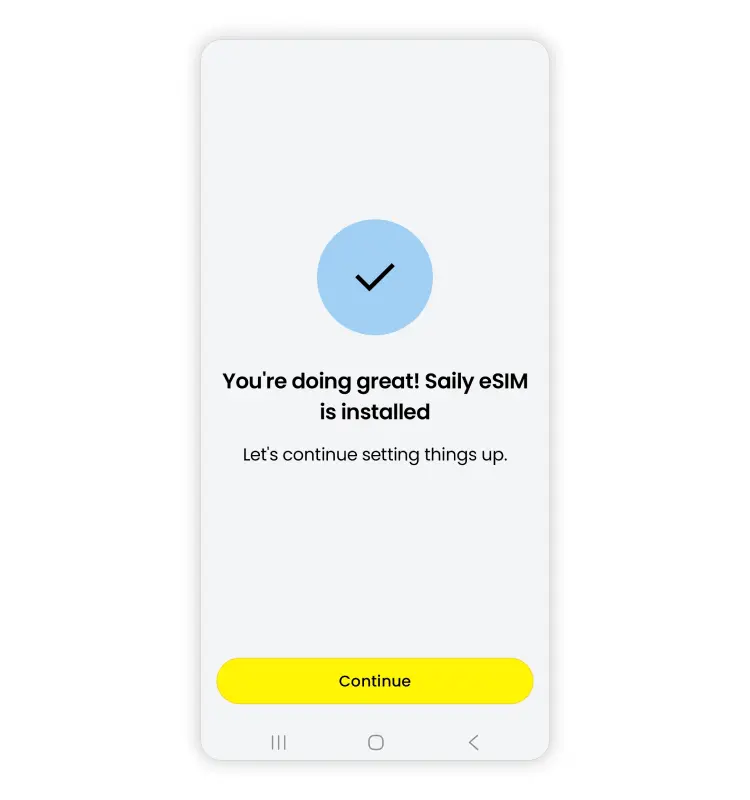
Download maps and backup apps. Save any maps, directions, booking details, and documents you may need offline. It’s also worth installing local alternatives such as Amap or Baidu Maps before you arrive.
Test your connection when you land. Turn on your travel eSIM and check that mobile data is working. If it doesn’t connect right away, restart your phone, toggle airplane mode on and off, or try switching to another available network.
For more information, including whether your device is compatible with eSIM technology, visit our guide to installing the Saily eSIM.
Other apps blocked in China travelers should know about
Google isn’t the only service you may lose access to in mainland China. Popular platforms such as Facebook, Instagram, X, YouTube, and WhatsApp are also generally blocked on local networks.
While you can keep WhatsApp on your phone, you won’t be able to send or receive messages without a connection workaround. Check out our guide Does WhatsApp work in China? for more details and consider downloading WeChat as a local backup for messaging before your trip.
Install any essential apps and set up your eSIM or VPN before you arrive. That way, you won’t have to rely on potentially restricted app stores or websites once you’re in mainland China.
💡 Pro tip: Whichever messaging app you use, it’s also worth knowing how to encrypt text messages when you’re communicating while you travel.
Tips for planning your trip to China
A little preparation can make it much easier to stay connected and productive after you arrive in China.
Set up your connection before you leave. Install and configure your eSIM and VPN at home so you don’t have to download them through a restricted network after you arrive.
Save important information offline. Download maps, booking confirmations, boarding passes, hotel addresses, and essential contacts to your device so you can reach them without an internet connection.
Get familiar with local apps. Download alternatives such as WeChat and Amap before your trip and learn the basics while you still have easy access to your usual apps.
Be careful on public Wi-Fi. Hotel, airport, and café Wi-Fi can be convenient, but public networks come with security risks. Learn more about whether public Wi-Fi is safe before relying on it for sensitive tasks.
Plan how you’ll use mobile data abroad. Understanding international roaming and your other options for staying connected to the internet while traveling can help you avoid unexpected charges or losing access when you need it most.
Know your calling options. Mobile data doesn’t automatically give you traditional voice service, so check whether your carrier supports Wi-Fi calling before your trip.
Consider a travel eSIM. If you’re planning to visit other countries in the region, Saily offers an Asia eSIM plan besides the China-specific one. The app also includes easy in-app setup, plus security features such as web protection, an ad blocker, and the ability to change your virtual location to help protect your connection while you travel.
Need data in China? Get an eSIM!

1 GB
7 days
US$4.493 GB
30 days
US$10.995 GB
30 days
US$15.99
We do our best to keep everything accurate and up to date, but eSIM service provider prices, plans, and features can change quickly. If you spot something that seems outdated or incorrect, feel free to get in touch with us at [email protected] — we’d really appreciate the heads-up!
FAQ
Baidu is China’s dominant search engine and the closest local equivalent to Google Search. For navigation, Amap (Gaode Maps) and Baidu Maps are popular options, but you will likely need a translation tool to navigate their Chinese-first interfaces.
Apple has continued operating in China while complying with local requirements around data storage, apps, and content. Google took a different approach, withdrawing its mainland Chinese search engine in 2010 following disagreements over censorship and redirecting users to its Hong Kong-based service.
Google shut down its mainland Chinese search engine in 2010 following disputes over censorship and redirected users to its Hong Kong-based service. Most Google services have since been blocked in mainland China and remain inaccessible on local networks in 2026.
WhatsApp is generally blocked in mainland China and won’t work reliably on local networks without a workaround. Before you travel, consider downloading WeChat as a widely used local alternative for messaging.
Yes. Google Fi Wireless routes your data through international networks instead of mainland China’s local ones, so Google services like Gmail, Google Maps, and Google Search typically work without a VPN when you use Google Fi Wireless. Keep in mind that coverage and connection speed depend on local partner networks and can vary by location. Pay-as-you-go plans can also get expensive on longer trips, so a travel eSIM may be a more budget-friendly alternative.

Always connected, always on course
Connect instantly with a Saily eSIM and enjoy effortless internet access.

Related articles