Japan is a country where a good set of apps can make tricky travel moments much easier to manage. From checking train routes in Tokyo to translating a convenience store label, the best apps for Japan travel can save you time and help you figure things out on the go. But you’ll want to download them before you travel so you’re not scrambling to set them up when you land. These are the best apps to download before your trip to Japan. They’ll help you get around, translate signs and menus, make reservations, understand local etiquette and avoid looking for public Wi-Fi every time you need to look something up.
Why you need to download apps for Japan before you go
Apps are part of everyday life in Japan, and you’ll notice that right when you step off the plane. Train tickets, restaurant reservations, IC transit cards, or cashless payments — tasks that might be handled in person or at a counter in other countries run almost entirely through apps in this country.
Some of these apps, like the cashless payment service PayPay, are built specifically for use in Japan. A few apps may require a Japanese phone number or regional App Store settings to install, so it’s worth checking compatibility well before your departure date.
Free Wi-Fi is less common in Japan than you might expect, which means most of the apps you’ll rely on need their own mobile data connection to work. Download and set up them before you fly so you’re not fumbling with installations at crowded airports like Narita or Kansai. And with Saily, an eSIM app created by the team behind NordVPN, you can activate a data plan for Japan right from your phone before you even board your flight — no physical SIM swap needed. And it starts working the moment you land.
What apps do I need to enter Japan?
You might expect to need a dedicated app to enter Japan, but Japan’s entry process actually runs through an official government website called Visit Japan Web (opens in a new tab). It handles immigration, customs, and a tax-free shopping service — all in one place. Keep in mind that Visit Japan Web is separate from the visa application service, so it’s worth checking visa requirements for your country of citizenship before you travel.
Before your trip, head to the site and fill out the forms using your passport information and flight details. Once the information is submitted, you’ll receive QR codes to show government officials when you land. Having mobile data ready at that point makes a real difference — you won’t have to hunt for airport Wi-Fi just to pull up your codes or screen shot them codes and save.
Before you start your trip, it helps to know which apps are worth downloading for Japan travel. The right apps can help you, for example, get around, read signs, and order food.
1. Google Maps
Google Maps is one of the best overall apps to use in Japan. Use it to plan neighborhood walks, check train routes, and find your way through malls and airports. It’s free, and you don’t need a Japanese phone number to use it.
You can also download offline maps, but many of the features work best with data. It helps to know how much data Google Maps uses before your trip, especially if you use it a lot to check train times, directions throughout the day, transit fares, and up-to-date business hours.
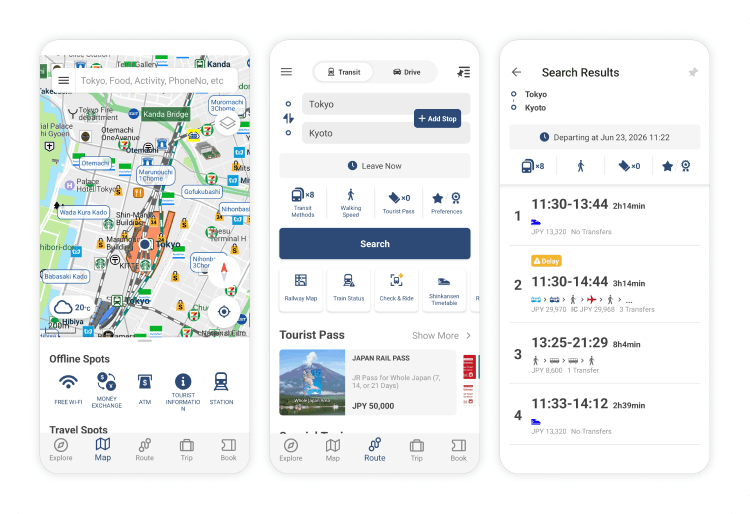
2. Japan Travel by NAVITIME
Another useful app for checking train routes, bus schedules, and walking directions is Japan Travel by NAVITIME. It’s built for travel in Japan and supports 13 languages, including English. The app gives you some of the local transit details Google Maps can miss and is especially helpful if you’re using a Japan Rail Pass. You can use it to plan trips from your hotel, filter routes by JR Pass coverage, double-check platform numbers, and see where to transfer inside stations.
The free version of the app and website offers enough travel-planning features for most trips, but you can upgrade for as little as ¥600 for 3 days to avoid ads, see route options, and check the next train or bus time if you miss one.
3. SmartEX
Buying Shinkansen tickets at the station isn’t too complicated, but lines can get long quickly. With the SmartEX app, you can book bullet train tickets ahead of time — right from your iPhone or Android device. It links to your IC card or generates a QR code, so you can scan yourself through the gate without stopping at the ticket counter. You can book or change tickets on the Tokaido, Kyushu, and Sanyo bullet train lines as long as you have Wi-Fi or data.
It’s worth remembering that you can find better fares by booking in advance, which helps if you’re figuring out how much it costs to visit Japan. The SmartEX app is available on iOS and Android but only from select app stores (including the US, Canada, Australia, and Japan). If your store is registered elsewhere, say in Europe, you can book through the official SmartEX website instead and then download the app once you land in Japan or you can switch your app store region before your trip to download it early.
4. Suica or PASMO (mobile IC cards)
Get a mobile IC card to make daily life much easier, especially in Tokyo or Osaka. From train gates and fare readers to shops and vending machines, you can tap to pay for small purchases throughout Japan with Suica or PASMO.
You can easily add a Suica or PASMO card to your Apple Wallet app if you use an iPhone. On Android, it’s trickier — mobile Suica and PASMO only work on phones sold in Japan because they need a FeliCa chip that most international Android devices don’t have. If you can’t get the digital version to work, you can get a travel IC card at Haneda or Narita airport with a minimum balance of ¥1,000.
You can still get a physical PASMO or Suica card, although availability has been limited in recent years.
5. Google Translate
Traveling in Japan is a lot easier when you have a translation app installed and ready to use. Google Translate is free and especially useful because it lets you point your camera at menus, signs, and vending machines to instantly translate them from Japanese to English (or other languages).
It also has conversation mode, which translates conversations in real time as you talk. It doesn’t translate everything perfectly, but it’s a must-have app for travelers who don’t speak Japanese.
💡Pro tip: Download the Japanese language pack before you travel, so you can use the app offline.
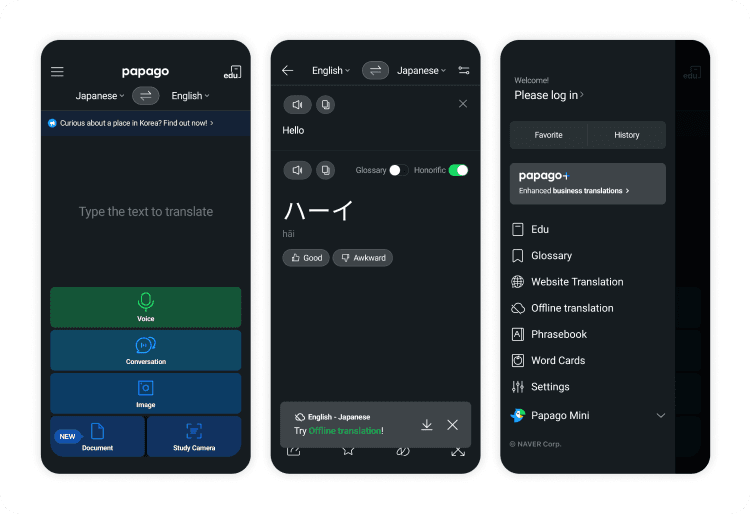
6. Naver Papago
It never hurts to have more than one translation app in Japan. It may come in handy especially when a translation doesn’t feel quite right. Built by a Korean tech company and especially strong with Asian languages, Naver Papago is a good backup to Google Translate. The app has natural-sounding translations and a user-friendly interface with features like image translation for signs and labels as well as dictionary tools for specific words.
Most travelers can get by with the free version, but you can upgrade to Papago Plus for US$9.99-55.99 a month if you want more translation support.
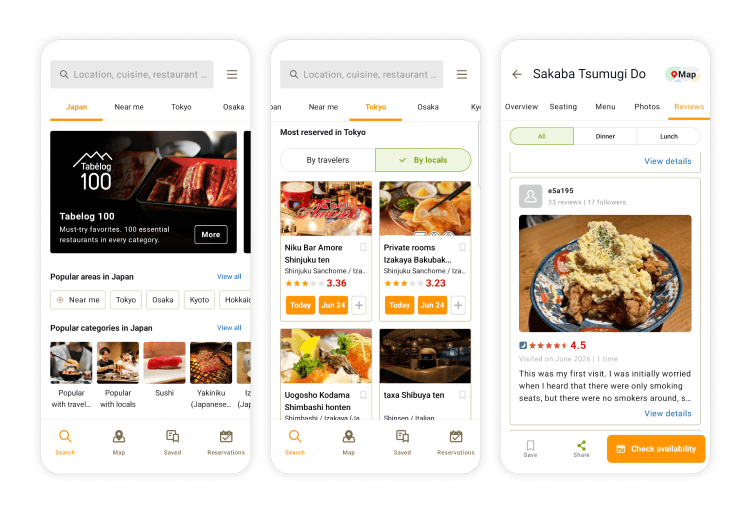
7. Tabelog
If finding the best restaurants is your priority, get the Tabelog app. It helps you find where locals eat, not just the obvious tourist spots. It’s Japan’s go-to restaurant review app, with more than 82 million reviews.
It’s worth noting that a 3.5 rating is considered excellent, even though that might seem low compared to Western review sites like Yelp.
The app offers an English version and is very convenient to use. You can also make reservations through the app, but it costs ¥440 per person. Email the restaurant or have your hotel concierge call it to avoid paying this fee.
8. PayPay
PayPay is Japan’s most widely used mobile payment app, accepted at convenience stores, vending machines, restaurants, and a growing number of small shops that don’t take credit cards. That makes it a genuinely useful backup for places where your Visa or Mastercard won’t work. Setting it up as a foreign tourist can be tricky, though — you may need a Japanese phone number, so check whether you can access the app before your trip. And while PayPay covers a lot of ground, Japan is still a heavily cash-based society, so carry some yen for the businesses that prefer it.
9. Ramen Beast
Ramen fans who want to find the best bowl in whatever neighborhood they’re exploring should install Ramen Beast before they go. The app is a connoisseur’s guide to more than 2,000 top-rated spots throughout Japan, with recommendations on what to order at each one. It’s free but only available on iPhone — if you’re on Android, Tabelog is a solid alternative for finding highly rated places.
And if you’re the kind of person who takes ramen seriously enough to wear it, the creator sells themed merch online worth browsing before your trip.
10. Agoda or Booking.com
Book your stay in Japan before you land, especially if you’re traveling over major holidays or cherry blossom season. Agoda tends to have strong inventory and competitive pricing for destinations in Asia, while Booking.com offers free cancellation on many properties — both are solid picks. It’s worth checking the same hotel or ryokan (a traditional Japanese inn) on each platform because prices can vary. Traditional ryokans and smaller guesthouses sometimes only appear on one of the two, so browsing both gives you the full picture.
11. DiDi
Taxis in Japan are safe, clean, and metered, but hailing one during peak hours or in less-traveled areas isn’t always easy. DiDi is one of the most widely used ride-hailing apps in Japan and takes the guesswork out of finding a ride. Uber exists here too, but its coverage is limited outside major cities.
DiDi is especially useful for late-night travel (trains in Japan stop running around midnight), airport transfers, or areas with limited public transit. The app supports English and works with most international credit cards, so setup is straightforward. You won’t need a Japanese phone number or address to get started.
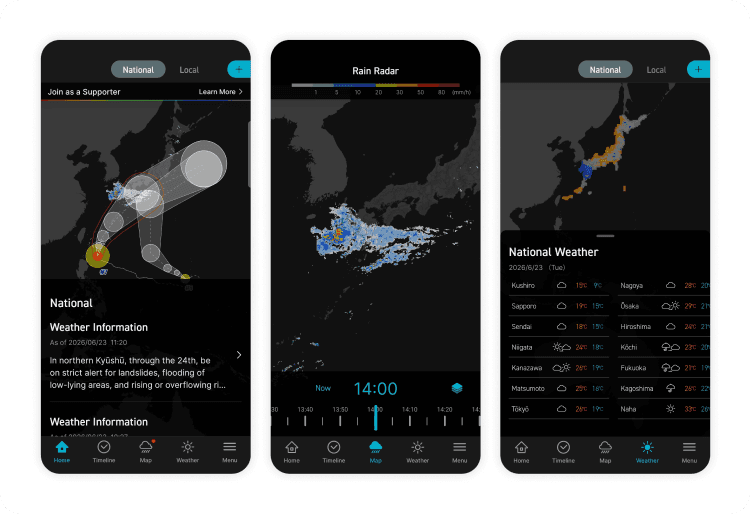
12. Tenki.jp or Weather News Japan
Japan's weather can shift fast, and getting caught off guard during typhoon season, rainy season (tsuyu), or even a cloudy cherry blossom week can throw off your plans. Knowing what to expect is part of choosing the best time to visit Japan, and global weather apps don’t account well for the country’s microclimates, especially in mountain areas or coastal towns outside the major cities.
Local apps like Tenki.jp and Weather News Japan give you hyper-local forecasts that are far more reliable for day-to-day planning — like knowing whether to pack an umbrella for a day trip to Kamakura. Weather News Japan has better English support, while Tenki.jp is in Japanese but easy enough to navigate with your phone’s built-in translation. Neither app requires a Japanese phone number.
13. NERV Disaster Prevention
Japan is one of the most seismically active countries in the world, and having a reliable alert app on your phone is a genuine safety measure, not an overreaction. NERV Disaster Prevention is a free app that sends real-time alerts for earthquakes, tsunamis, and severe weather across Japan.
Alerts come in English and include clear guidance on what to do and where to go. Most travelers won’t need it, but those who do will be grateful it was already on their phone. Just make sure you have an active data connection — whether that’s an eSIM, a local SIM for Asia, or roaming — so the alerts can reach you. If you’re relying on roaming, check out our guide on whether T-Mobile works in Japan.
14. XE Currency
Converting yen prices to your home currency on the fly isn’t easy, especially since the yen has fluctuated significantly in recent years. XE Currency is a free app for iPhone and Android that gives you real-time exchange rates, so you can budget with confidence while you shop, eat, and explore. It works in offline mode too, which is handy when you don’t have data.
15. ChatGPT or AI assistant apps
Your older Japan travel guides probably didn’t mention an AI assistant, but travel in 2026 looks different. ChatGPT and similar AI tools make a surprisingly versatile travel companion — you can use them to translate complex menus, generate custom itineraries, get quick explanations of cultural customs, or troubleshoot on the fly.
Need to figure out the fastest route from Shibuya to Arashiyama? Wondering how a Japanese vending machine works? These are the kinds of questions an AI assistant can answer in seconds. The catch is that they all need a data connection to work, so make sure your Saily eSIM, local SIM card, or roaming is set up before you go.
Apps needed for Japan by category
The best travel apps are the ones that take the stress out of travel by helping you book tickets, translate menus, and offer quick fixes for common travel problems.
Category
Apps
For
Payments
PayPay, XE Currency
Mobile payments, conversions
Restaurants
Tabelog, Ramen Beast
Reviews, reservations
Translation
Google Translate, Naver Papago
Menus, labels, conversations
Transportation
Google Maps, Japan Travel by NAVITIME, DiDi, SmartEX, Suica, PASMO
Directions and walking routes, transit cards and train reservations
Travel essentials
ChatGPT, Saily eSIM app
Travel assistance, mobile data
Trip reservations
Agoda, Booking.com
Hotels, tours
Weather and safety
Tenki.jp, Weather News Japan, NERV Disaster Prevention
Forecasts, alerts
Most of these apps work best with mobile data, so set up your phone before you arrive. If you haven’t figured out how you’ll stay connected, compare eSIM vs. pocket Wi-Fi in Japan before your flight, and don’t forget about checking other options like SIM cards and roaming.
Tips for planning your Japan trip in 2026
Apps can help a lot once you start exploring Japan, but planning ahead is also a good idea. Take care of the small details now so they don’t slow you down later.
Download apps ahead. Finish setting up any accounts, sign in, enable offline translation, and add payment details via your home Wi-Fi.
Learn basic Japanese etiquette. Don’t answer calls on trains, avoid eating while walking around, and remember that tipping isn’t expected.
Book hotels and activities early. Popular hotels, ryokans, restaurants, and tours can fill up weeks, if not months, ahead of time.
Price out your train fares. A Japan Rail Pass can save you money, but only if you’re taking enough long-distance train rides or a multi-stop route. Compare prices before you buy tickets.
Get cash after you land. Find an ATM at a 7-Eleven or post office — these tend to accept international cards more reliably than bank ATMs. Withdrawing ¥10,000-30,000 is a good starting point because many businesses still only take cash.
Set up mobile data. You’ll need reliable data for nearly every app on this list. You can download the Saily eSIM app, get an affordable data plan for Japan, and have mobile data without a physical SIM card.
Cover your full trip. If Japan is just one stop on a longer trip, look into regional or multi-destination eSIM, such as Saily’s Global eSIM data plans so you can visit more than one destination without swapping SIM cards every time you reach your next stop.
The best apps for Japan travel help you with local transit, walking routes, translation, and finding restaurants and things to do. At a minimum, you should use Google Maps, Google Translate, Tabelog, and a mobile IC card app like Suica.
Fill out your personal details on the Visit Japan Web before you land in Japan. It’s the official Japanese government website where you register customs and immigration details. Visit Japan Web isn’t a visa, so check the most recent entry requirements before you arrive.
LINE is one of the most widely used apps in Japan, especially for messaging. Most tourists won’t need it as much as Google Maps, which helps you navigate airports, train stations, and city streets. Japan-specific apps like PayPay, which supports mobile payments, and Tabelog, a restaurant review app, are widely used by locals and visitors.
Always connected, always on course
Connect instantly with a Saily eSIM and enjoy effortless internet access.