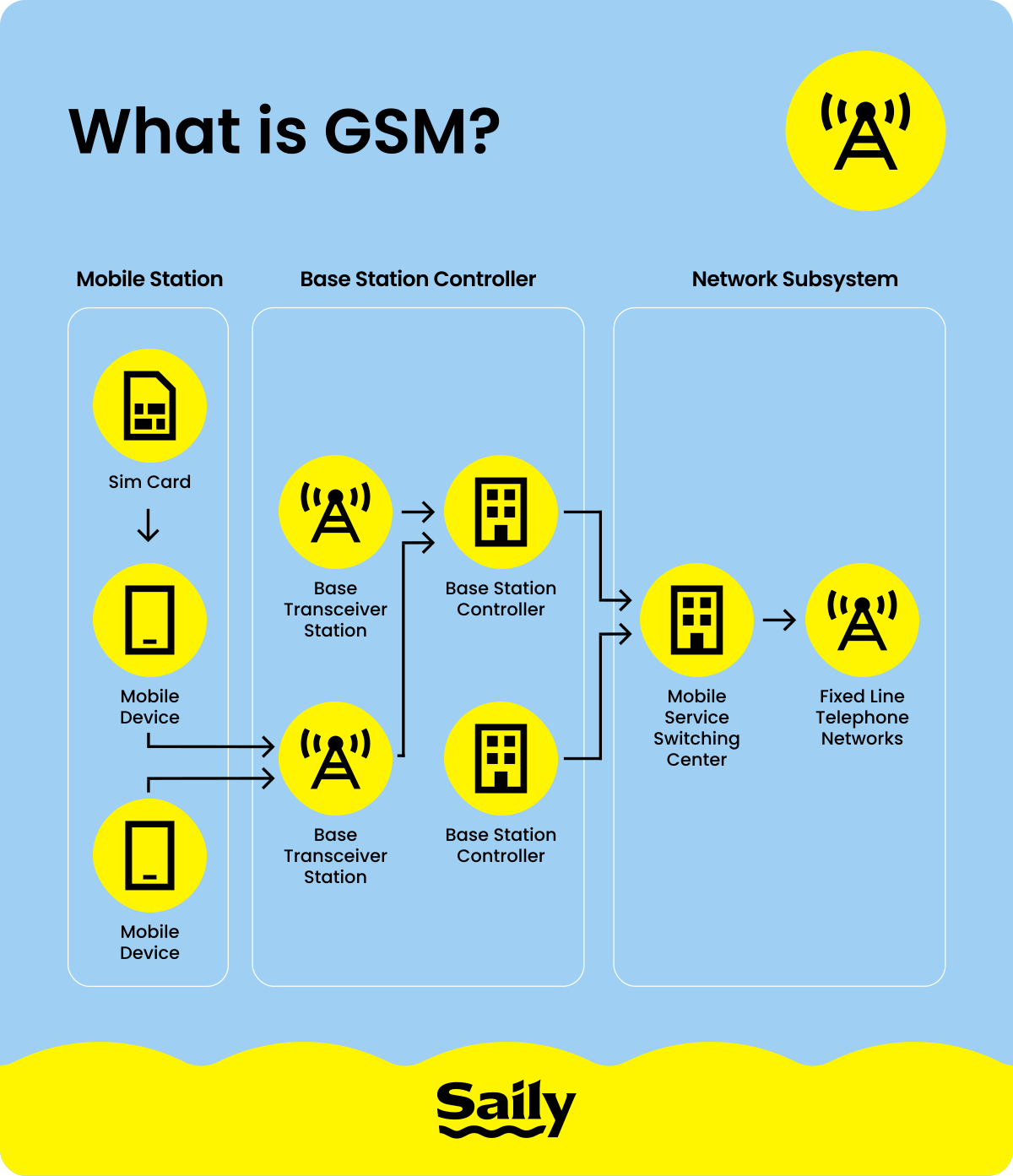
What are GSM and CDMA?
GSM stands for Global System for Mobile Communications, while CDMA is Code Division Multiple Access. Both are older cellular network technologies that were widely used for 2G and 3G mobile service.
Technically speaking, the main difference between the two lies in how they divide network capacity. GSM divides network capacity into different channels and time slots so multiple users can share it. CDMA lets multiple calls use the same frequency at the same time, separating each connection with a unique code.
If you want a deeper look at how GSM networks worked, see our guide to what GSM is.
CDMA vs. GSM: The key differences
For most phone users, the main difference between GSM and CDMA was how each network identified the device.
GSM networks used a removable SIM card that stored information used to identify your mobile account and connect your phone to the network. If you’re curious about the details, see what’s stored on a SIM. Removable SIM cards make it relatively easy to move your service to another compatible phone, switch carriers, or use a local SIM while traveling abroad.
CDMA carriers identified devices using an electronic serial number (ESN) or mobile equipment identifier (MEID). Instead of just moving a SIM card, switching devices on CDMA generally meant having the carrier activate the new device, which made the whole process less flexible.
Another difference involved using voice and mobile data at the same time. Many 3G GSM-based networks allowed simultaneous calls and data, while older CDMA networks typically required you to use one or the other.
💡 Good to know: Although SIM cards were traditionally associated with GSM devices, some later CDMA phones also used SIM cards, particularly as carriers added 4G LTE.
GSM and CDMA comparison table
The main differences between GSM vs. CDMA networks came down to how phones were activated, how easily you could switch devices or carriers, and how widely each standard was used around the world.
| GSM | CDMA |
|---|
SIM card | Traditionally used a removable SIM card to identify the subscriber
| Traditionally identified the phone through its ESN or MEID rather than a removable SIM
|
|---|
Global roaming | Generally easier because GSM was widely used internationally and travelers could often swap in a local SIM | CDMA was used most heavily in North America and parts of Asia, which made CDMA-only devices harder to use internationally because compatible networks weren’t widely available |
|---|
Switching phones or carriers | Usually easier because you could move the SIM to another compatible, unlocked phone
| Usually required the carrier to activate the new phone
|
|---|
Simultaneous voice and data | Commonly supported on 3G GSM-family networks such as UMTS or HSPA | Older CDMA networks generally couldn’t handle a call and mobile data at the same time |
|---|
Worldwide availability | Historically the more widely adopted standard worldwide | Used in fewer countries and markets
|
|---|
Example US carriers | AT&T and T-Mobile historically used GSM-based networks | Verizon and Sprint historically used CDMA-based networks
|
|---|
These differences mainly apply to older CDMA and GSM phones and 2G or 3G networks. Modern US carriers now rely on LTE and 5G (5G began broadly rolling out worldwide in 2019), so phone compatibility today depends more on supported frequency bands, carrier certification, and whether the device is carrier unlocked. If you switch carriers today, number porting usually lets you keep your existing phone number as long as it’s eligible for transfer.
Which carriers use GSM vs. CDMA in the US?
In the past, US carriers were divided between GSM and CDMA networks:
AT&T and T-Mobile used GSM.
Verizon, Sprint, and UScellular used CDMA.
That is the legacy picture, though. Sprint became part of T-Mobile, and UScellular is now part of T-Mobile. More importantly, the old GSM and CDMA networks have been retired.
AT&T shut down its 3G network in February 2022. Sprint’s CDMA network was retired in 2022, followed by Verizon’s CDMA network at the end of that year. UScellular decommissioned its 3G CDMA network in early 2024, and T-Mobile discontinued its remaining 2G GSM network in August 2026.
Today, the major US carriers use 4G LTE and 5G rather than the old GSM vs. CDMA network standards. Recent phones connect using a physical SIM or eSIM, so whether a carrier was once considered GSM or CDMA usually no longer determines whether your phone will work on its network.
How to tell if your phone is GSM or CDMA
If you have an older phone and want to know whether it was designed for GSM or CDMA, the most reliable method is to check the exact model number and look up its network specifications.
On an iPhone, go to “Settings” > “General” > “About” to find the model number and IMEI number. On an Android phone, open “Settings” > “About phone.” Depending on the manufacturer, you may need to tap “Status,” “Phone identity,” or a similar option to see the device identifiers.
Older CDMA phones may also display a MEID or ESN, while GSM phones typically have an IMEI. Some older phones support both technologies, however, so these identifiers alone don’t always give you a definitive answer.
Be sure to search the manufacturer’s specifications for your exact model number or use your carrier’s compatibility checker. This is especially useful for phones such as older iPhones, which were sometimes sold in different GSM and CDMA versions depending on the carrier.
If your real question is whether the phone will work with a different carrier today, GSM vs. CDMA is no longer the most important piece of information to check. Make sure the phone supports the carrier’s LTE or 5G bands and confirm that it is carrier unlocked.
GSM vs. CDMA: Which is better?
For most people today, neither GSM nor CDMA is the better choice because newer phones no longer rely on either standard for current cellular service. If you’re comparing their historical impact, though, GSM became the more widely adopted technology worldwide, and the standards family that included GSM and UMTS ultimately led into LTE and 5G.
CDMA had some advantages in its time. It could use available spectrum efficiently and offered strong coverage and capacity in some network deployments, which helped make it popular with carriers such as Verizon and Sprint in the US. GSM, however, was used much more widely around the world and made switching phones and using international SIM cards easier.
LTE eventually brought carriers from both paths onto the same 4G standard. Former GSM and CDMA carriers alike adopted LTE and later 5G, so the old CDMA vs. GSM vs. LTE distinction no longer determines which phone you should buy.
Today, it’s more useful to check whether a phone supports your carrier’s LTE and 5G bands, is carrier unlocked, and supports the type of SIM or eSIM you want to use.
What actually matters now: LTE, 5G, unlocked phones, and eSIM
Today, GSM vs. CDMA is mostly a historical distinction. If you are checking whether a phone will work with a carrier or while traveling, a few other things matter:
Is the phone carrier unlocked? An unlocked phone can generally connect to compatible networks from different carriers.
Does it support VoLTE? VoLTE support is an important compatibility check because carriers no longer rely on old 2G or 3G networks for voice service.
Does it support the right LTE and 5G bands? A phone needs to support the frequency bands used by the carrier or network you want to connect to.
Does it use a physical SIM, eSIM, or both? This determines how you can add or switch mobile plans.
The same applies when you travel. Staying connected abroad is now less about whether your phone is GSM or CDMA and more about whether it supports the local network and what kind of mobile data plan you use. You could use your regular carrier’s international roaming service, buy a local SIM, or add a travel eSIM. If you’re not sure how roaming works, see our guide on what data roaming is.
A Saily travel eSIM lets you get mobile data in 200+ destinations without removing your regular SIM card. You can install the eSIM before your trip, turn it on when you need it, and keep your primary line for calls or texts.
If you’re deciding which option works best for your device, compare an eSIM vs. a physical SIM and check whether your phone appears on Saily’s list of eSIM-compatible devices.