Roaming in Thailand: Costs and cheaper options for staying online
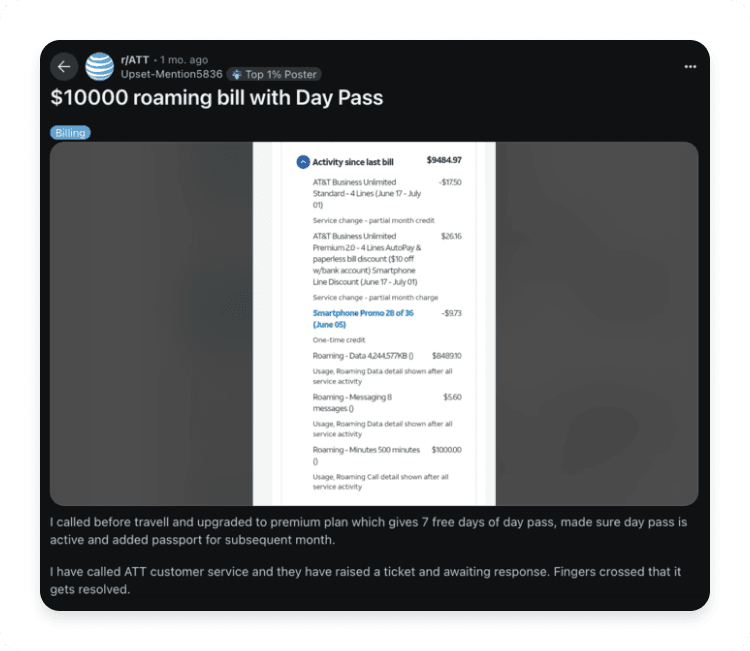
Thinking of switching on your international roaming while in Thailand? Be aware that you could unknowingly rack up a roaming bill of more than US$4,000 for just 2 GB of data, depending on your provider (yes, we’re serious). While AT&T, T-Mobile, and Verizon all give you the option to roam in Thailand, plenty of cheaper options exist to get internet access on your trip. Learn more about prices you can expect for roaming in Thailand and the best alternatives for staying online as you explore one of Southeast Asia’s most popular destinations.




Turinys
How does roaming in Thailand work?
Hold up — what’s data roaming? In short, it’s a way for you to get cell service and an internet connection on your phone while you travel abroad. When you’re in Thailand, your phone can't connect to your home country’s network anymore. Instead, it hooks up with a local Thai carrier through something called a roaming agreement (basically, a local Thai network makes an agreement with your carrier to let you use their towers). Your home carrier (e.g., Verizon or AT&T) pays the Thai network for your internet usage, then passes that cost along to you.
Roaming fees vary depending on which US provider you're with and what plan you have. Some carriers offer daily flat rates, while others charge per megabyte (MB) or gigabyte (GB). With the flat rates, you’ll pay the same price for a quick “things to do in Chiang Mai” search as you would for streaming a 20-minute video on how Thailand became one of just a few countries in the world to evade colonialism. If you’re being charged by the MB, on the other hand, you’ll want to skip out on any videos at all.
More simply, if you’re wondering if your phone will work in Thailand, the answer is almost certainly yes. Thailand uses GSM networks (the same technology as most of the world), so your phone should connect without issues as long as it’s “carrier-unlocked” (i.e., able to connect to networks other than the one you use at home). But when it comes to data roaming, it's less of a question of whether you can and more so about whether you’ll want to, knowing the potential costs.

How much does roaming cost in Thailand?
The amount you’ll spend on roaming charges in Thailand will depend on your network carrier, what roaming allowances are included in your mobile plan, how much data you use, and whether you plan on making calls or sending text messages. For example, some providers like T-Mobile give you the option to plan ahead and purchase an international data pass, which gives you more high-speed data than is normally included in your mobile plan plus unlimited calling to or from 215+ destinations. However, if you’re just winging it and count on a pay-per-day rate, you might rack up a huge bill before you even realize it, especially with providers charging a few dollars per MB.
Here’s a breakdown of the pay-per-use roaming charges you can expect in Thailand with major US carriers:
Provider | Calls | Texts (SMS) | Mobile data |
|---|---|---|---|
AT&T | US$3/min | US$0.50/msg to send or receive | US$2.05/MB |
Verizon | US$1.79/min | US$0.50/msg | US$2.05/MB |
T-Mobile | US$2.39/min | US$0.50/msg | US$15/MB |
For reference, a Saily unlimited eSIM plan for Thailand can cost as low as US$2.40 per day over a 30-day period.
For UK customers wondering about Vodafone roaming charges in Thailand, the carrier’s website states that if you’ve purchased your mobile plan on or after August 11, 2021, you’ll be charged £7.86 a day on top of your existing plan for calls, texts, and up to 25GB of data. For those who’ve bought a plan after August 11, 2025, the rate is slightly lower at £6 for the same offerings.
Canadians with Rogers can expect rates at CA$3 per call, CA$0.75 per SMS text, and CA$9.99 for 10 GB of data per day. Bell’s pay-per-use rates are CA$3.50 per call, CA$0.99 per text, and CA$12 per MB of data.
If you want to keep your mobile data costs in Thailand low, consider switching off your international roaming entirely and opt for a cheaper mobile data solution.

Why you should turn data roaming off in Thailand
Should your data roaming be on or off when you visit Thailand? Anyone who’s been burned by a sky-high roaming bill is shouting “off!” from the rooftops. Here are a handful of reasons to keep your roaming off while enjoying your vacation:
You’ll avoid expensive roaming fees. Even if you choose an international data package add-on at US$10 per day for a two-week trip, that totals to US$140 just to stay online. That’s over 100 Singha beers, over 100 street-side pad thais, or 22 entrance tickets to Wat Arun. Trust us, you’ll have far better and more exciting ways to spend your money than on data roaming.
Roaming drains your battery. Okay, using your phone in general drains the battery, but keeping roaming switched on will drain it faster than usual. Roaming requires your phone to constantly search for the nearest network and switch to the one with the best speed. It’ll have to work even harder the further away you are from a cell tower.
Some apps use data in the background. Email syncing, app updates, and cloud backups are just a few ways that your phone quietly munches through your data plan while you’re not even on it. When roaming charges are billed by the MB, this sneaky background data usage adds up.
If you want to disable data roaming:
On an iPhone: Go to “Settings,” then “Cellular” or “Mobile service” (depending on your phone’s language setting). Next, tap “Mobile data” and select “Off.”
On an Android: Go to “Settings,” then “Connections.” Next, tap “Mobile networks” and toggle the switch beside “Data roaming” to the off position.
Best ways to avoid roaming charges in Thailand
Hopefully by now we’ve hammered home why data roaming isn’t your best option for staying online in Thailand. You’ll want to avoid roaming fees like the blazing sun during the country’s hot season (arguably the worst time to visit Thailand, by the way). But if you’re ditching roaming, what cheaper alternatives do you have at your disposal? Just like checking off items on your Thailand packing list, planning your connectivity ahead of time will save you money and hassle.
1. Get an eSIM plan — the easiest and most flexible solution
By far, the most convenient and budget-friendly alternative to turning on your international roaming in Thailand is by getting a prepaid data plan on an eSIM. And what is an eSIM, you ask? It’s a digital version of the SIM card you probably already have in your phone. Instead of having to pop a little chip into your phone, you just buy a data plan and then install an eSIM directly onto your device through an app or by scanning a QR code on an eSIM service’s website.
The biggest difference between an eSIM vs. a physical SIM card is that with a SIM card, you’ll need to purchase it in person and physically insert it into your phone. Aside from the annoyance of the in-person purchase, you’ll also need to make sure that you don’t lose the regular, tiny SIM card you use at home. On the other hand, it’s impossible to lose an eSIM because it’s embedded into your phone (unless you lose your phone, of course).
Some of the main benefits of an eSIM include:
No roaming fees to worry about.
You won’t have to find a SIM card in person.
You won’t have to take out your home SIM and risk losing it.
Setup is quick and easy.
It’s one of the cheapest ways to get mobile data abroad.
If you run out of data, you can easily top up on more through an app.
To get an eSIM for Thailand, you can download an eSIM app for free and choose a data package that works for your online habits. The Saily eSIM app offers plenty of options for Thailand, with fixed plans for as little as US$2.99 (1 GB), as well as 3 GB, 5 GB, 10 GB, and 20 GB plans, and unlimited data plans valid over 10, 15, 20, 25, or 30 days.
Need data in Tailandas? Get an eSIM!

1 GB
7 dienos
US$2,99
3 GB
30 dienų
US$5,99
5 GB
30 dienų
US$7,99
2. Buy a local SIM card
Buying a Thailand SIM card for tourists may be more old school than an eSIM, but it’s still a relatively cheap and convenient way to get an internet connection on your trip. You’ll find them at the airport, convenience stores (especially the country’s beloved 7-Elevens), and telecommunication shops at malls like Siam Paragon, MBK Center, and Terminal 21 in Bangkok.
The top three SIM card providers in Thailand are AIS, dtac, and TrueMove H. Prices depend on the data package, but the typical range for prepaid Thai SIM cards is ฿299 (US$9, for 15 GB of data over 8 days) to ฿1199 (US$35, for unlimited data over 30 days). AIS also offers a pay-as-you-go option at ฿49 (US$1.48).
Keep in mind that not all SIM card packages will give you a Thai phone number. While some plans allow you to make calls and send texts, others are data only. That said, you can always use VoIP apps like WhatsApp, Signal, or Viber for calls and messaging. Just make sure the recipient also has one of these apps downloaded!
3. Rent a pocket Wi-Fi router
Another way to get internet access in Thailand without incurring roaming charges is by renting a pocket Wi-Fi router (also known as a “mobile router” or “portable Wi-Fi”). As for how pocket Wi-Fi works, the name says it all — it’s a portable Wi-Fi router similar to the one you’d use at home that allows you to connect to multiple devices at once. You can get such a device through an online rental service like Klook or SMILE WIFI and have it shipped to your home address or to your accommodation in Thailand. Aside from the router, you’ll also need to purchase a prepaid mobile data plan on either a SIM card or an eSIM, depending on the company.
Pocket Wi-Fi can be an easy way for families or folks traveling in groups to all get internet access on the go at once. However, it comes with a slew of cons:
You'll need to order a router online and arrange pickup/dropoff. Usually, you need to pick up the router from the airport, or you can have it shipped to your hotel lobby or other accommodation. However, the risk of relying on snail mail is getting your router late or having it lost in the postal abyss. Plus, it can be a bit of a nuisance to drop off if you’re already rushing to the airport for an early-morning flight.
You might need to rent or buy a power bank, too. Pocket Wi-Fi devices will typically last you 6-8 hours when fully charged, which may not be enough if you’re out exploring all day with a group. Some rental services include a power bank in the cost, while others charge extra. Either way, you’ll have two additional devices to carry!
Everyone needs to be within range of the router to stay connected. The router range is about 30-50 feet. If one person wanders off to find the nearest bathroom while another runs to the store for water, someone’s losing their internet connection.
It’s often more expensive than other alternatives. Between router rental, data plans, and potential power bank rental, you're looking at costs much greater than most eSIM plans or local SIM cards.
You’ll have one more thing to potentially lose or break. Drop the router as you run for cover from the rain? Leave it in a taxi? Good luck — you’ll owe the rental service for replacement and you’ll need to find an alternative way to get internet access for your group until it’s sorted.
Since you need to purchase a prepaid data plan in order to use the router anyway, it’s more logical to just get a prepaid eSIM plan that offers unlimited hotspot sharing, like Saily. When you share a hotspot with friends and family, your phone essentially becomes the router! One less thing to carry is a win in our book.
4. Use public Wi-Fi
Public Wi-Fi is everywhere in Thailand's main tourist hubs — you'll find it in Bangkok's extravagant (and thankfully air-conditioned) shopping malls, at the airport, and in plenty of cafes throughout the city. If free Wi-Fi is available around the country to stay connected, what’s the point of getting mobile data anyway?
While relying on public Wi-Fi may be tempting (and certainly budget friendly), it should be a last resort for a few reasons:
Speed and reliability issues are common. Public Wi-Fi often is in high demand during peak hours when every eager tourist is simultaneously looking up opening hours for the best night markets or trying to video call home. If you want to use Wi-Fi at Bangkok Airport during high tourist season, be prepared for annoying lags.
Unsecured networks pose a real risk. Believe it or not, cybercriminals actually sit in cafes and create fake Wi-Fi hotspots with names like "Cafe_WiFi_Free" to trick you into connecting. Once you're on their network, they can spy on everything you do online (yep, including your banking). On the other hand, the Saily eSIM app’s built-in security features add a layer of digital privacy at no extra cost.
It won’t always be available. Sure, you’ll have no problem finding Wi-Fi in Bangkok's city center, but you won’t have as much luck on Thai beaches, in the mountain villages, or anywhere remote in between.
Staying online in Thailand: Which option is best?
Luckily, you have a few ways to escape data roaming fees on your trip to Thailand. Here’s a quick side-by-side comparison of all your internet options:
Internet option | Setup | Internet speed | Security | Cost |
|---|---|---|---|---|
eSIM | Instant | Fast | Strong, especially with the Saily eSIM app | Low |
Local SIM card | Relatively easy | Fast | Strong | Low |
Pocket Wi-Fi | Tedious | Fast, as long as you’re within range of the router | Medium | Medium |
Public Wi-Fi | Instant, once you find it | Potentially slow | Weak | Free |
The best way to stay connected in Thailand: An eSIM plan
Switching on your international roaming in Thailand may take only a second, but once you see your roaming bill, the regret will surely linger. While you have plenty of options for using your phone overseas without roaming, snagging an eSIM plan is a cheap and easy way to stay connected while vacationing in Thailand. Installing an eSIM only takes a couple of minutes, you can choose from a range of data plans to accommodate your internet needs, it’s more affordable than pocket Wi-Fi and some SIM cards, and you won’t have to make any in-person purchases.
If you’re wondering which eSIM service to choose for your Thailand trip, the Saily eSIM app is a fantastic option. Saily offers fixed prepaid plans starting from just US$2.99 and unlimited data at just US$2.40 per day (over 30 days). Unlike any other eSIM app currently on the market, Saily offers three security features built right into the app — an ad blocker, web protection against malicious sites, and a virtual location changer for more digital privacy. Saily’s ad blocker feature even helps you use up to 28.6% less of your data. That means you get more of your data and more money to spend on Thai iced teas, night market trinkets, or mango sticky rice.
Whether your Thai vacation will be spent overlooking glistening turquoise waters or flashing neon signs in one of Bangkok’s sois, make sure to add an eSIM for Thailand to your packing list!

Stay connected with the Saily eSIM app
Affordable mobile data plans for every journey.