






Bangkok Airport Wi-Fi: How to connect and safer alternatives
Suvarnabhumi Airport (BKK) is a prologue to Thailand itself, showcasing a taste of the country’s gold-clad architecture and ornate mythic artworks. You’ll also have the opportunity to use the free airport Wi-Fi to arrange a ride to your hotel or simply scroll as you savor the air conditioning before facing Bangkok’s thick humidity. We’ll cover everything you need to know about connecting to Suvarnabhumi Airport’s free Wi-Fi, including the official SSID, login instructions, and safer alternatives for getting online.

Table of Contents
How to connect to the free Wi-Fi at Bangkok Airport
Connecting to the free Wi-Fi at Suvarnabhumi Airport (BKK) is a breeze because you don’t need a password. Here's exactly how to get online:
In your device's settings, go to Wi-Fi.
Select "AOT Airport Free Wi-Fi by NT" from the available networks.
Enter your email address on the login page and select the "Agree to terms and conditions" box.
Tap "OK" and you’re online! You’ll have 60 minutes of browsing time.
A little word of warning, though — be vigilant when selecting the Wi-Fi network. It’s not unheard of for hackers to hang around airports and create fake hotspots with names like "Bangkok_airport_WiFi_free" to trick unsuspecting travelers into connecting. This opens up the opportunity for your private data to be exposed or your device to be infected by malware. Stick to the official network name and avoid connecting to anything vaguely similar.
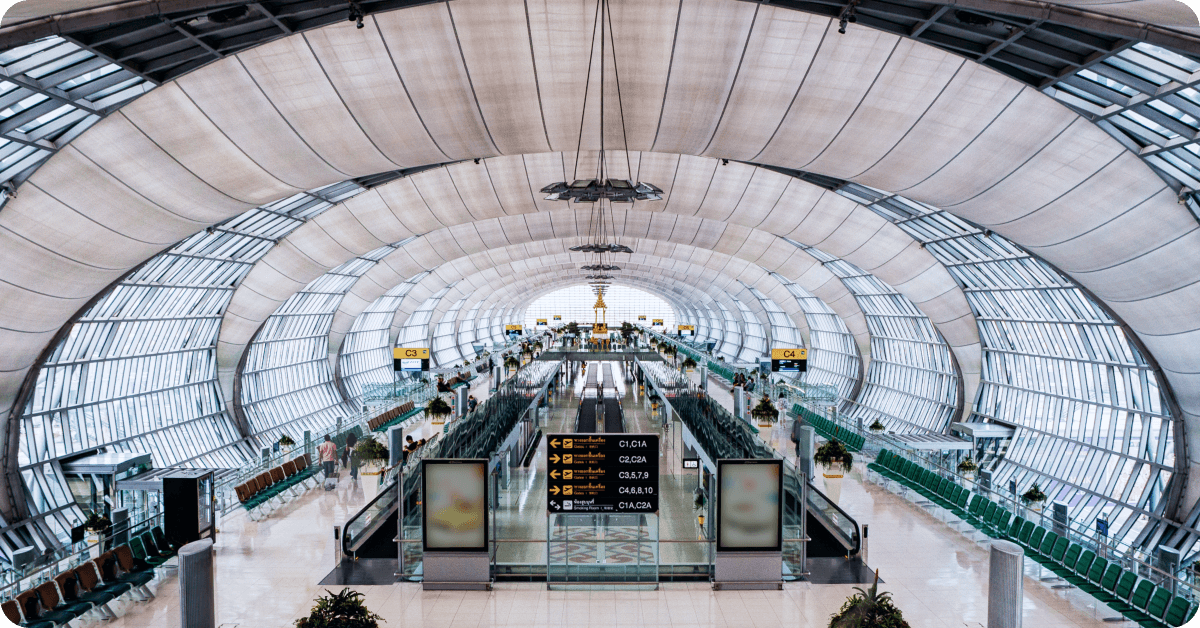
Wi-Fi coverage areas at Bangkok Airport
You shouldn’t have trouble staying connected to the Suvarnabhumi Airport Wi-Fi in either the main terminal or satellite terminal. That said, Thailand is one of the most visited countries in the world, and the BKK Airport welcomes enormous amounts of traffic throughout the year. And with foot traffic comes network traffic — the more people trying to get online, the slower the internet speed.
You also may not get quite as strong of a Wi-Fi signal in more secluded areas of the airport like bathrooms and the outer edges of the building or busy areas where everyone’s eager to kill time before their flight.
However, if you’re lucky enough to have lounge access, you’ll get to skip out on the cramped public network and use dedicated, password-protected Wi-Fi instead. Enjoy faster Wi-Fi at the following lounges:
Miracle First and Business Class Lounge (located in concourses A, A1, and C)
Miracle First Class Lounge (located in concourses D, G, and satellite building 1)
Miracle Business Class Lounge (located in concourses D, F, G, and satellite building 1)
Miracle Domestic Class Lounge (located in concourse D)
Coral Cosmo Lounge (located in concourse C)
Coral Executive Lounge (located in concourse D)
Coral Finest Business Class Lounge (located in concourses C and D)
Coral First Class Lounge (located in concourse D)

Looking for free access to lounges at Suvarnabhumi Airport?
Enjoy unlimited mobile data, lounge access, and other perks with the Saily Ultra plan!
Is the Wi-Fi at Bangkok Airport free? How fast is it?
Yes, Suvarnabhumi Airport has free Wi-Fi through its network “AOT Airport Free Wi-Fi by NT,” but it’ll only last for 60 minutes at a time. The exception is Wi-Fi at one of the airport’s lounges, which is included in the entry price.
In 2015, Suvarnabhumi Airport reportedly had the fastest airport Wi-Fi in the world, with download speeds at 41.45 Mbps.1 If those numbers don’t mean anything to you, that speed is more than enough to comfortably make video calls without seeing a jumble of pixels in place of your loved one’s face. But it’s been a decade since this data was recorded, and it may not reflect the kind of Wi-Fi speed you’ll get in 2025.
That said, travelers have left Google reviews as recently as August, 2025, sharing that BKK Airport’s free Wi-Fi is reasonably fast and reliable. One Reddit user mentioned that it was even good enough to stream a video conference.
However, like any crowded space with free networks available, you’re likely to experience slowdowns during peak hours.
Safer and faster alternatives to airport Wi-Fi
While using free Wi-Fi at airports isn't inherently dangerous, it does expose your device to security risks like man-in-the-middle attacks, evil twin attacks, and malware. Unfortunately, public networks are prime hunting grounds for hackers, who can intercept your data or trick you into connecting to a malicious network.
Generally, airport Wi-Fi is also seldom the fastest internet connection you can find. While BKK Airport does have a reputation for fast internet speeds compared to other international airports, you’re likely to experience slowdowns if hundreds of passengers are connecting at the same time.
On top of that, Suvarnabhumi Airport only gives you one hour of browsing per session. If you’re clocking in to a 10-hour layover, you might be left twiddling your thumbs for the remaining nine hours.
So, what’s a better way to stay online at Suvarnabhumi Airport? Let’s take a look at safer and faster connectivity options that you can use for more than an hour.
eSIM for Thailand (Best alternative)
By far the easiest way to get reliable mobile internet in Thailand, and in Bangkok specifically, is by buying a cheap prepaid plan on an eSIM (virtual SIM card). All you need to do is download an eSIM app, buy a plan with as much data as you need, and install the eSIM onto your phone or tablet — the whole process takes a couple of minutes.
And why get an eSIM for Thailand over a SIM card, turning on your international roaming, or simply sticking to the free Suvarnabhumi Airport Wi-Fi?

eSIMs provide faster and more reliable speeds than airport Wi-Fi. Cramped public Wi-Fi networks can lead to frustrating slowdowns during peak hours, which won’t be the case when you’re using a prepaid mobile data plan.
You won’t face unexpected international roaming charges. With an eSIM plan for Thailand, you won’t have to worry about pay-as-you-go roaming charges from your mobile carrier. You pay a set price for a set amount of data, and that’s it — no shockingly high roaming bills waiting for you at the end of your trip.
You won’t risk losing or damaging your home SIM. Tiny SIM cards are easy to lose track of and hard to store in a truly secure place. You won’t run this risk if you opt for an eSIM over a SIM card since it’s embedded into your device. Plus, you’ll be able to switch between your prepaid plan for Thailand and your regular data plan through your settings without having to switch between two SIM cards.
You won’t have to wait in line for a physical SIM card. You can buy an eSIM plan right from the comfort of your phone — no passports or boarding passes need to be presented, unlike at the airport.
Local SIM card
Another way to get internet at Bangkok Airport is by buying a Thailand SIM card for tourists. The most popular providers are AIS, dtac, and TrueMove H, all of which offer prepaid SIM cards at kiosks throughout the airport. Prices range from about ฿299 (US$9) to ฿1199 (US$35) depending on the provider and how many GBs of data you want. For reference, the cheapest Saily eSIM plan for Thailand is US$2.99 for 1 GB of data — a more budget-friendly choice if you don’t need a lot of data.
But before getting a Thai SIM card, make sure your phone is carrier unlocked (i.e., able to connect to networks other than the one you use at home). If you’re unsure about your carrier lock status, take a look at our articles on how to check if your iPhone is unlocked and how to check if your Android phone is unlocked.
Pocket Wi-Fi
Another way to get online at Suvarnabhumi Airport is by renting a pocket Wi-Fi router at a rental counter — you'll find them on the second and fourth floors of the main terminal, near the arrival gates. Pocket Wi-Fi is appealing to folks traveling in big groups or solo travelers carrying multiple devices since it works the same way as the router you’d use at home. If you just want to use the router at the airport, it’s a more secure option than connecting to the public Wi-Fi since you’ll have a password-protected network.
But not so fast — the cons outweigh the pros for pocket Wi-Fi rentals by quite a large margin. We wouldn’t recommend renting a pocket Wi-Fi router from the airport for a few reasons:

Airport rentals may cost more than pre-ordering a router online. If you plan on keeping the router with you throughout your trip, you might pay a premium price at the airport.
Pocket Wi-Fi is more expensive than a prepaid eSIM or SIM card for Thailand. You’ll be paying between US$4.60 to US$5 per day with pocket Wi-Fi rentals from Suvarnabhumi Airport. With a Saily eSIM plan for Thailand, you can get 20 GB of data over 30 days for US$19.99 (US$0.67/day).
You’ll need to be within range of the router to stay connected. Most routers have a range of about 30-50 feet — walk any further and you’ll lose internet.
There’s a risk of losing or damaging the router. An extra device to carry around means you’ll have an extra device to lose or damage. In this unsavory scenario, you’ll also owe the rental company a fee.
You might need a powerbank to keep the battery alive. Pocket Wi-Fi devices will typically last you 6-8 hours when fully charged. If you have a hefty itinerary, you might need a powerbank to keep it alive for the whole day. That’s two extra devices to carry!
You’ll need to return the router before leaving the country. It’s not exactly ideal to find the rental counter if you’re already rushing for your flight back home.
TL;DR: While renting a pocket Wi-Fi device is an alternative to using free airport Wi-Fi, it’s not one we recommend.
International roaming
Enabling your mobile carrier’s international roaming is yet another way to get a more secure connection at Suvarnabhumi Airport compared to using its free Wi-Fi. However, roaming in Thailand is not cheap. If you don’t purchase an international roaming pass before you depart for Thailand, you’ll be paying between US$2.05 to US$15 per MB with major carriers like AT&T, Verizon, and T-Mobile. A 30-second TikTok could cost you triple-digit dollars with these rates. If you’re asking yourself “What is the worst time to visit Thailand?,” the answer is not the hot season or monsoon season — it’s whenever you have to pay these soul-crushing roaming charges. If you’re really set on enabling your roaming, make sure to check if Thailand is covered in your mobile plan or buy a data pass beforehand.
Still with us? Let’s quickly review how all your Bangkok Airport internet options stack up:
Internet option | Browsing speed | Security | Cost |
|---|---|---|---|
Free Wi-Fi | Low-Medium | ❌ | Free |
eSIM | High | ✅ | $ |
SIM card | Medium-High | ✅ | $-$$ |
Pocket Wi-Fi | High | ✅ | $$$ |
In short, you’ll get free internet access if you use the Suvarnabhumi Airport Wi-Fi, but the potential threats of having your data spied on isn’t worth it — especially when a cheap and much more secure alternative exists.
The best way to stay connected in Bangkok, Thailand
When you’re immersed in the wonderful sensory overload that is Bangkok, you’ll want to have an internet connection handy for navigation apps or to quickly search for the best night market around. You can stay connected across Thailand with a Saily eSIM plan starting from just US$2.99.
The Saily eSIM app is the only one on the market with three built-in security features: ad blocker, web protection, and virtual location. Saily’s ad blocker feature helps you use up to 28.6% less data when enabled, allowing you to stretch your plan further. Plus, all plans include unlimited hotspot sharing, so you can keep your travel companions connected, too. No roaming fees, no security risks of public Wi-Fi networks, and no waiting in line for a SIM card.
Need data in Thailand? Get an eSIM!

1 GB
7 days
US$2.99
3 GB
30 days
US$5.99
5 GB
30 days
US$7.99
References
1 Bangkok Post. (2015, June 20). Suvarnabhumi WiFi 'world's fastest.' https://www.bangkokpost.com/thailand/general/598236/suvarnabhumi-wifi-world-fastest
FAQ


Related articles
