






What is a SIM card, and what is it used for? Types, sizes, and what it stores
When you got your first mobile phone, you probably learned that a SIM card is essential — without it, your phone’s just an expensive brick. You can think of a SIM card as your phone’s ID card — it tells the mobile network who you are and gives you access to calls, texts, and data. Beyond everyday use, SIM cards make practical tasks like switching devices or staying connected while traveling simple and seamless. Let’s take a closer look at how this tiny chip makes such big things possible.

Table of Contents
- What is a SIM card, and what is it used for? Types, sizes, and what it stores
- What is a SIM card?
- What exactly does a SIM card do?
- What is stored on a SIM card?
- SIM card types and sizes
- Full-size SIM card (1FF)
- Mini SIM card (2FF)
- Micro SIM card (3FF)
- Nano SIM card (4FF)
- Dual SIM (capability) card
- eSIM (a virtual SIM)
- iSIM (integrated SIM) (MFF2)
- What is the capacity of a SIM card?
- Advantages and disadvantages of SIM cards
- An eSIM vs. a physical SIM card
- What is a SIM card? The key takeaways
What is a SIM card, and what is it used for? Types, sizes, and what it stores
A SIM card is the essential heart of your mobile connectivity, acting as the digital identity that bridges your device to a cellular network. In this guide, we break down everything you need to know about these tiny chips, from how they securely store your data and handle authentication to the differences between physical cards and the newer eSIM technology. We also explore how to choose the right SIM for international travel and how to troubleshoot common connection issues. Ready to master your mobile setup? Let’s dive into how this small piece of tech powers your digital life.
What is a SIM card?
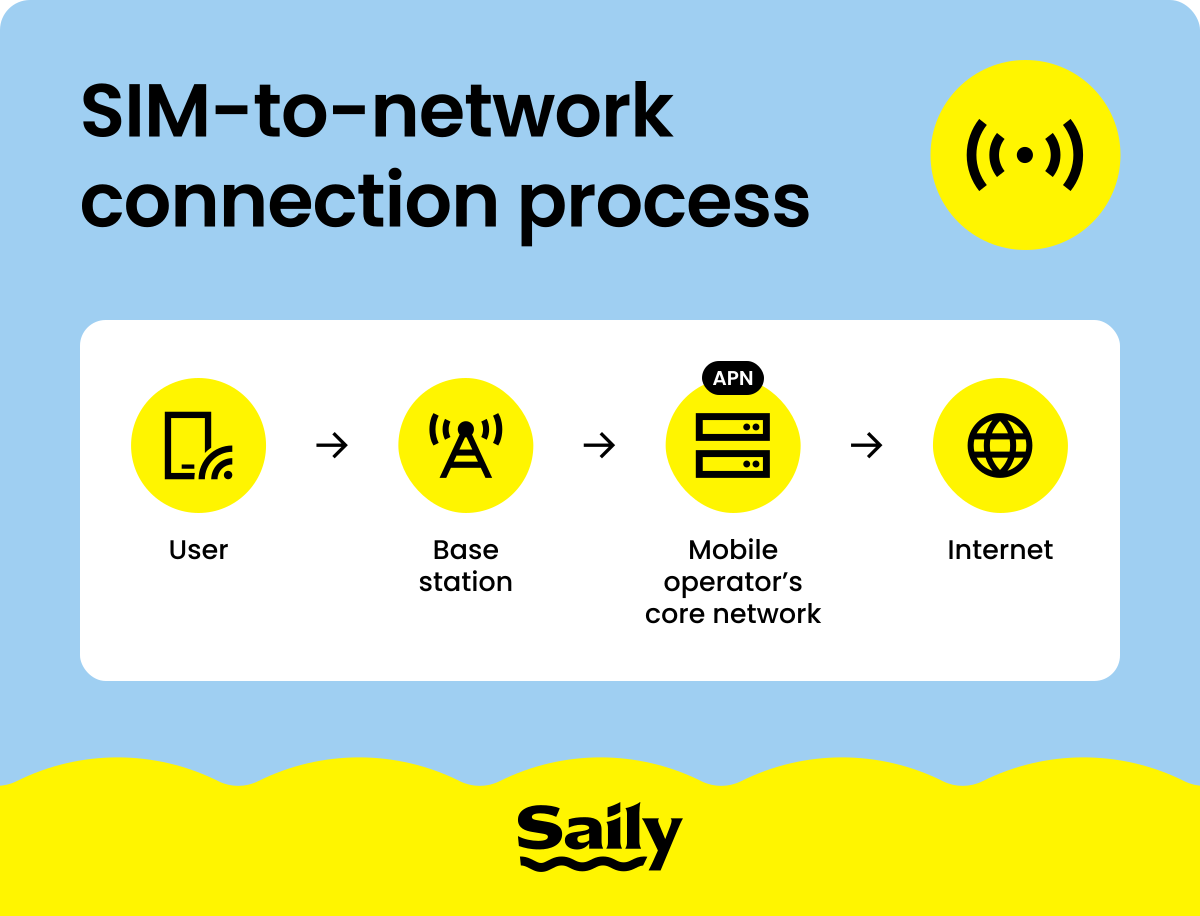
A SIM (Subscriber Identity Module) card is a small, removable card used in mobile devices to connect to cellular networks. It’s a piece of plastic with a metallic chip at its core, but don’t be fooled by its humble appearance — this component securely stores important information, such as your phone number and carrier details.
The SIM card serves as your phone’s connection to the carrier's network. Every time you make a call to a friend, send a message, or browse the web using mobile data, your SIM card works behind the scenes to link you to your carrier’s network. Depending on your device, you may need different SIM sizes — standard, micro, or nano, each progressively smaller than the last.
What exactly does a SIM card do?
A SIM card connects your phone to a cellular network, storing key details like your phone number, account information, and authorization so you can make calls, send texts, and use mobile data. In short, it handles three jobs: identification, connectivity, and limited storage.
Each SIM card carries unique identifiers — IMSI (International Mobile Subscriber Identity) and ICCID (Integrated Circuit Card Identifier). The IMSI is how your carrier knows who you are, ensuring your calls, texts, and data are linked to the correct account. For example, if you stop paying your bill, your IMSI is the code that allows your provider to block you from its network. The ICCID, on the other hand, tells mobile operators which network your SIM should connect to, directing your device to the right provider.
The SIM card is also responsible for network connectivity. It links your device to your carrier’s network, and it tells your phone where to connect. Whether you're using cellular data at home or roaming abroad, your SIM card ensures your phone can always find a signal.
Depending on the phone model, you can use a SIM card on both Android and iPhone devices.
What is stored on a SIM card?
If you’ve been wondering what your SIM card stores, you can expect it to be a handful of information — but it won’t hold your vacation photos. It has specific tasks and sticks to them.
First, a SIM card holds some personal data. Before smartphones, SIM cards were the go-to spot for saving your contacts and text messages. While most of that data now lives in the cloud or on your phone’s internal storage, your SIM can still store a limited number of contacts and a few SMS messages.
More importantly, a SIM card is a secure vault for network data. It stores your IMSI, ICCID, and essential carrier settings, which allow your phone to connect to the network and ensure that your calls and texts stay protected.
SIM card types and sizes
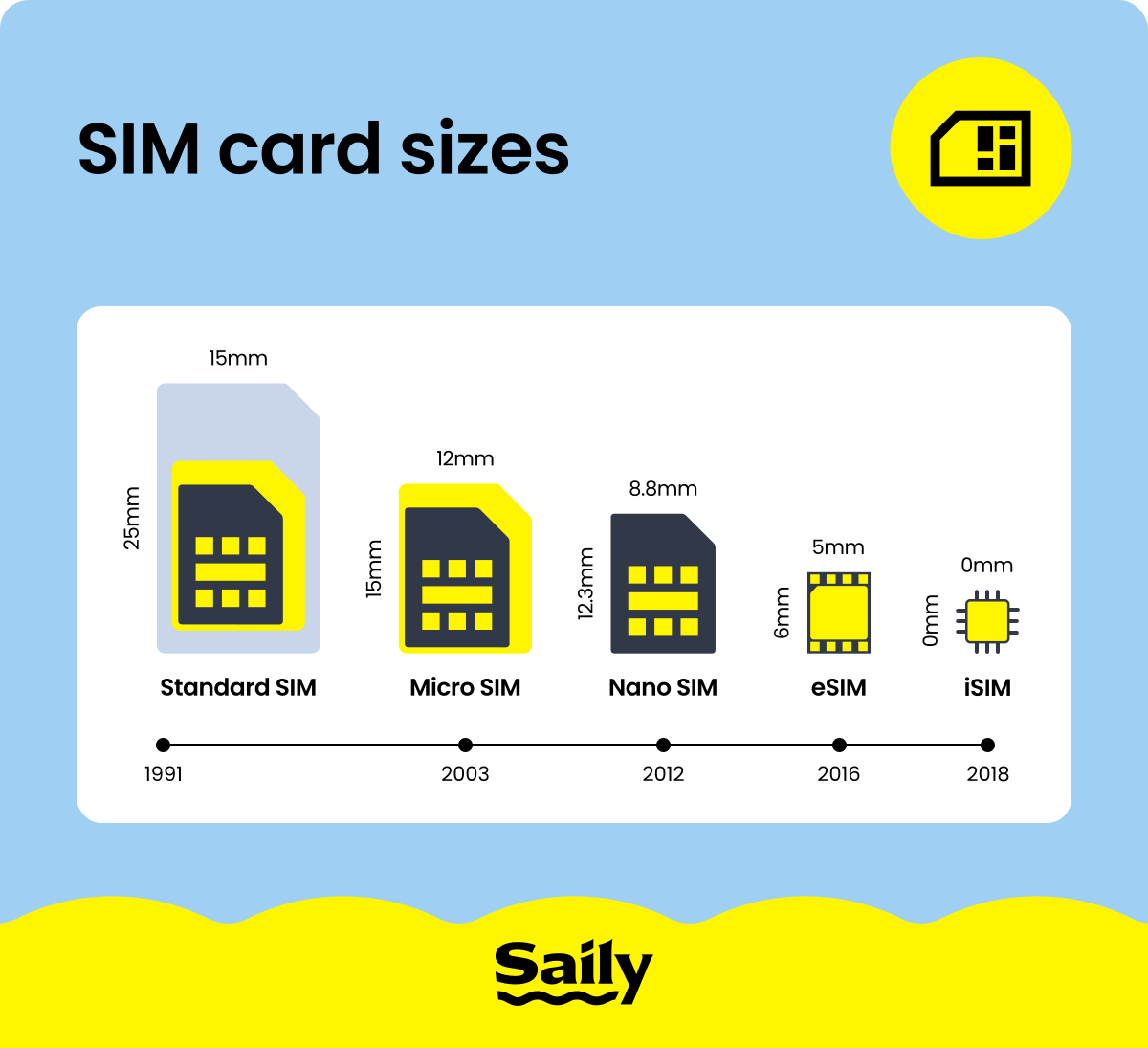
Since their debut in the early 1990s, SIM cards have steadily evolved — shrinking in size while keeping the same essential role. Each new version reflected the changing design of mobile phones, making room for sleeker shapes, bigger batteries, and more advanced features.
Full-size SIM card (1FF)
The full-size SIM card (1FF) was the original format used in mobile devices. Roughly the size of a credit card (85.6 mm x 53.98 mm) and introduced in the early days of mobile phones, these cards could be considered the grandfather of all SIMs. Full-size SIM cards were anything but compact, but they were perfect for the first GSM mobile phones of the 1990s. While now a relic of the past, they paved the way for the SIM cards we use today.
Mini SIM card (2FF)
The standard SIM card, also known as a mini SIM and 2FF, marked the first step toward making SIM cards more practical. Introduced after the bulky full-size version, the mini SIM measures 25 mm x15 mm and became the go-to size during the late 1990s and early 2000s. This version balanced functionality and portability, fitting into most devices and leaving room for other internal components.
Micro SIM card (3FF)
As phones became smaller, so did SIM cards. The micro SIM (3FF), a smaller version measuring 15 mm x 12 mm, was introduced in 2003 by the European Telecommunications Standards Institute (ETSI). However, it only gained widespread use in the early 2010s — the iPhone 4 was one of the first major smartphones to use the micro SIM, and it set a trend for other manufacturers to adopt this size. Offering the same functionality as the larger SIM formats, the micro SIM allowed manufacturers to free up phone space for other components, like larger batteries and improved cameras.
Nano SIM card (4FF)
The nano SIM (4FF) is the smallest and most advanced physical SIM card to date. Launched in 2012 and measuring just 12.3 mm x 8.8 mm, it's nearly all chip with minimal plastic. This ultra-compact design allows manufacturers to save valuable internal space and make the thinner smartphones we use today. Despite its tiny size, the nano SIM delivers the full capabilities to keep devices connected.
Dual SIM (capability) card
A dual SIM configuration allows a single mobile device to hold two active SIM cards or profiles simultaneously. This feature originated with phones featuring two physical slots but has evolved to include combinations of a physical nano-SIM and a digital eSIM. Dual SIM functionality is a practical solution for users who need to manage two phone numbers — such as a personal and a business line — on one device, or for travelers who want to use a local data plan while keeping their primary home number active.
eSIM (a virtual SIM)
An eSIM (embedded SIM) is a built-in chip in your device that works like a physical SIM. It’s the new kid on the block — unlike traditional SIMs, eSIMs are digital and allow you to switch carriers or plans without swapping a card. This technology saves space and makes setting up a new network connection as easy as scanning a QR code. Their adoption is growing, but eSIMs aren’t universal yet and not all devices support eSIMs. However, their flexibility and convenience make them an exciting step forward for users who frequently travel internationally or switch networks.
iSIM (integrated SIM) (MFF2)
The newest step in SIM technology is the iSIM, or integrated SIM. Unlike a physical SIM or even an eSIM, an iSIM is built directly into the phone’s processor, taking up virtually no extra space. This design could open the door to even slimmer devices, longer battery life, and new applications in wearables and IoT devices. Right now, iSIMs are still in their early stages, with limited availability and carrier support, but they point to a future where connectivity is built into the core of our devices.
What is the capacity of a SIM card?
While physical SIM cards have shrunk in size over the years, their internal memory capacity has steadily grown to meet modern network requirements. The original full-size SIM card had a capacity of just 32 KB, which was only enough to store approximately five text messages and 20 contacts. As devices evolved, the micro-SIM card doubled this memory to 64 KB, despite its smaller physical footprint.
Today’s nano-SIM cards typically feature 128 KB of memory, allowing them to hold up to 250 contacts. While it is possible to find SIM cards with 256 KB of storage, this extra space is rarely necessary because modern smartphones rely on much larger internal drives and cloud services for data management.
But it’s important to note that a SIM card’s memory capacity is distinct from a device's general storage capacity. The SIM card is dedicated to storing your network identity, security keys, and basic contact information. High-volume data — such as your photos, apps, and music — is handled by the phone's internal storage, an SD card, or cloud technology.
Advantages and disadvantages of SIM cards
SIM cards offer several key benefits that have made them indispensable in mobile communication. However, like any technology, they come with both strengths and limitations:
Advantages | Disadvantages |
|---|---|
Portability. You can move your number and carrier settings between devices by swapping the SIM. | Fragility. A SIM card is small and easy to lose, with circuits that can be damaged if mishandled. |
Global connectivity. A SIM card taps into networks around the world for calls, texts, and data. | Carrier restrictions. SIM locking and new card requirements can make switching networks harder. |
One of the biggest perks of a SIM card is how easy it is to move around. Pop it out of one phone, slide it into another, and your number and plan can travel with you.
That said, SIM cards aren’t perfect. For example, a damaged SIM can disrupt your ability to connect to a network, leaving you without service. With the rise of eSIMs, many of these issues are disappearing, but physical SIMs still play an important role and remain a familiar, dependable choice for millions of people.
An eSIM vs. a physical SIM card
The eSIM vs. physical SIM card battle doesn’t have a clear winner — it depends on your lifestyle and mobile needs. While physical SIM cards have been the traditional choice, eSIMs are quickly taking the lead. Here’s how they compare:
Feature | Physical SIM Card | An eSIM |
|---|---|---|
Form factor | Removable plastic card with a chip. | Embedded directly into the device’s hardware. |
Setup | Requires inserting the card, sometimes visiting a store to buy it. | Activated digitally via QR code or app. |
Switching carriers | May require a new card and manual swap. | Quick switch through software, no physical change needed. |
Storage space in device | Takes up a physical slot. | No extra space needed. |
Dual SIM support | Requires two slots (if available). | Many phones allow dual setup — an eSIM and a physical SIM. |
Travel use | Must buy and insert a local SIM. | Download plans instantly for seamless connection. |
All in all, physical SIM cards are ideal if you prefer a tangible card or switch phones often or if your carrier doesn’t yet support eSIMs.
However, eSIMs are a lot better for frequent travelers, digital nomads, or anyone who wants flexibility without the hassle of swapping cards. With just a few taps, you can add a new plan, update your carrier, or activate service abroad.
eSIM apps like Saily make staying connected easier than ever. With an intuitive platform, activating an eSIM is fast and simple, taking only a few taps. If you’re traveling internationally, Saily ensures you stay seamlessly connected no matter where you are.
What is a SIM card? The key takeaways
A SIM card is far more than just a tiny piece of plastic — it’s the essential digital identity that bridges your device to a global mobile network. From its origins as a credit-card-sized chip in the 1990s to the microscopic nano SIMs of today, this technology has consistently evolved to save internal device space while increasing its memory capacity to store more network data and contacts.
But as we move toward a more connected future, the eSIM has emerged as the most efficient and versatile alternative to physical cards. By eliminating the need for a physical tray, eSIM technology allows for instant, remote carrier switching and makes managing multiple lines — like a local data plan for travel from Saily — entirely seamless.

Stay connected with the Saily eSIM app
Affordable mobile data plans for every journey.
FAQ


Related articles
