







Es tut uns leid, aber dieser Artikel ist noch nicht in deiner gewünschten Sprache verfügbar.
What is data roaming? Definition, charges, and how to stay connected abroad
Data roaming lets you access mobile internet when you’re outside your carrier’s network. It’s what keeps you connected abroad so you can still check emails, use maps, or post that beach photo without Wi-Fi. But it’s also one of the easiest ways to run up a hefty phone bill on your account. How does data roaming work, how much does it cost, and how can you set it up? Let's find out.

Inhaltsverzeichnis
- What is data roaming?
- What does data roaming do?
- Pros and cons of data roaming
- Data roaming vs. mobile data vs. Wi-Fi
- How much does data roaming cost?
- How to turn data roaming on or off (iOS and Android)
- How to turn data roaming on or off on an iPhone
- How to turn data roaming on or off on an Android device
- How to avoid data roaming charges
- Alternatives to data roaming
- eSIMs
- Local SIM cards
- Pocket Wi-Fi
- Wi-Fi hotspots
What is data roaming?
Data roaming is when your mobile phone uses data services outside your carrier’s coverage. Let’s say you’re a T-Mobile user from the US visiting Spain. T-Mobile doesn’t operate in Spain, so your phone will "roam" by connecting to a local Spanish network (like Movistar or Orange) to access the internet.
This works because carriers sign agreements with foreign networks that allow visitors from other countries to connect to their networks. So when you use international data roaming, a foreign provider grants your device access, tracks your data usage, and sends it back to your carrier, letting it know how much data you’ve spent.
And while many travelers think of roaming just for personal use, roaming for business is important for staying productive on work trips.
What does data roaming do?
Data roaming allows you to access data networks in regions not covered by your carrier’s network. This is how the process looks behind the scenes:
Network detection. When you arrive in a new country and turn on your phone, it looks for available networks.
Connection. Your phone connects to a partner network with which your home carrier has an agreement.
Authentication. Your carrier confirms that you’re allowed to roam and activates roaming services.
Data usage. You consume data for streaming, uploading, or browsing.
Billing. The local carrier tracks your usage and reports it back to your home carrier, which adds charges to your bill.
These roaming agreements are what make it possible to use mobile data abroad. Some plans include roaming in popular destinations, while others charge by the megabyte — sometimes at painfully high rates.
Pros and cons of data roaming
Data roaming makes it easy to get online the moment you land, but this convenience comes at a price. Let’s take a look at its pros and cons:
Pros | Cons |
|---|---|
No setup needed — just turn your phone on | High per-MB charges if not included in your plan |
Works instantly when you arrive | Background apps can burn through data without you noticing |
Handy for quick tasks like maps or email | Not cost-effective for long trips or heavy data usage |
For most travelers, roaming is fine for short and urgent use. But if you want to stay connected without worrying about the bill, it's best to find a way to use your phone overseas without roaming.
Data roaming vs. mobile data vs. Wi-Fi
In your home country, you use cellular data on your carrier’s own network. Abroad, your usual browsing or streaming becomes data roaming, because your phone is connecting through a foreign carrier. The difference is in who provides the service and how much it costs. Mobile data at home is usually cheap or bundled into your plan. Roaming abroad often comes with extra fees because a second provider is involved.
Availability is another key difference. Mobile data is limited to your carrier’s coverage area. Roaming depends on whether your carrier has agreements with local providers — without them, you may have no connection at all. In some situations, you may need to know how to troubleshoot cellular data.
Wi-Fi is different altogether. It doesn’t rely on mobile networks. Instead, it connects your phone to the internet through a router at a hotel, café, or airport lounge. It can be free or paid, but it bypasses your mobile provider entirely.
How much does data roaming cost?
Data roaming prices vary depending on your service provider and the destination. They also depend on your home region.
United States: US carriers often charge high daily fees unless you’re on a premium roaming plan.
European Union: Thanks to EU roaming regulations, roaming is treated like domestic usage if you’re using an EU SIM. No extra fees apply within the EU for calls, texts, or data.
Asia-Pacific: Costs vary widely. Some areas are covered by carrier time-limited passes, while others default to pay-per-MB.
Here’s a quick look at how the major US carriers compare:
Carrier | Daily pass (flat rate) | Pay-per-MB rate (no pass) |
|---|---|---|
Verizon | US$12/day | ~$US2.05-2.99 per MB |
T-Mobile | US$5/day or free in 215+ destinations (low speeds) | US$15/MB in some regions |
AT&T | US$12/day | ~US$2.05 per MB |
Prices vary, but pay-per-MB roaming can quickly rack up a hefty bill. For reference:
Loading one Instagram photo uses 2-4 MB.
Streaming a 3-minute YouTube video uses 15-20 MB.
Using Google Maps navigation for 10 minutes uses about 5 MB.
Note that if your plan has a data cap, roaming can also trigger extra fees once you go over your data limit.
How to turn data roaming on or off (iOS and Android)
Phones are set to connect to roaming networks automatically, but you’re always in control. You can switch roaming on or off in your settings at any time.
Should your data roaming be on or off? If you’re not planning a trip abroad, it’s safer to disable data roaming. That way, your phone won’t accidentally connect to a foreign network near a border, and you won’t get hit with unexpected charges. When you do go abroad and need internet access, you can turn it back on in seconds.
How to turn data roaming on or off on an iPhone
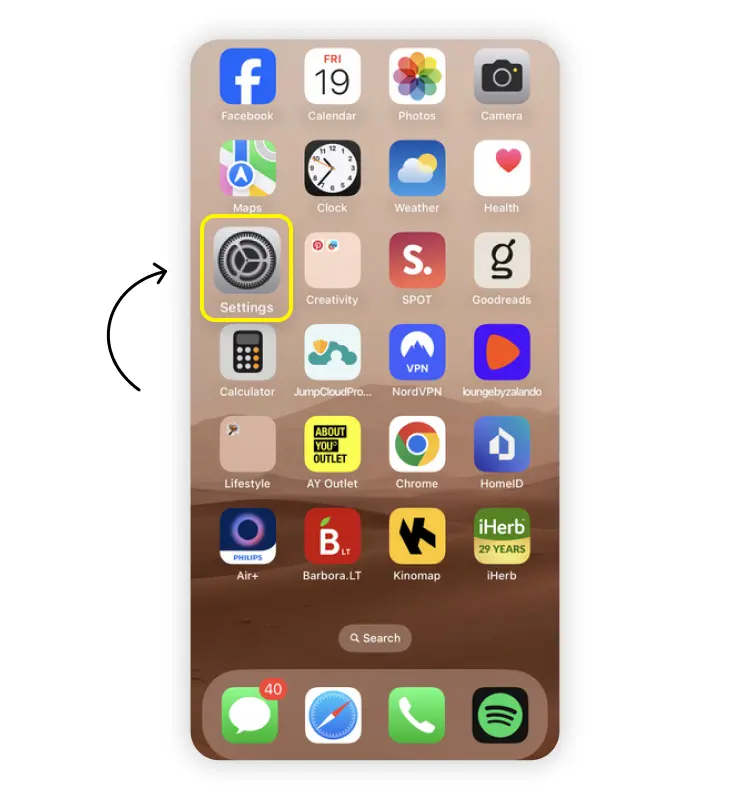
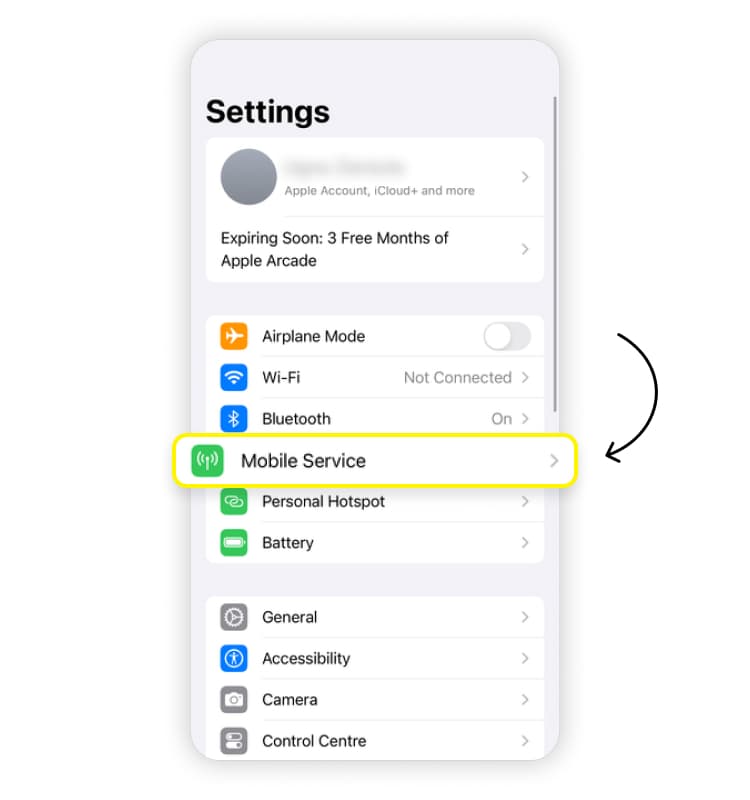
Turning roaming on or off only takes a few taps on an iPhone:
Open "Settings."
Tap "Cellular" (or "Mobile service") > "Cellular/Mobile data options."
Find the "Data roaming" section.
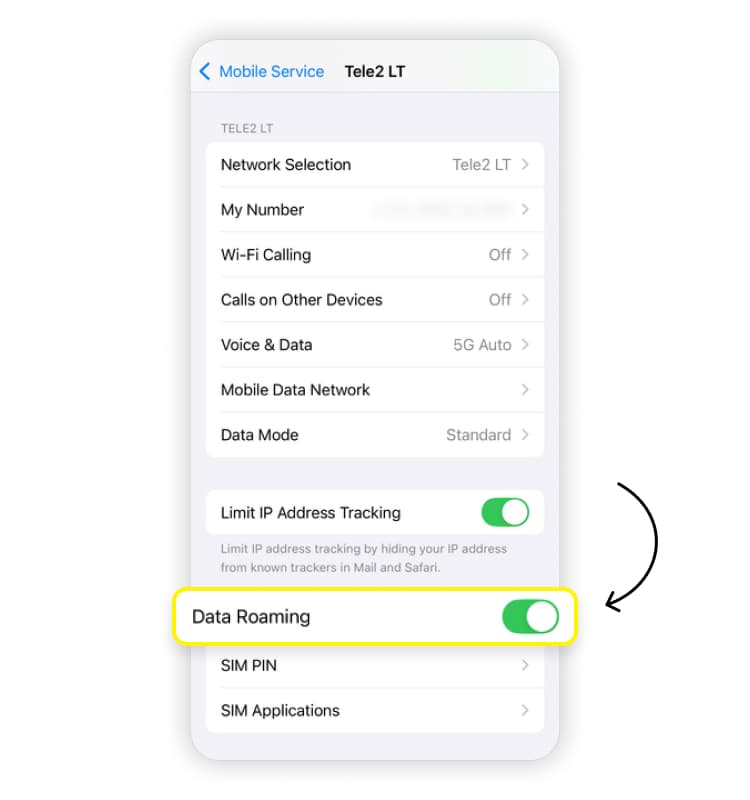
Toggle the switch on or off as needed.
If you’re traveling, it’s a good idea to keep an eye on how much data you’ve used. You can check it in your phone’s settings in the "Data roaming" section. To check the current-period roaming data on an iPhone, go to "Cellular/Mobile service" and look for "Current period roaming" — it will show you the exact amount of data used.
How to turn data roaming on or off on an Android device
The specific menu names vary by device, but on a Samsung phone, you’ll find roaming here:
Open "Settings."
Tap "Connections" > "Mobile networks."
Toggle "Data roaming access" on or off.
On other Android devices, the path may be slightly different, but the option will usually appear under "Mobile networks" or "Cellular data settings."
How to avoid data roaming charges
The simplest way to avoid roaming fees is to limit how much you use roaming in the first place. To do so, you can use airplane mode to avoid accidentally accessing mobile data services while traveling or simply turn off data roaming when not using it. You can also switch off the mobile data option on your mobile device to avoid using it altogether.
Other ways to keep roaming costs under control:
Use a data usage calculator to estimate how much you’ll need.
Disable background data for non-essential apps. Set your apps to update only on Wi-Fi to avoid roaming charges from background downloads you don’t really need.
Turn off automatic downloads. Prevent cloud sync, app updates, and large file downloads.
Use Wi-Fi whenever possible. Hotels, cafés, airports are all good spots to connect without using roaming.
Track your usage. Your phone or carrier app can help you monitor your data use in real time.
Alternatives to data roaming
We’ve already mentioned that roaming isn’t the only way to access the internet when traveling. So what are the alternatives to international roaming?
eSIMs
An eSIM is the simplest way to stay connected overseas. Instead of buying a physical SIM card, you install a digital one directly on your phone. It’s fast to set up, works in multiple countries, and usually costs far less than roaming.
Want a smooth way to stay online while traveling? Try Saily’s eSIM app. You’ll get affordable data plans in 200+ destinations, built-in security, and the option to share your connection with travel companions.
Local SIM cards
Probably the least convenient alternative to roaming, local SIM cards may offer cheaper data options. Still, they can cause other headaches due to time consumption, complicated setup, or impractical data plans.
Pocket Wi-Fi
Another alternative to roaming, pocket Wi-Fi can be a great option for those traveling in remote areas where getting a proper mobile data connection is hard. However, pocket Wi-Fi is often highly expensive and requires users to carry a portable Wi-Fi router for a stable connection.
Wi-Fi hotspots
Wi-Fi is an easy way to connect to the internet without paying for roaming. Many hotels, airports, cafés, and other public spaces offer free hotspots. Go online, and you can use all your usual apps without touching mobile data.
The downside is security: Public Wi-Fi is often unreliable and can leave you vulnerable to snooping. Stick to trusted networks, avoid logging into sensitive accounts, and use a VPN for extra protection.

Say goodbye to roaming fees with a travel eSIM
Affordable mobile data plans for every journey.
FAQ


Ähnliche Artikel
