What is a SIM card?
In short, the abbreviation SIM stands for “subscriber identity module.” The module is integrated within the physical SIM card, allowing networks to recognize the user. The SIM card also stores important personal information, including details about your contacts.
What does a SIM card do?
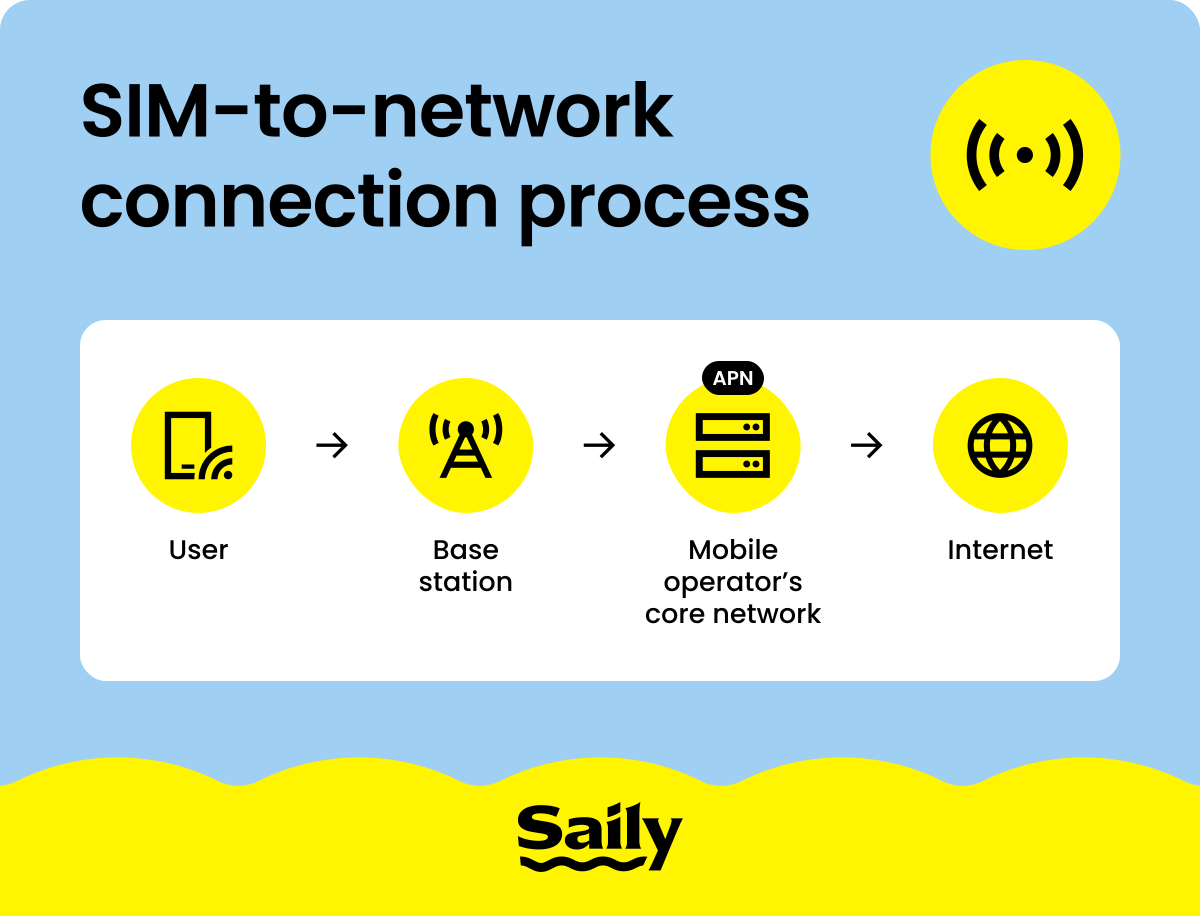
A SIM card’s primary role is to identify whether you have an agreement with the carrier that allows your mobile phone to make calls, send text messages, or surf the internet.
Each SIM card has its own unique integrated circuit card identifier (ICCID) and an international mobile subscriber identity (IMSI) number. The 18-to-22-digit ICCID number is identified by mobile networks, informing them about the country, the manufacturer, the network operator, and the individual number of the SIM card. The IMSI, while serving a similar purpose, primarily identifies the subscriber with the network and is a bit shorter — up to 15 digits.
Here’s what a SIM card does:
Identifies a user with the network using the IMSI number.
Authenticates a user’s access to the network, meaning they can call, text, or use cellular data. Authentication also happens when a user is roaming — connecting to a network that’s not native to their operator, regardless of whether they’re on a different network in their own country or abroad.
Saves basic data associated with the user, including their phone number, carrier-related information, contacts, and a small number of text messages.
Depending on the phone model, you can use a SIM card on both Android and iPhone devices.
What is stored on a SIM card?
First, a SIM card stores some of your personal information, such as your phone number, contacts, and on older phones, short message service (SMS) messages. However, newer phones keep your information in cloud storage, which does include your contacts — making transferring between SIMs, operators, or phones a much smoother process.
Second, SIMs also store subscriber-related information, including the ICCID and IMSI as well as the authentication key (Ki) and location area identity (LAI) information. The Ki, as its name suggests, is used as part of the user’s authentication process, while the LAI is used to determine the location of a subscriber through their mobile phone. The network locates a subscriber via cell towers, so when a call comes through, it knows which tower to route the call to.
SIM card types and sizes
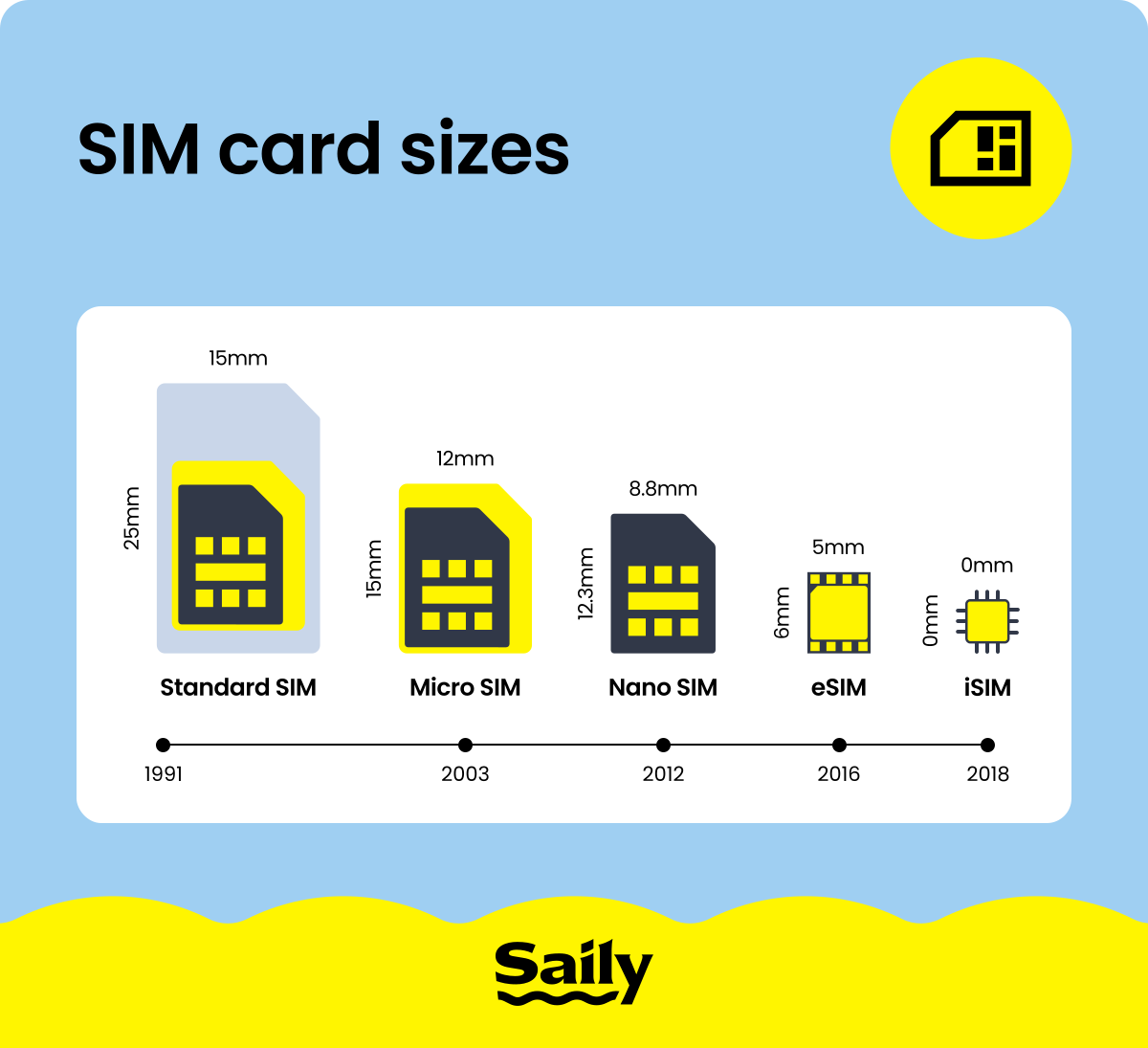
Since their debut in the early 1990s, SIM cards have steadily evolved — shrinking in size while keeping the same essential role. Each new version reflected the changing design of mobile phones, making room for sleeker shapes, bigger batteries, and more advanced features.
Full-size SIM card (1FF)
The full-size SIM card (1FF) was the original format used in mobile devices. Roughly the size of a credit card (85.6 mm x 53.98 mm) and introduced in the early days of mobile phones, these cards could be considered the grandfather of all SIMs. Full-size SIM cards were anything but compact, but they were perfect for the first GSM mobile phones of the 1990s. While now a relic of the past, they paved the way for the SIM cards we use today.
Mini SIM card (2FF)
The standard SIM card, also known as a mini SIM and 2FF, marked the first step toward making SIM cards more practical. Introduced after the bulky full-size version, the mini SIM measures 25 mm x15 mm and became the go-to size during the late 1990s and early 2000s. This version balanced functionality and portability, fitting into most devices and leaving room for other internal components.
Micro SIM card (3FF)
As phones became smaller, so did SIM cards. The micro SIM (3FF), a smaller version measuring 15 mm x 12 mm, was introduced in 2003 by the European Telecommunications Standards Institute (ETSI). However, it only gained widespread use in the early 2010s — the iPhone 4 was one of the first major smartphones to use the micro SIM, and it set a trend for other manufacturers to adopt this size. Offering the same functionality as the larger SIM formats, the micro SIM allowed manufacturers to free up phone space for other components, like larger batteries and improved cameras.
Nano SIM card (4FF)
The nano SIM (4FF) is the smallest and most advanced physical SIM card to date. Launched in 2012 and measuring just 12.3 mm x 8.8 mm, it's nearly all chip with minimal plastic. This ultra-compact design allows manufacturers to save valuable internal space and make the thinner smartphones we use today. Despite its tiny size, the nano SIM delivers the full capabilities to keep devices connected.
Dual SIM card
A dual SIM configuration allows a single mobile device to hold two active SIM cards or profiles simultaneously. This feature originated with phones featuring two physical slots but has evolved to include combinations of a physical nano-SIM and a digital eSIM. Dual SIM functionality is a practical solution for users who need to manage two phone numbers — such as a personal and a business line — on one device, or for travelers who want to use a local data plan while keeping their primary home number active.
eSIM (a virtual SIM)
An eSIM (embedded SIM) is a built-in chip in your device that works like a physical SIM. It’s the new kid on the block — unlike traditional SIMs, eSIMs are digital and allow you to switch carriers or plans without swapping a card. This technology saves space and makes setting up a new network connection as easy as scanning a QR code. Their adoption is growing, but eSIMs aren’t universal yet and not all devices support eSIMs. However, their flexibility and convenience make them an exciting step forward for users who frequently travel internationally or switch networks.
iSIM (integrated SIM)
The newest step in SIM technology is the iSIM, or integrated SIM. Unlike a physical SIM or even an eSIM, an iSIM is built directly into the phone’s processor, taking up virtually no extra space. This design could open the door to even slimmer devices, longer battery life, and new applications in wearables and IoT devices. Right now, iSIMs are still in their early stages, with limited availability and carrier support, but they point to a future where connectivity is built into the core of our devices.
How much data can a SIM card store?
How much data a SIM card can store depends on the format of the SIM card, ranging from 8 KB to 256 KB. Nano SIM cards, the modern standard of consumer SIM cards, range from 64 KB to 128 KB of storage. Some SIM cards do have 256 KB or more of storage, but that much memory is usually needed in non-consumer devices within private Internet of Things (IoT) networks in manufacturing, logistics, and other industrial settings.
Nano SIM cards, the standard SIMs issued by network operators, can hold up to 250 contacts and 50 text messages. Beyond what you can see on your phone — contacts and SMS — SIM cards store ICCID, IMSI, Ki, and LAI information, which allows you to call, text, or surf the web.
Advantages and disadvantages of SIM cards
SIM cards offer several key benefits that have made them indispensable in mobile communication. However, like any technology, they come with both strengths and limitations:
Advantages | Disadvantages |
|---|
Portability. You can move your number and carrier settings between devices by swapping the SIM. | Fragility. A SIM card is small and easy to lose, with circuits that can be damaged if mishandled. |
|---|
Global connectivity. A SIM card taps into networks around the world for calls, texts, and data. | Carrier restrictions. SIM locking and new card requirements can make switching networks harder. |
|---|
One of the biggest perks of a SIM card is how easy it is to move around. Pop it out of one phone, slide it into another, and your number and plan can travel with you.
That said, SIM cards aren’t perfect. For example, a damaged SIM can disrupt your ability to connect to a network, leaving you without service. With the rise of eSIMs, many of these issues are disappearing, but physical SIMs still play an important role and remain a familiar, dependable choice for millions of people.
eSIM vs. physical SIM card
The eSIM vs. physical SIM card battle doesn’t have a clear winner — it depends on your lifestyle and mobile needs. While physical SIM cards have been the traditional choice, eSIMs are quickly taking the lead. Here’s how they compare:
Feature | Physical SIM Card | An eSIM |
|---|
Form factor | Removable plastic card with a chip. | Embedded directly into the device’s hardware. |
|---|
Setup | Requires inserting the card, sometimes visiting a store to buy it. | Activated digitally via QR code or app. |
|---|
Switching carriers | May require a new card and manual swap. | Quick switch through software, no physical change needed. |
|---|
Storage space in device | Takes up a physical slot. | No extra space needed. |
|---|
Dual SIM support | Requires two slots (if available). | Many phones allow dual setup — an eSIM and a physical SIM. |
|---|
Travel use | Must buy and insert a local SIM. | Download plans instantly for seamless connection. |
|---|
All in all, physical SIM cards are ideal if you prefer a tangible card or switch phones often or if your carrier doesn’t yet support eSIMs.
However, eSIMs are a lot better for frequent travelers, digital nomads, or anyone who wants flexibility without the hassle of swapping cards. With just a few taps, you can add a new plan, update your carrier, or activate service abroad.
eSIM apps like Saily make staying connected easier than ever. With an intuitive platform, activating an eSIM is fast and simple, taking only a few taps. If you’re traveling internationally, Saily ensures you stay seamlessly connected no matter where you are.
💡 Good to know: To understand why SIM cards became standard in the first place, it helps to know the difference between GSM and CDMA networks, the two major competing technologies that shaped mobile phones.
Do all cell phones have SIM cards?
All phones have some form of a SIM card — a physical SIM or an eSIM, sometimes both. Some modern smartphones in specific regions no longer have physical SIM card trays.
Whether your new iPhone comes with a SIM card slot depends on where you buy the device. In the US, all iPhones starting with the iPhone 14 are eSIM only, as is the iPhone Air, which only supports eSIMs regardless of the market it’s sold in. The latest Samsung Galaxy S26 phones, including the S26 FE, which was introduced on September 4, 2026, still have physical SIM card trays. The Google Pixel 10 and Pixel 11 models are eSIM only in the US. Whether a modern smartphone has a physical SIM card slot varies by manufacturer and by region. Most modern smartphones, especially the high-end devices made by Apple and Google, are moving toward being eSIM only.
But if you’re not from the US, don’t think about what to do with your old SIM card just yet. While rumors are plentiful, it remains unclear what major phone makers like Apple, Google, or Samsung have in the pipeline for their next models, including whether they’ll be eSIM only outside of the US.
Read our guide on how to remove a SIM card from your phone.
Key takeaways
To summarize, SIM cards, which come in various shapes and sizes, enable you to call, text, or use mobile data on your phone. Whether the SIM card is dead is still up in the air, but some of the most popular phonemakers — like Apple and Google — are introducing eSIM-only smartphones in specific regions, which will affect how widespread SIM cards are in the years ahead.
For now, though, you still have plenty of options when it comes to phones that have physical SIM card trays. But if you’re looking to stay connected while traveling, an eSIM app like Saily makes it easy — you won’t have to find a physical SIM card to buy, and you’ll be able to buy as much data as you need for your trip.