


aloSIM review: I tested this Canadian eSIM provider in Canada. Here’s my honest review
In October 2025, I took a trip back to my home country of Canada. Canadians like myself suffer from infamously expensive phone bills and roaming charges (some of the most expensive in the world, in fact!), which is why eSIM apps are absolutely crucial for me when I travel abroad. I still use my Telus plan when I’m back home, but I took the opportunity to test out aloSIM, a Canadian eSIM service, to see what travelers can expect. This review will cover my experience using a 1 GB aloSIM plan for Canada, how to install an aloSIM eSIM, as well as aloSIM’s pricing, available plans, network speed, and customer support.
Tabla de contenidos
- What is aloSIM, and how does it work?
- aloSIM pros and cons at a glance
- How to install an aloSIM eSIM on your phone
- aloSIM eSIM review: Pricing and plans
- aloSIM vs. top eSIM competitors: How does it stack up?
- aloSIM network speed and performance
- Customer support
- Real aloSIM customer reviews: What users are saying
- Additional features
- Free phone number (via the Hushed app)
- eSIM plans for business
- alocash
- Referral program
- Final verdict: Is aloSIM worth it?
What is aloSIM, and how does it work?
aloSIM is a Canadian eSIM app that offers prepaid travel data plans for 200+ worldwide destinations. The idea is that travelers won’t have to worry about incurring devastatingly expensive roaming charges when they travel abroad or go through the hassle of getting a SIM card when they arrive at their destination country. aloSIM launched in 2022 and was created by AffinityClick, the same team behind the Hushed app.
But let’s back up a bit — what is an eSIM? In short, an eSIM (embedded SIM) is a virtual version of a SIM card. Instead of buying a physical SIM card that you pop into your phone or tablet, you install an eSIM without having to insert or remove a tiny plastic card from your device.
Here's how aloSIM works — you start by buying a data plan on the website or on the app. If you bought a plan through aloSIM’s website, you’ll have a QR code sent to your email for you to scan on an eSIM-compatible device. If you’ve purchased it through the app, you’ll get step-by-step instructions on how to install the eSIM on your phone or tablet. Make sure you’re connected to a stable Wi-Fi network during installation. Then, as long as you’ve enabled data roaming for your aloSIM plan in your device’s settings, you’ll be connected to the internet. aloSIM offers data-only plans, but you can get a local phone number through the company’s sister app, Hushed.
Follow-up question — why bother getting an eSIM vs. a physical SIM card? Well, not to name names, but some of us have lost their Canadian SIM card because they thought putting it in their wallet would be a good idea. And after a long phone call with a Telus customer service rep, I managed to switch my Canadian plan to an eSIM anyway (wait, did I say “I”?). The point is that eSIMs save travelers time and hassle. You can buy a data plan, install your eSIM before you even leave for your trip, and have an internet connection the moment you land.
As of December 2025, aloSIM has a 4.2/5 rating on Trustpilot based on 846 reviews. For reference, Saily has a 4.7/5 rating based on 15,425, even though the company was launched later than aloSIM — in 2023.
Disclaimer: This aloSIM eSIM review is based on a 1 GB data plan for Canada that I tested in October 2025, which was purchased by Saily. I tested my aloSIM plan on two different days — October 20, 2025 (the day of the worldwide AWS outage) and on October 26, 2025. The first day I tested the plan, I experienced extremely slow network speeds due to the outage, so I retested it after the outage was over, yielding much better results. aloSIM’s customer service handled my concerns about network speeds extremely well on the day of the outage, so I’ve decided to include my experience from that day in this review.
aloSIM pros and cons at a glance
Like any eSIM service, aloSIM comes with a list of pros and cons — some apply to eSIMs in general, others to aloSIM’s eSIMs specifically. The following aloSIM pros and cons are based on my honest experience using the eSIM service, as well as information taken from Trustpilot reviews, Reddit discussions, aloSIM's official website, and our in-depth Saily vs. aloSIM comparison article.
aloSIM pros:

User-friendly app interface.
Easy eSIM installation process.
5% cash back with every purchase.
Coverage in 200+ destinations.
Referral program (invite a friend to use aloSIM, and you’ll both get US$3).
Free international phone number via the Hushed app (calls and texts only work over Wi-Fi or mobile data).
Strong customer support.
Both fixed and unlimited data plans available.
Regional and global plans available.
2FA during login.
aloSIM cons:

Doesn’t have the most competitive prices for certain popular destinations, like Thailand.
You need to install an eSIM every time you purchase a data plan for a new destination.
No option for automatic data top-ups.
No 24/7 live customer support chat in the app.
No Africa or Middle East regional plans.
No built-in security features.
Might require manual network selection for better network performance in Canada.
Limited options for unlimited plans compared to other eSIM providers.
Now, let’s cover how to actually get an aloSIM eSIM onto your device.
How to install an aloSIM eSIM on your phone
Setting up my aloSIM eSIM was pretty straightforward, though the installation process took longer than expected, likely due to the AWS outage. Installation worked exactly as advertised — aloSIM provides clear screenshots for different phone models, and I had no issues with scanning a QR code from the website.
Before buying an aloSIM plan, you’ll want to make sure your device supports eSIM technology. Most smartphones manufactured in 2019 or later are eSIM compatible. If you’re unsure about yours, check out Saily’s list of eSIM-compatible devices. You’ll also want to make sure your phone is unlocked (i.e., able to connect to networks other than the one you use at home). To do so, skim through Saily’s articles on how to check if an iPhone is unlocked or how to check if an Android phone is unlocked.
To install an aloSIM eSIM:
- 1.
Purchase a data plan for the destination you’re traveling to, either by downloading the aloSIM app from the App Store or Google Play, or through aloSIM’s website. Just search for your destination, pick a fixed or unlimited data plan, and go to checkout.
- 2.
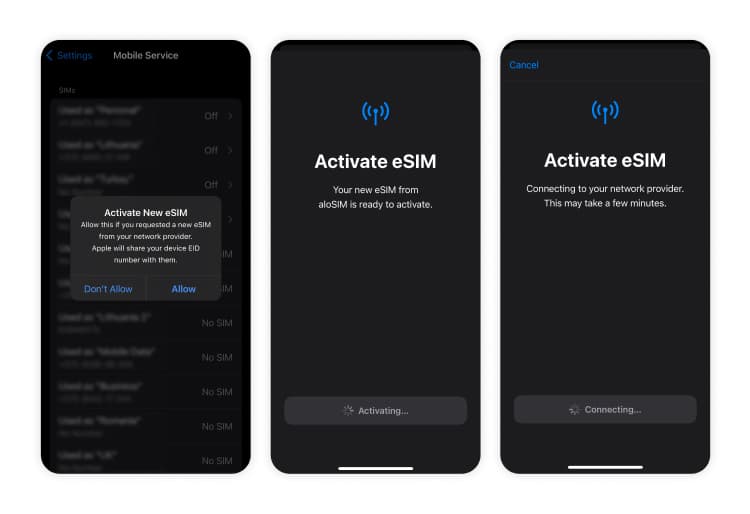
Install the eSIM on your device. If you purchased your plan through the app, tap on your eSIM plan, then “Installation guide,” and then “Install eSIM now.” Make sure you have a stable internet connection as you install your eSIM. Once you’ve scrolled through the step-by-step installation instructions, tap “Install eSIM now” once again.
If you purchased your data plan through the website, click on your eSIM plan, then “View” beside the installation guide. Then, navigate to the “QR code” tab and scan the QR code on the device you want to install your eSIM on.
- 3.
Follow the on-screen instructions to install your eSIM. If you’re having trouble installing your eSIM, check out Saily’s guides on how to install an eSIM on an iPhone or how to install an eSIM on an Android device for troubleshooting tips.
- 4.
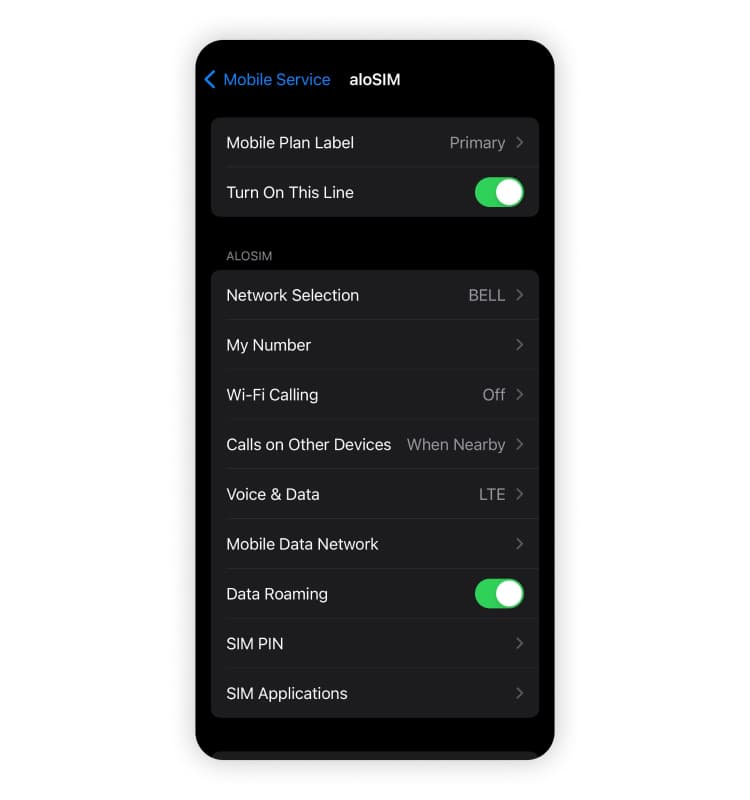
Make sure data roaming is enabled for your aloSIM plan. Once your eSIM is installed, you’ll only actually have an internet connection if your data roaming is enabled. If you don’t know how to do this, check out Saily’s guide on how to enable data roaming on an iPhone or Android device.
As long as you have a stable Wi-Fi connection as you install your eSIM, the whole process should only take a few minutes. It took about two full minutes for my aloSIM eSIM to be installed — I eventually got a notification saying, "You can keep using your phone as [your eSIM] activates," and it was done about 10 seconds later.
Ideally, you should install your eSIM before arriving in your destination country so that you can get online the moment you land. Admittedly, I’ve been the type of traveler trying to install an eSIM over extremely spotty airport Wi-Fi. Trust me, you’ll thank yourself later if you install your eSIM before you even leave your house for your departure flight.
Now for the important part — how much do aloSIM’s eSIM plans cost?
aloSIM eSIM review: Pricing and plans
aloSIM offers a variety of fixed data plan options as well as unlimited data plans in select destinations. Its fixed plans start at 1 GB that can be used over 7 days, and its largest fixed plans for long-term travelers include 100 GB, which can be used over 180 days (in select destinations). However, it’s worth noting that aloSIM’s unlimited plans don’t offer much flexibility when it comes to the validity period — you’ll typically only get to choose between 10 or 15 days.
As of December 2025, here are aloSIM’s plan prices for popular destinations:
Destination | Plans and validity period | Price |
|---|---|---|
🇪🇺 Europe (35 countries) | 1 GB (7 days) | US$5 |
🇲🇽 Mexico | 1 GB (7 days) | US$6 |
🇬🇧 United Kingdom | 1 GB (7 days) | US$4.50 |
🇺🇸 United States | 1 GB (7 days) | US$4.50 |
🇨🇦 Canada (domestic plans) | 1 GB (7 days) | US$5.50 |
These prices were taken from aloSIM’s plan pricing pages on December 20, 2025. Prices and plans are subject to change over time.
How do aloSIM’s prices compare to competing eSIM services? For most destinations, the company sits right in the middle of the eSIM app market — its plans are not the cheapest, but not the most expensive either. For example, a Saily eSIM for Europe (which covers 35 countries) starts at US$4.99 (1 GB over 7 days) — a nearly identical price to aloSIM’s. On the other hand, Saily’s smallest eSIM for Canada plan is slightly cheaper than aloSIM’s, at US$5.29 (1 GB over 7 days).
So is aloSIM worth the price? Well, roaming fees from Canadian carriers like Rogers, Bell, and Telus rack up quickly — Telus charges me CA$16/day for roaming in most destinations (that’s CA$112 for a week-long trip). If it’s between turning on your international roaming or getting an aloSIM eSIM, then the choice is obvious. But if you’d like to find the best eSIM plan prices, it’s worth shopping around before committing to aloSIM.
On that note, let’s take a closer look at how aloSIM compares to its major eSIM app competitors.
aloSIM vs. top eSIM competitors: How does it stack up?
When it comes to aloSIM’s eSIM offerings compared to top competitors like Saily, Airalo, and Holafly, the company doesn’t particularly stand out. As previously mentioned, its plans aren’t the most expensive on the market, nor the cheapest. aloSIM’s Trustpilot score of 4.1/5 is decent, and you get 5% cash back every time you purchase a data plan.
Feature | aloSIM | Saily | Airalo | Holafly |
|---|---|---|---|---|
Lowest plan price* | US$3.50 | US$1.99 | US$3.50 | US$3.90 |
Fixed plan sizes | 1 GB, 2 GB, 3 GB, 5 GB, 10 GB, 20 GB, 50 GB, 100 GB | 1 GB, 2 GB, 3 GB, 5 GB, 10 GB, 20 GB, 25 GB, 50 GB | 1 GB, 3 GB, 5 GB, 10 GB, 20 GB, 50 GB | N/A |
Unlimited data plans | For select destinations | For select destinations | For select destinations | Yes, unlimited plans only |
Available destinations | 200+ | 200+ | 200+ | 200+ |
One-time eSIM installation | ❌ | ✅ | ❌ | ❌ |
Trustpilot rating | 4.1/5 ⭐ | 4.7/5 ⭐ | 4.0/5 ⭐ | 4.6/5 ⭐ |
Regional plans | ✅ | ✅ | ✅ | ✅ |
Global plans | ✅ | ✅ | ✅ | ✅ |
Automatic top-up option | ❌ | ✅ | ❌ | ❌ |
Built-in security features | ❌ | ✅ Ad blocker | ❌ | ❌ |
Data-saving features | ❌ | ❌ | ❌ | |
Cash back with each purchase | 5% | ❌ | 5%, 6%, 7%, or 10% | 5%, 6%, or 7% |
*As of December 20, 2025, aloSIM’s US$3.50 price only applies to the 1 GB plan for Bulgaria, Czechia (the Czech Republic), and Thailand. As of December 20, 2025, Saily’s US$1.99 price only applies to the 1 GB plan for Bulgaria, Czechia (the Czech Republic), and Mayotte. As of December 20, 2025, Airalo’s US$3.50 price only applies to the 1 GB plan for Tunisia. As of December 20, 2025, Holafly’s US$3.90 price applies to its 1-day plans for various destinations, including (but not limited to) China, Europe, Japan, Thailand, and Turkey. Prices and plans are subject to change over time.
The bottom line is that aloSIM sits smack dab in the middle of its eSIM app competitors. Out of aloSIM, Saily, Airalo, and Holafly, Saily has the highest Trustpilot score and the cheapest available plan price. It’s the only one out of the bunch where you’ll only need to install an eSIM once for all future data plans. It’s also the only one that offers an option for automatic data top-ups, and it’s the only eSIM app on the market with three built-in security features. One of Saily’s security features — the ad blocker — even helps you use an average of 28.6% less of your data when enabled. Airalo offers the best cashback perks, with Holafly close behind.
But hey, if you’re a Canadian who wants to support a locally-owned eSIM service, aloSIM should be your pick.
Curious about other top players in the eSIM-app market? Check out our Airalo review and Holafly review!

Looking for an aloSIM alternative that offers stronger security features?
The Saily eSIM app includes three built-in security features, one of which helps you use 28.6% less data!
aloSIM network speed and performance
I couldn’t have picked a worse time to test my aloSIM eSIM in Canada the first time around — it just so happened to be the day the worldwide AWS outage occurred. As you would expect, my signal strength was weak (oscillating between one and two bars for hours), and the results of my internet speed tests were awful, even though I was sitting in a high-rise condo in Toronto. After I installed my eSIM, I was automatically connected to Bell’s network, but I managed to get a slightly stronger signal when I manually selected the Rogers Wireless network. I should note, however, that my regular Canadian Telus plan worked throughout the entire outage.
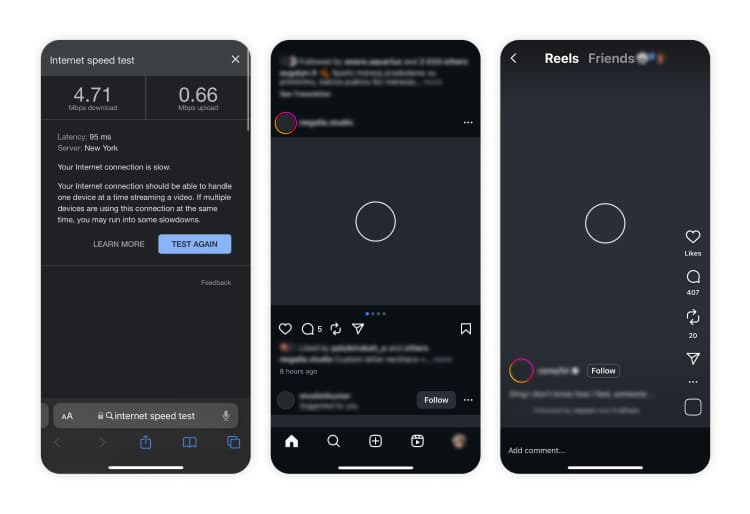
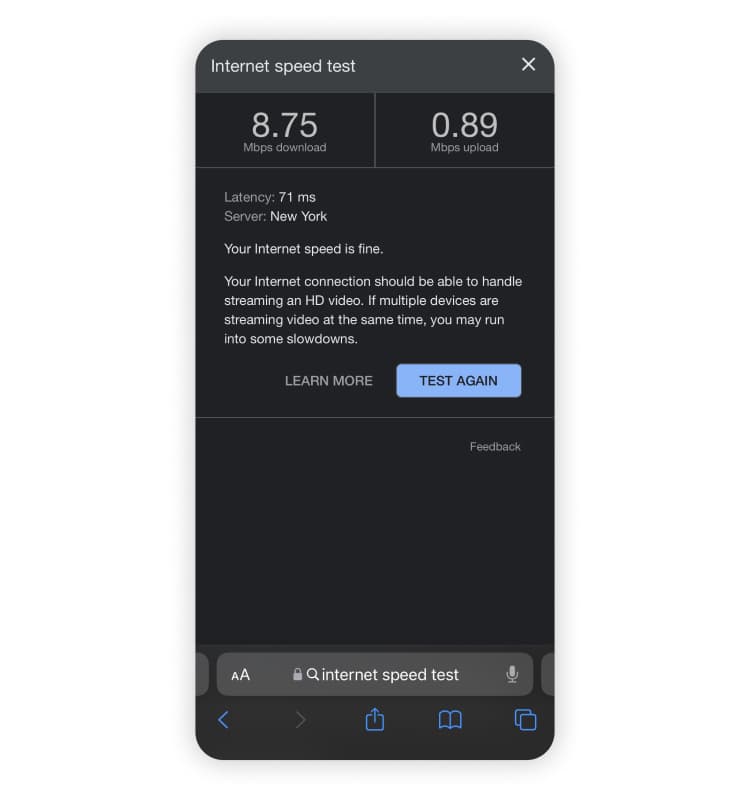
It would’ve been unfair to base my experience with aloSIM only on the day of the outage, so I retested it six days later, on October 26, 2025, when I saw significant performance improvement. The internet speed test results were “fine,” with a download speed of 8.75 Mbps and an upload speed of 0.89 Mbps. Videos loaded without buffering, and most of my apps worked normally, though Instagram buffered slightly while scrolling. The signal strength was initially at three bars and improved to five bars later in the day, while I was still connected to the Rogers Wireless network.
If your network speeds are slow while using aloSIM:
Try manually selecting another network via your settings. On an iPhone, go to “Settings” > “Mobile service” or “Cellular,” and select your aloSIM eSIM under “SIMs.” Then, tap “Network selection,” toggle the switch beside “Automatic” to off, and select another available network.
Check that aloSIM is enabled in your device’s settings. On an iPhone, go to “Settings” > “Mobile service” or “Cellular.” Then, in your list of SIMs, check to see if your aloSIM eSIM says “On.” If not, select it and toggle the switch beside “Turn on this line.”
Make sure data roaming is turned on for your aloSIM plan. Following the instructions in the point above, you’ll also want to make sure the switch beside “Data roaming” has been toggled on. To avoid incurring roaming charges from your regular carrier, make sure that data roaming is off for your regular plan.
Verify that your APN settings are correct. On an iPhone, go to “Settings” > “Mobile service” or “Cellular,” then select your aloSIM eSIM under the list of SIMs. Next, tap “Mobile data network” and check that it says “alosim” beside “APN.” If you don’t see “alosim,” you may need to manually enter your APN settings after contacting customer support.
If all else fails, contact aloSIM support. You can contact aloSIM customer support through the app or the 24/7 live chat on its website.
Customer support
As I mentioned earlier, I happened to test my aloSIM eSIM plan for Canada on the day of the AWS outage, which caused significant slowdowns in internet speed. While I did retest my plan six days later, I took the outage as an opportunity to see how aloSIM’s customer support would respond to my concerns about network performance.
I contacted aloSIM’s customer support through the app and explained that I was experiencing extremely slow internet speeds when I was automatically connected to Bell’s network and got some better speeds by manually connecting to the Rogers Wireless network.
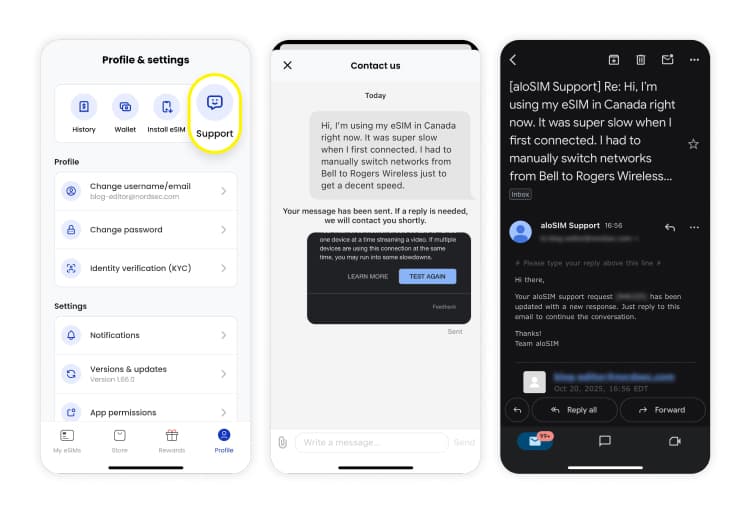
Although aloSIM claims to have in-app customer support, it’s not a live chat — once you submit a complaint or feedback, you’ll only receive a reply via email.
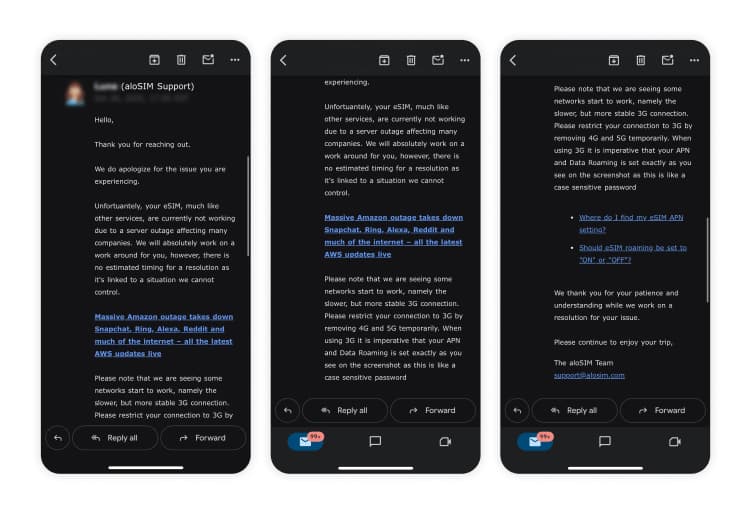
After explaining my connectivity issues in the app (five minutes later, to be exact), I received an email from a customer support representative who sent me a comprehensive explanation of how the AWS outage was affecting my network speeds. I was advised to manually switch from 4G/LTE or 5G to 3G and to make sure my APN settings matched the screenshot I was provided. I was also given two support articles on how to find my APN settings and whether my data roaming should be set to on or off.
So overall, I had a great experience with aloSIM’s customer support! They were prompt and thorough in their explanations and provided as much support as they could, given the circumstances out of their control.
One critique I have is the verbiage used in the in-app chatbox — “If a reply is needed, we’ll contact you shortly” — which implies that a response isn’t guaranteed.
If you need customer support for your aloSIM eSIM, you can get it in the following ways:
In the app (however, you’ll receive a response via email — a 24/7 in-app live chat isn’t available).
Through a 24/7 live chat on the aloSIM website.
FAQs, guides, and installation tutorials via the help center on aloSIM’s website.
I didn’t need a refund for my eSIM plan, but aloSIM does offer a 30-day money-back guarantee for compatibility issues and major service problems. You’ll need to contact support with your email receipt to have your refund processed.
Real aloSIM customer reviews: What users are saying
aloSIM generally gets positive feedback online. As of December 2025, it holds a 4.1/5 score on Trustpilot, though this is only based on over 800 customer reviews.
Positive feedback from Trustpilot includes:
"eSIM installation [has improved] over two years."
"Value for money."
"I liked that when I landed at the country I brought my package for it kicked in."
"Network coverage is good"
"I had [a problem] with the eSIM and it was solved within minutes with the customer service very efficient very nice people."
"Amazing team with quick feed back and trouble shooting."
Negative feedback from Trustpilot includes:
“The [eSIM] did not work for ¾ of our two week trip.”
“The speeds are disgustingly slow.”
“Poor service and support for [the] UAE.”
“There was no signal majority of the time for data.”
However, aloSIM customer support has graciously addressed the negative feedback on Trustpilot directly and has offered solutions to avoid future issues with its service.
My official review after testing a 1 GB aloSIM plan in Canada is that the eSIM installation process is straightforward, aloSIM provides ample resources on how to troubleshoot connectivity issues, and its customer support is prompt and comprehensive. That said, you might need to manually select a different network if you want better internet speeds, and it’s not the cheapest 1 GB eSIM plan for Canada that you’ll find on the market.
Additional features
aloSIM offers a few perks with its eSIM service that set it apart from other providers.
Free phone number (via the Hushed app)
Most aloSIM data plans include a free phone number through the company’s sister app, Hushed. The phone number lasts as long as your data plan is active. You get US$3 in calling credit, and you can choose between Canadian or US area codes. You can buy additional credits if needed and even extend the number after your data plan expires.
However, the number only works over Wi-Fi or your data connection, which doesn’t make it functionally different from using a VoIP app like WhatsApp, Messenger, or Signal for calling and messaging.
eSIM plans for business
aloSIM offers several monthly subscriptions for business travelers to use eSIM data from one shared account. An eSIM for business typically works by having one or several admins who can monitor their team’s data usage and top up when needed.
alocash
Every time you purchase an aloSIM eSIM plan, you get 5% cash back in credits that can be used for future purchases.
Referral program
aloSIM offers a referral program where if you invite your friend to buy an eSIM plan using your code, you’ll both get US$3 in credits.
Some additional points to consider:
aloSIM seems to offer unlimited hotspot sharing so that you can use your data on multiple devices or share it with your travel companions.
aloSIM doesn’t include any built-in security features like a VPN or features that help keep your data usage down.
Final verdict: Is aloSIM worth it?
Look, anything — I mean anything — is better than enabling your international roaming if you’re a Canadian telecom customer. So yes, I would recommend aloSIM if it were between that and racking up a roaming bill in the hundreds. aloSIM has great customer support, the eSIM installation process is as straightforward as with most major eSIM apps, and network speeds were decent in Canada (though not as good as my regular Canadian Telus data plan). But after testing an aloSIM eSIM myself, I’ve concluded that it’s not the best eSIM app on the market.
Choose aloSIM if:
You want an eSIM service with great customer support.
You want a phone number that you can only use via Wi-Fi or data.
You want 5% cash back with every eSIM plan purchase.
You're Canadian and want to support a Canadian-owned business.
Consider an alternative eSIM service if:
You want cheaper prices for certain destinations.
You don’t want to have to install a new eSIM every time you purchase a new data plan.
You want automatic data top-ups so you never run out of data during your trip.
You want a regional plan that covers Africa and/or the Middle East.
You want built-in security features that add a layer of privacy to your browsing and keep your data usage down.
The bottom line is that Canadian travelers want one thing and one thing only — no terrifyingly high roaming bills waiting for us at the end of our trip. aloSIM can certainly help with that! But I’d advise shopping around if budget is your biggest concern and if you don’t want to go through the hassle of installing an eSIM every time you purchase a new data plan.
If you’re looking for an aloSIM alternative with built-in security features, competitive prices, and one-time eSIM installation, download the Saily eSIM app!

Stay connected with the Saily eSIM app
Affordable mobile data plans for every journey.
We do our best to keep everything accurate and up to date, but eSIM service provider prices, plans, and features can change quickly. If you spot something that seems outdated or incorrect, feel free to get in touch with us at [email protected] — we’d really appreciate the heads-up!
FAQ





Sabina launched an embarrassing travel blog at the age of 18 to document her insatiable hunger for deep cultural immersion, new flora and fauna, and … food! She relies on her phone at all times while she travels. Between her bird ID app, light meter app for her broken film camera, and good ol’ Instagram, an eSIM gives her speedy mobile data to power her adventures.